
Show and Hide on Visibility Rules | Community
Skip to main content
Prinu_George
Level 3
November 1, 2017
Solved

Show and Hide on Visibility Rules

  • November 1, 2017
  • 2 replies
  • 2663 views

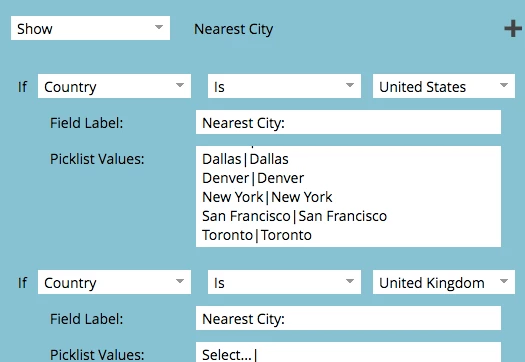
When setting up visibility rules on a  field (Nearest City, in this e.g.), is there a way to 'Show' and 'Hide' at the same time.

I want to be able to Show Nearest City for certain countries and Hide for few others. Is this possible?
This post is no longer active and is closed to new replies. Need help? Start a new post to ask your question.
Best answer by Kevin_McMahon1

Yes this possible and quite easy. It looks like you're already on the right track.

Click into the Country field box and add all of the Country values first:

Then click in to the Nearest City field box and add all of the city values.

Then you do what you're already doing above. Click into Visibility Rules and just select the values you want to show for each country.

2 replies

Kevin_McMahon1
Kevin_McMahon1Accepted solution
Level 4
November 1, 2017

Yes this possible and quite easy. It looks like you're already on the right track.

Click into the Country field box and add all of the Country values first:

Then click in to the Nearest City field box and add all of the city values.

Then you do what you're already doing above. Click into Visibility Rules and just select the values you want to show for each country.

SanfordWhiteman
Level 10
November 1, 2017

In addition to Kevin's note, "Show" already implies "... or Hide".  Just use the is/is not operators.