
SFDC ID – A Deep Dive | Community
Skip to main content
Brian_Law_MKTO
Adobe Employee
Adobe Employee
July 4, 2017

SFDC ID – A Deep Dive

  • July 4, 2017
  • 2 replies
  • 5140 views

The SFDC Id token can be used in emails and the value can be viewed in a Smart List and on individual records. You unfortunately can't search by a SFDC Id in the database area of Marketo.
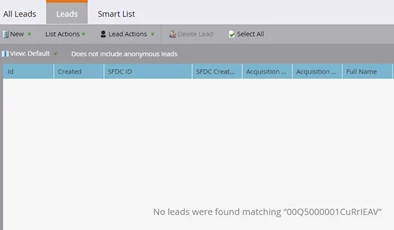

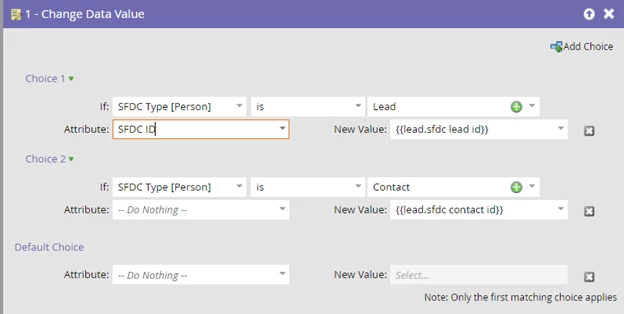
The SFD id can’t be used in a Change Data Value flow step to populate a custom field. The SFDC Id also can’t be used as filter in a smart list. You can populate a custom string field with the 18 character SFDC id using the tokens {{lead.sfdc lead id}} and {{lead.sfdc contact id}}.

Flow example
If you have a large database, I recommend running 100K batches at night and on the weekends and waiting a few hours after each is completed so you don't impact system performance.

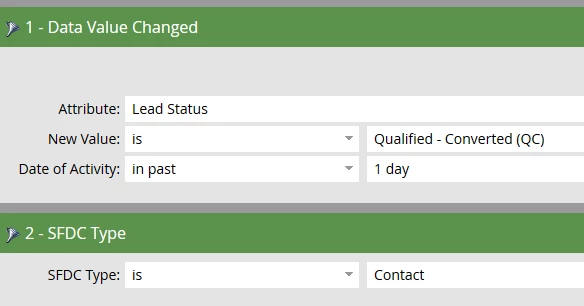
By the way, after a lead is converted to a contact you will need to run a daily batch campaign to set the new SFDC Id.

Here is an example of how to set the Smart List of the batch campaign.
This post is no longer active and is closed to new replies. Need help? Start a new post to ask your question.

2 replies

Delinda_Tinkey1
Level 5
July 6, 2017

I have the 18 digit IDs created as formula fields in SFDC. It's handy to have there in addition to Marketo so that when you export to Excel from SFDC you have a unique ID that excel can recognize (the default 16 digit IDs that export are not unique unless you count capitalization, which Excel does not).

Those formula fields sync to Marketo without any batch campaigns needed and can be used to filter, change data flows, etc.

Brian_Law_MKTO
Adobe Employee
Adobe Employee
July 8, 2017

Yes, absolutely you can use SFDC to populate a field with the SFDC ID, thanks!