
Brian_Law_MKTO
Level 5
April 9, 2016

Setting the SFDC Record Type

  • April 9, 2016
  • 5 replies
  • 22500 views

If you use Record Types in SFDC, you can set the Record Type ID in Marketo. Set the value before using the “Sync Lead to SFDC” flow step. Insert the 18-character ID, not the name of the Record Type.
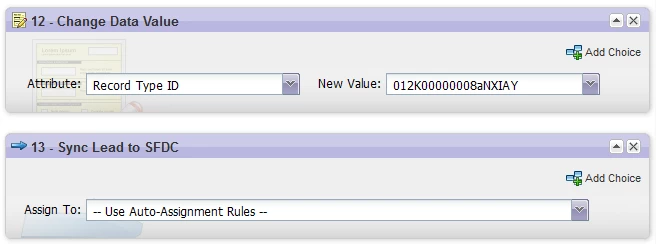
Work with your SFDC Admin to get the Record Types IDs and to determine the logic for which records should get which IDs.  Since the Record Type is a lookup field it will contain an ID instead of a name. Here is an interesting article about viewing the name.

This post is no longer active and is closed to new replies. Need help? Start a new post to ask your question.

5 replies

Grégoire_Miche2
Level 10
April 9, 2016

HI Brian,

When using record types, it is strongly recommended to add Formula fields in SFDC that will bring back the Record Type Name (the typical formula will be recordtype.name). These fields will enable to control the setting made and debug what is done, much more efficiently than trying to read and memorize SFDC IDs

-Greg

Brian_Law_MKTO
Level 5
April 11, 2016

Greg, thanks for adding the great tip.

Josh_Hill13
Level 10
August 2, 2016

@Brian Law​ do you have answers for applying the Record Type ID when SFDC sees

CODE\n ??

and the flow step has no extra characters? Marketo is saying SFDC saw a malformed ID  of XXXXXXXXXXXXXX\n and I'm not sure how to fix this.

July 17, 2018

I have seen this \n. It looks like from the sfdc logs that there is an extra \n coming from marketo> but i cant get marketo to agree or id how to fix it. I have seen this with ID's, and Picklist Fields. I am not sure why.

Grégoire_Miche2
Level 10
July 17, 2018

Check you have not added a carriage return in the change data value flow step new value.

-Greg