Sending a birthday email across timezones? | Community
Skip to main content
Level 6
February 1, 2023
Solved

Sending a birthday email across timezones?

  • February 1, 2023
  • 2 replies
  • 2982 views

Hi everyone,


This might be a dumb question but I want to run it by others here before forging ahead.


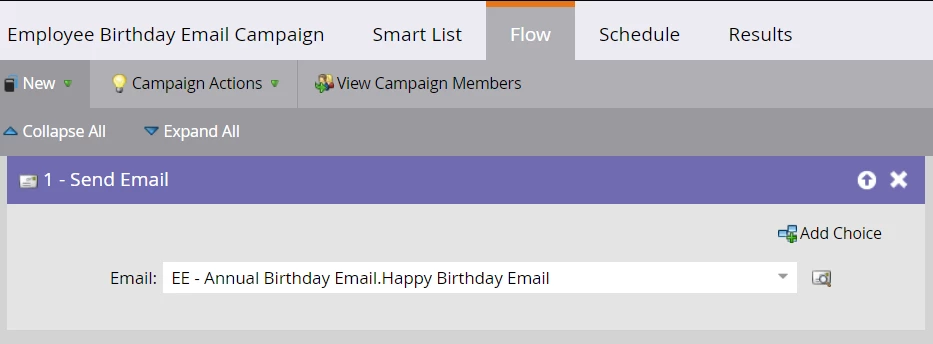
We send a birthday email to all employees on the day of their birthday. 


The logic we use is simple:
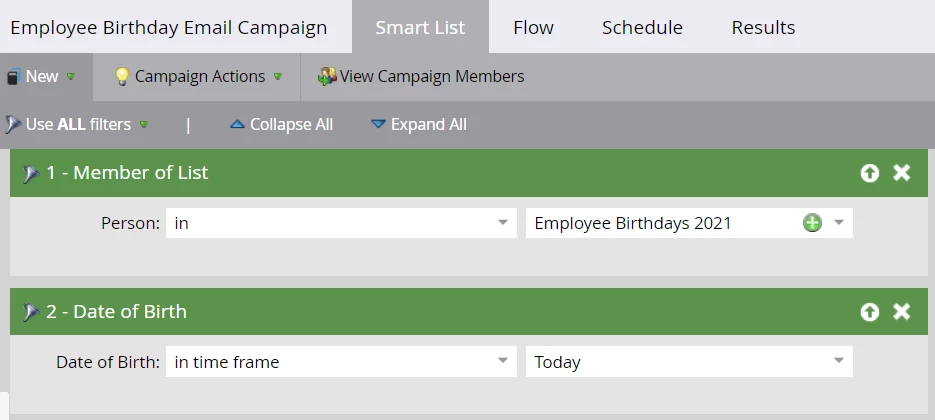

The only problem is that because the campaign is based on my local time (MST), for our India employees, the email is getting to them the day after their birthday.


The fix I'm thinking of for our India employees is to set up a new, separate campaign for them using this SL logic:
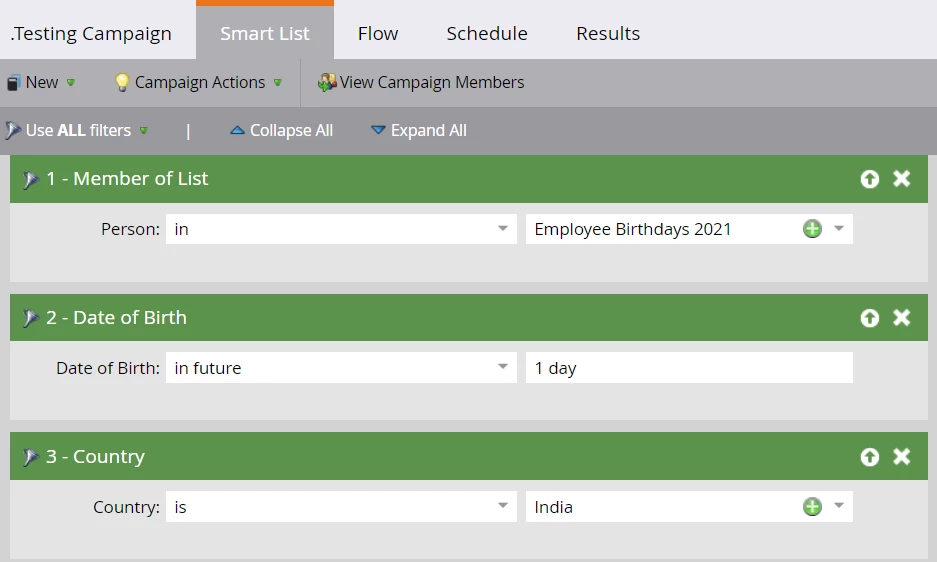


Any reason why this wouldn't work?


Thank you!

LK

This post is no longer active and is closed to new replies. Need help? Start a new post to ask your question.
Best answer by Darshil_Shah1

One solution would be to update the campaign's qualification rules to allow qualifying people to flow through the campaign once every 364 days. Creating separate email programs for each day doesn't make sense for this use case; instead, you can set a single campaign's configuration in a way that people who have a birthdate in the future one day qualify but don't qualify for the next day's run. Make sure to suppress people with Country = India from your original campaign; otherwise, people in India would receive emails from both campaigns.


You should check out this blog which explains a couple of different ways of setting the birthday email - 1st method uses the in-tact birthdate field (with the year same as the actual birth year of a person) and 2nd method is similar to yours whereas in the year in the birthdate is updated to match the current year.


2 replies

Darshil_Shah1
Community Advisor and Adobe Champion
February 1, 2023

A couple of caveats here to be aware of here - 

"In future" operator would let people who have their date value in the next 1 day from today (today refers to the day as per MST) qualify. IMO, there's a chance for the person who was sent the email from the last send to be included in the campaign for today as well. Since per their value in the date field, they would still qualify for "in future" 1 day from today. Additionally, the "Country" field needs to be accurately populated.


Edit: Above is how the "in future" operator works, but as Sandy notes, this is not the correct way to send the birthday email in the first place


Level 6
February 1, 2023

Ah, good point Darshil.


I do know that the email program can send emails based on recipients' timezone, but we would have to create 30 programs each month to send one Happy Birthday email, which doesn't make sense.


Any potential workarounds/solutions?

Darshil_Shah1
Community Advisor and Adobe Champion
Darshil_Shah1Community Advisor and Adobe ChampionAccepted solution
Community Advisor and Adobe Champion
February 2, 2023

One solution would be to update the campaign's qualification rules to allow qualifying people to flow through the campaign once every 364 days. Creating separate email programs for each day doesn't make sense for this use case; instead, you can set a single campaign's configuration in a way that people who have a birthdate in the future one day qualify but don't qualify for the next day's run. Make sure to suppress people with Country = India from your original campaign; otherwise, people in India would receive emails from both campaigns.


You should check out this blog which explains a couple of different ways of setting the birthday email - 1st method uses the in-tact birthdate field (with the year same as the actual birth year of a person) and 2nd method is similar to yours whereas in the year in the birthdate is updated to match the current year.


SanfordWhiteman
Level 10
February 1, 2023

You're right to wonder about this! I've noted before that to humans, dates like birthdays have implicit time zones, even if on a technical level they're treated as time-free (and thus timezone-free).


However, think we need to step back. Sending to people whose Date of Birth = today isn't a birthday email. It's literally sending to people who were born today.


Darshil_Shah1
Community Advisor and Adobe Champion
February 1, 2023

Great catch - I got into the rabbit hole of how the operators function and missed that this is a birthday email in the first place!