
Send an automated email to a specific opportunity contact role 24 hours after an opportunity is closed won | Community
Skip to main content
Ray_Miller
Level 2
April 16, 2018
Solved

Send an automated email to a specific opportunity contact role 24 hours after an opportunity is closed won

  • April 16, 2018
  • 3 replies
  • 6047 views

Hi there,

Hoping the community can help.

I'm trying to set up a smart campaign to automatically send an email to a closed won opportunity 24 hours after an opportunity is closed won. The business case is as follows:

  • We have an administrator contact role on each opportunity that acts as the implementation partner. We would like to intro them to their new CSM using an automated process as the volume is high. The roles are (LRT Admin, CC Admin, Implementer, STV Admin, Decision Maker, CC LMS Admin, LRT LMS Admin) for the remaining discussion purposes I will refer to them as "Implementers".
  • The Opportunity is designated into two types of opportunities, self-service and white glove, these are determined by a salesforce formula field checkbox that is accurate before the opp is closed.

  • Our business has a piece of business logic that in order to close an opportunity as Closed Won, our finance team has to approve it. To avoid delay the sales operations team checks the box "Sale Closed" checkbox at the time the customer signs the contract - that should be the trigger for the 24 hour wait step to email. At this point our Sales ops admin has checked that these Opportunity contact roles exist on the opportunity.

Below is what I have set up:
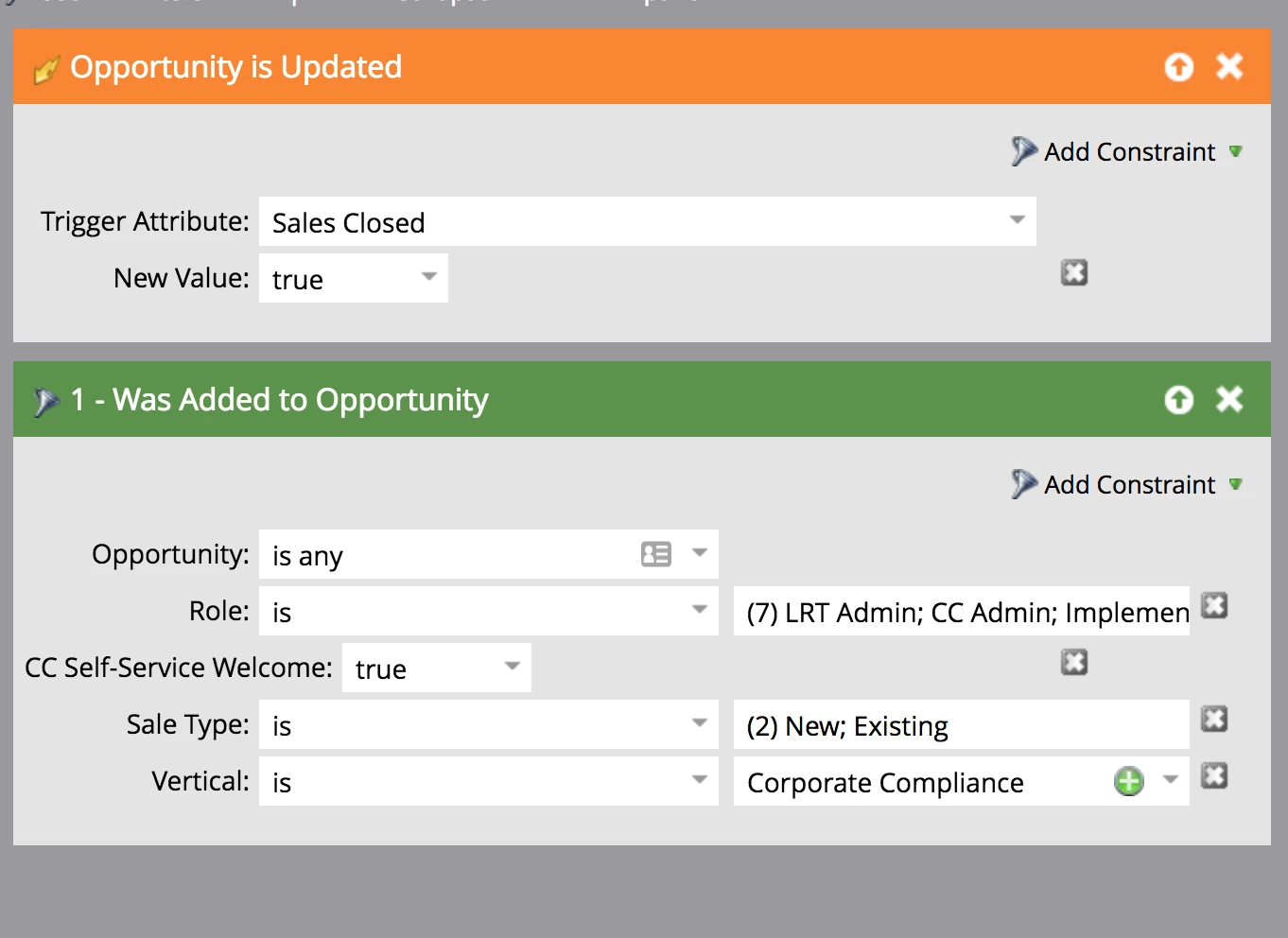
Currently I'm only seeing about a 40% hit rate rate on members being added to the list and can't figure out why some members are not being added to the list.

Any thoughts on this? @Sanford Whiteman​

Best answer by Devraj_Grewal

Ray,

I believe what might be happening here is that at the time the contact's opportunity is updated to "Sales Closed: True", they do not qualify for all of the filters in "Was Added to Opportunity" so they do not trigger the flow. So how about running a batch campaign instead that checks every day for all of the filters in "Was Added to Opportunity" as well as "Sales Closed: True". This ensures all of them will move to the flow since both conditions need to be met in order to enter the wait step and get the email.

3 replies

Devraj_Grewal
Devraj_GrewalAccepted solution
Level 10
April 16, 2018

Ray,

I believe what might be happening here is that at the time the contact's opportunity is updated to "Sales Closed: True", they do not qualify for all of the filters in "Was Added to Opportunity" so they do not trigger the flow. So how about running a batch campaign instead that checks every day for all of the filters in "Was Added to Opportunity" as well as "Sales Closed: True". This ensures all of them will move to the flow since both conditions need to be met in order to enter the wait step and get the email.

Ray_Miller
Level 2
April 17, 2018

So @Devraj Grewal​ your suggestion is that I do is add all of the parameters in my combined trigger program and make them a batch program like below:

I'm new to Marketo so this entire conversation has been extremely helpful to me to understand where to use triggers and where to use batches.

Devraj_Grewal
Level 10
April 17, 2018

That's correct. This ensures you do not run into the issue of the trigger firing when not all of the opportunity's parameters have been met and thus people will not qualify. Run this batch daily and this will then send the email. If you want to make sure the email is only sent at a certain time of the day, you can include a wait step with advanced wait steps to wait until a M-F at 9a or something similar.

April 16, 2018

Hey Ray,

First question - Is this an on-demand bidirectional sync with your CRM? If your sync happens in batches you may have folks falling out of the process because the accounting team is overwriting the field quickly. I wasn't completely clear on whether or not this checkbox is separate from your "Closed Won" field. I've included this info just in case they're using the same field.

Also...

If this is SFDC you MUST ensure that your sales team is properly assigning people to roles on the opportunity. It sounds like this could be your issue (as it is in many organizations). Basically, if your sales team is adding all relevant players to the opportunity and assigning them a proper role you'll have people falling out of your process. This could be the case if your sales guys are check your checkbox and THEN adding people to oppty/role.

A good way to overcome the obstacle of your sales team following an incorrect procedure is to switch this from a trigger to a batch campaign. It sounds like this being a trigger is unnecessary since you're waiting 24 hours to send your email. If you have other things that need to happen immediately you can disregard this and keep it as a trigger.

If none of that works...

Check the particulars around your filter. It seems like there are a lot of moving parts which can get you in trouble if you're not absolutely meticulous.

SanfordWhiteman
Level 10
April 16, 2018

It sounds like this being a trigger is unnecessary since you're waiting 24 hours to send your email.

But 24 hours from a trigger firing isn't the same as a scheduled batch running every 24 hours. You can't reproduce a 24-hour wait with daily batches: you'll always send before or after your goal (sometimes wildly so!). Of course this may be an acceptable change, but it's not the same concept.

April 16, 2018

Thanks for your input, Sanford.

While you're correct from a technical standpoint, I have to think from a practical business stand point a batch is going to work out just fine for him.

Most businesses want to have uniformity (easily achieved with a batch) when sending out such correspondence. i.e If my account rep marks a contract as closed at 5 pm, you're probably trying to send your client an email connecting them with their new CSM at a time other than 5pm the next day, but maybe that's just me.

Further, it's very easy to get "trigger happy" and bog your system down after awhile. Being judicious with your triggers can help avoid this problem from creeping up often.

At the end of the day the automation manager here has to evaluate based on their needs.

Grégoire_Miche2
Level 10
April 16, 2018

Hi Ray,

There is a risk in the way your trigger is set with a filter: there is no reason the opportunity that fires the trigger is the same as the opportunity in the "was added to opportunity" filter. If the person is added to 2 oppies simultaneously, it may lead to false positives.

There is no way around it as the "role" constraint is only available on the filter, not on the trigger. Still, I would add the "CC Self-Service Welcome", "Sales Type" and "Vertical" constraints to the trigger and the "sales closed" constraint to the filter to remove some of the discrepancies.

and vote here:

-Greg

SanfordWhiteman
Level 10
April 16, 2018

If the person is added to 2 oppies simultaneously, it may lead to false positives.

Absolutely! But here we have a false negative, which means the overly broad interpretation of the filter wouldn't be the cause.

I think the direct cause is exactly what Devraj said above:

at the time the contact's opportunity is updated to "Sales Closed: True", they do not qualify for all of the filters in "Was Added to Opportunity"

Therefore I think an SFDC-side trigger on Opportunity is the solution. Don't let the Oppty get closed unless business criteria have been met -- either with the current Sales Closed​ field or a secondary field dedicated to this flow.

Grégoire_Miche2
Level 10
April 16, 2018

Yes, agreed on this, In fact, I am not saying the contrary

Getting sales to add contacts into the OCR table is a never ending fight. It is a fight that the sales managers need to get involved in: they should not tolerate that opportunities are managed without the company knowing who are the relevant contacts.

We also often modify SFDC setup to improve the OCR completion rates (such as removing the possibility to create oppies from the account or opportunity tabs, setting an OCR counter on oppies and adding validation rules to it, etc...)

-Greg