Send Alert to "None" but "To Other Emails" not working | Community
Skip to main content
Level 7
June 20, 2018
Solved

Send Alert to "None" but "To Other Emails" not working

  • June 20, 2018
  • 8 replies
  • 7748 views

Hi All -

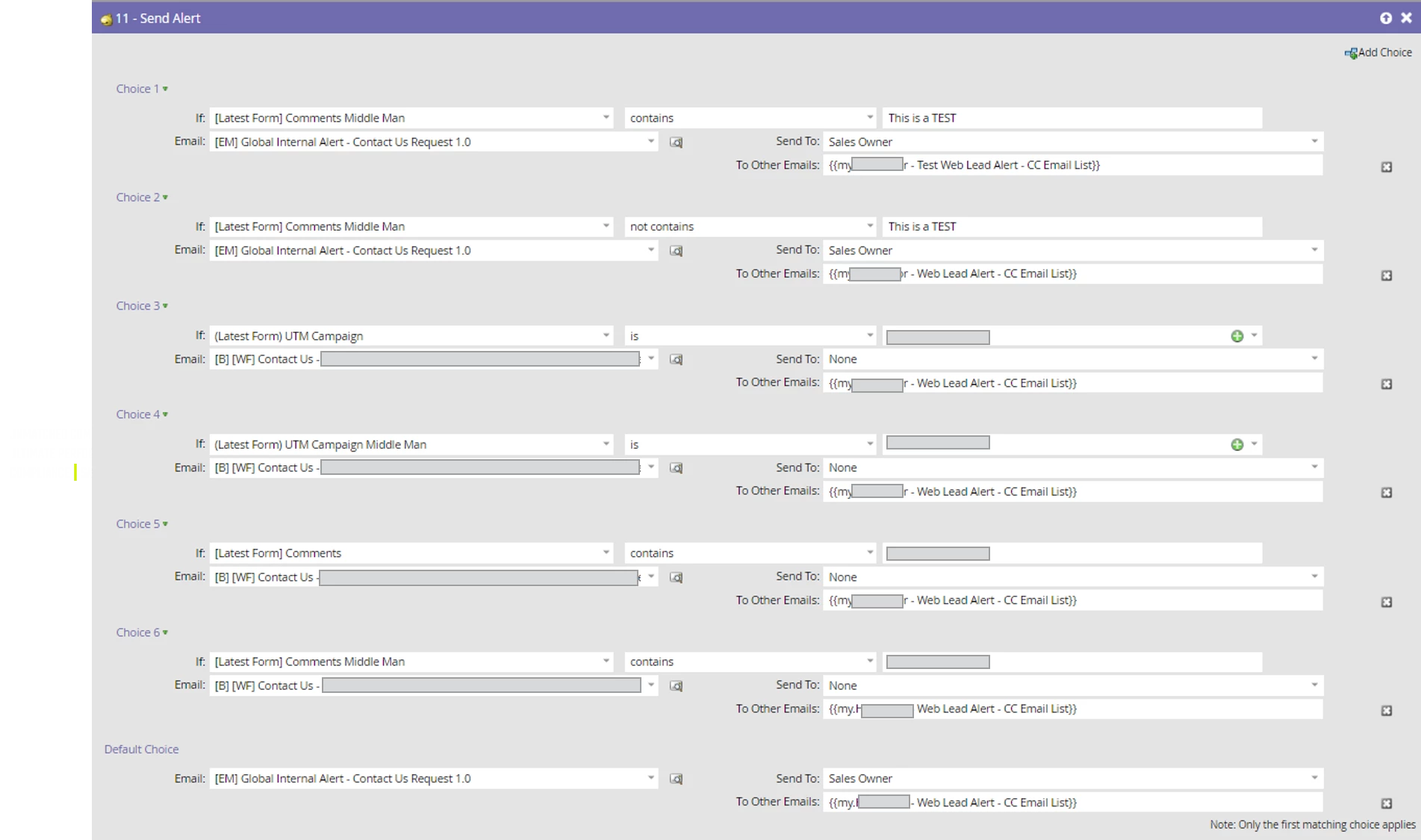
I am having some issues with a Send Alert flow step that has several Choices and seems to skip over some and goes through the default for a reason I can't figure out. The choices being skipped are set to "Send To: None" but "To Other Emails: some other emails".  We are basically looking to not have the alert go to a Sales Owner or Account Owner in certain circumstances but to "Other Emails".

Any ideas on why these choices would get skipped when they shouldn't?

See my attached screenshot
This post is no longer active and is closed to new replies. Need help? Start a new post to ask your question.
Best answer by Nate_Oosterhous

Well, that's pretty out of character.

I can't repro anything like this.

Clearly it's not the token itself but rather that the data values aren't being considered in the choices; I would guess you're looking at the wrong fields b/c everything else falls in line with expectations. Double, triple-check the fields is what I'd do.


So I just copied the values that were in the flow steps choices, pasted back over, and click them in the drop down that pops up and that solved it.  Weird.

8 replies

Sant_Singh_Rath
Adobe Champion
Adobe Champion
June 20, 2018

I am not 100% sure but you can try using contains or not contains in choice 3 and 4. You can also check the lead activity if fields used in choice are being updated from the flow and they are not getting updated once alert has been sent.

~ Sant Singh Rathaur
Level 7
June 20, 2018

Thanks for the reply.  I have checked the lead activity and those values are populated before the Send Alert flow action and also just tried switching to contains and still isn't working.

Sant_Singh_Rath
Adobe Champion
Adobe Champion
June 20, 2018

I think now only possible reason can be you are using multiple fields in the choice and single flow action. If you have this requirement create seperate send alert for each filed:

Once send alert for [Latest Form] Comment middle man field with multiple choice then
Another one for (Latest form) UTM campaign

and so on..

I hope this will work.

~ Sant Singh Rathaur
Level 7
June 20, 2018

That shouldn't be an issue since only the first Choice will apply in the Send Alert flow.  Also those are two different fields.  Not the same field.

Steven_Vanderb3
Adobe Employee
Adobe Employee
June 20, 2018

Is your campaign a batch or a trigger campaign?  If it's a batch campaign the tokens wont resolve and the alert cant send.  If it's a trigger campaign then they will.

Level 7
June 20, 2018

Thanks Steven.  It is a trigger campaign.

Carrie_Taylor
Level 2
June 20, 2018

Are you sure it is hitting the default step and not just qualifying on Choice 2?  Choice 2 is the same email send set up as the default. Since you have "not contains This is a TEST", you could have a records qualifying for this choice even if that field is blank. 

Level 7
June 20, 2018

That was one mistake but now it doesn't send any alert to "The Other Emails"

Carrie_Taylor
Level 2
June 20, 2018

So...the other emails token isn't working in any of the Choices? Are the emails in that lead alert list all valid?  Are they separated by either a comma or a semicolon?

Brooke_Bartos1
Level 4
June 20, 2018

Can you try leaving the "Send To" field blank, as opposed to stating None?

Carrie_Taylor
Level 2
June 20, 2018

I was just going to ask that same thing I usually leave it blank when I do Send Alerts.

SanfordWhiteman
Level 10
June 20, 2018

Let's not get distracted by the use of Add Choice. Does this exact same token work when there's only a single default choice? 

How are you verifying that the leads should have qualified for choice B or C, instead of the default, at the exact time the campaign ran?  Are you sure you don't have a race condition where values are not populated at the time you look for them?

Level 7
June 20, 2018

Hi Sanford.  Yes the token functions properly.  I also did check that those values are populated before the Send Alert Flow Step does get executed and they do.  Is this simply not a functionality when using the Send Alert Flow Step?  Do you have to select Sales Owner or Account Owner

SanfordWhiteman
Level 10
June 20, 2018

Yes the token functions properly.

Meaning it sends to all leads in the list if there's only one Send Alert option (i.e. you don't hit Add Choice and there's only one possible list of recipients)?

Is this simply not a functionality when using the Send Alert Flow Step? Do you have to select Sales Owner or Account Owner

No, it works perfectly fine for me, which is why I think something else is happening -- either your token itself is broken (should be comma-delimited) or people aren't qualifying for your choices -- not that the token doesn't work.

also did check that those values are populated before the Send Alert Flow Step does get executed and they do

How are you checking the order of operations?  You can only use the token in a trigger, so you have to be using Request Campaign to trigger this campaign if the values are already settled on the lead.

Josh_Hill13
Level 10
June 20, 2018

How sure are you that the token value is formatted correctly?

Believe you can only have commas between email addresses in that box at the Program My Token level.

Level 4
June 20, 2018

How are the values displayed in the token you are using for the to other emails. I just tested this and as long as you have a comma and space between email addresses, it should send. 

SanfordWhiteman
Level 10
June 20, 2018

(space doesn't matter FYI)