Security Alert SSL on IE8.0 | Community
Skip to main content
January 16, 2015
Solved

Security Alert SSL on IE8.0

  • January 16, 2015
  • 4 replies
  • 1605 views
Hi

We created Marketo Form and embedded it in our existing website. Plus, our Marketo instance has been applied to SSL.

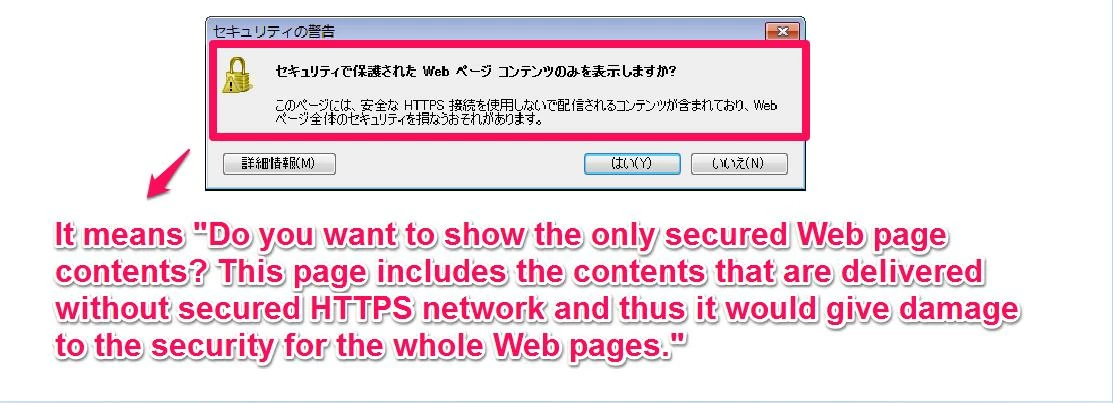
Now, I have a problem, which is every time I accessed the webpage embedded with the form, the security alert (see the photo) pops up. Take note that I have this problem only when I use IE 8.0. Could you give the advice how to stop this?

It might be error because of the code that can do with both http  and https, specified for only IE8.0.

Any insight would be welcome

Tad
This post is no longer active and is closed to new replies. Need help? Start a new post to ask your question.
Best answer by
Hi Tad

It's IE8 bug.

Even more problems with the IE 8 mixed content warning

http://blog.httpwatch.com/2009/09/17/even-more-problems-with-the-ie-8-mixed-content-warning/#comment-32970

Try changing embed code explicit HTTPS protocol.
Before
<script src="//app-xxxx.marketo.com/js/forms2/js/forms2.js"></script>
<form id="mktoForm_9999"></form>
<script>MktoForms2.loadForm("//app-xxxx.marketo.com", "999-xxx-999", 9999);</script>

After
<script src="https://app-xxxx.marketo.com/js/forms2/js/forms2.js"></script>
<form id="mktoForm_9999"></form>
<script>MktoForms2.loadForm("https://app-xxxx.marketo.com", "999-xxx-999", 9999);</script>

But this is my little idea. I can not know that your problem will be fixed.

Takehiro

4 replies

Dory_Viscoglio
Level 10
January 16, 2015
Hi Tad, this might have to do with removal of support for IE8 in the March 2014 release of Marketo. I believe there were some impacts on landing pages and while I don't know the specifics of it, it's possible that it's related to the fact that it's an older browser. 
Level 2
January 16, 2015
You may also want to confirm that the images hosted on the page are HTTPS as well.  Even if you moved to SSL, you would have to update images one by one to HTTPS.
Accepted solution
January 17, 2015
Hi Tad

It's IE8 bug.

Even more problems with the IE 8 mixed content warning

http://blog.httpwatch.com/2009/09/17/even-more-problems-with-the-ie-8-mixed-content-warning/#comment-32970

Try changing embed code explicit HTTPS protocol.
Before
<script src="//app-xxxx.marketo.com/js/forms2/js/forms2.js"></script>
<form id="mktoForm_9999"></form>
<script>MktoForms2.loadForm("//app-xxxx.marketo.com", "999-xxx-999", 9999);</script>

After
<script src="https://app-xxxx.marketo.com/js/forms2/js/forms2.js"></script>
<form id="mktoForm_9999"></form>
<script>MktoForms2.loadForm("https://app-xxxx.marketo.com", "999-xxx-999", 9999);</script>

But this is my little idea. I can not know that your problem will be fixed.

Takehiro
January 19, 2015
Hi Takehiro,

Thanks for your idea. Will be back with the feedback later on.

Tad