Sample Test Email Limitations / Testing CRM Sync w/ Marketo | Community
Skip to main content
Level 7
December 17, 2015
Solved

Sample Test Email Limitations / Testing CRM Sync w/ Marketo

  • December 17, 2015
  • 2 replies
  • 2679 views

Hi all,

Would like to learn more about any shortcomings of sample test emails and how they might differ from emails that are "live" (aside from the obvious). 

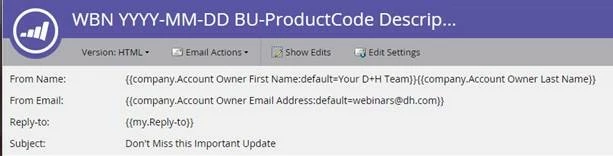
Will a sample test email help when testing for proper CRM sync?  We tried using the {{lead.lead Owner}} tokens as well as the {{company.Account Owner}} tokens.  See screenshots below...
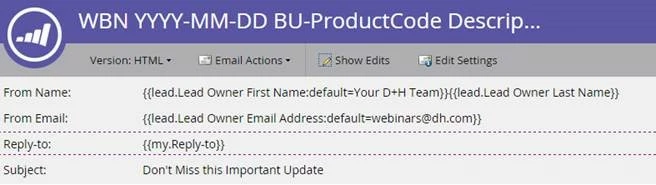
The tokens did not seem to populate the data from CRM and instead went to default value after we sent out the sample test email.  Not sure if we are going about this the right way.

I appreciate your help! 

Thanks, Tom
This post is no longer active and is closed to new replies. Need help? Start a new post to ask your question.
Best answer by Grégoire_Miche2

Hi Tom,

If you want these tokens to populate, you will need to select a lead when sending the sample.

This can be done either from the email edit screen or from the Marketo main screen.

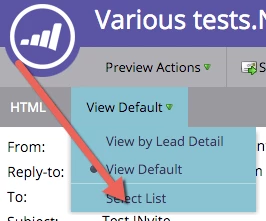
In the email preview screen, it works slightly differently : you have to select a test list for the tokens to get a value.

Clcik here :

select a list, and you will be done.

-Greg

2 replies

Grégoire_Miche2
Grégoire_Miche2Accepted solution
Level 10
December 17, 2015

Hi Tom,

If you want these tokens to populate, you will need to select a lead when sending the sample.

This can be done either from the email edit screen or from the Marketo main screen.

In the email preview screen, it works slightly differently : you have to select a test list for the tokens to get a value.

Clcik here :

select a list, and you will be done.

-Greg

Level 7
December 17, 2015

Thanks Greg,

I'm clicking through each lead in list I selected in preview section but the lead that is supposedly synced with our CRM looks the same.  The {{company.account owner}} tokens aren't populating.  I'll try using the {{lead.lead owner}} tokens.

Tom Kerlin
Level 7
December 18, 2015

Tom, go to the activity log of the record and see if the sync to SFDC occurred. That will happen automatically for records that synced from SFDC to Marketo (ie, records that were created in SFDC).  Remember that you need to have a separate campaign to push new records from Marketo to SFDC SFDC Sync: Lead Sync - Marketo Docs - Product Docs. ​If you do not tell Marketo specifically to sync new records to SFDC, they will only reside in Marketo.

Josh_Hill13
Level 10
December 17, 2015

You should not use Sample Emails or live tests to decide if the sync is working.

You can do this by testing a lead record and syncing it manually or waiting 5 minutes to see what worked.

Otherwise, Greg has the right idea.