Salesforce Sync Error: No XML Document Error | Community
Skip to main content
Level 2
June 23, 2023
Question

Salesforce Sync Error: No XML Document Error

  • June 23, 2023
  • 3 replies
  • 7130 views

Hello, 


I received a Marketo Salesforce Sync Error that myself and my team are not familiar with. The error is as follows:
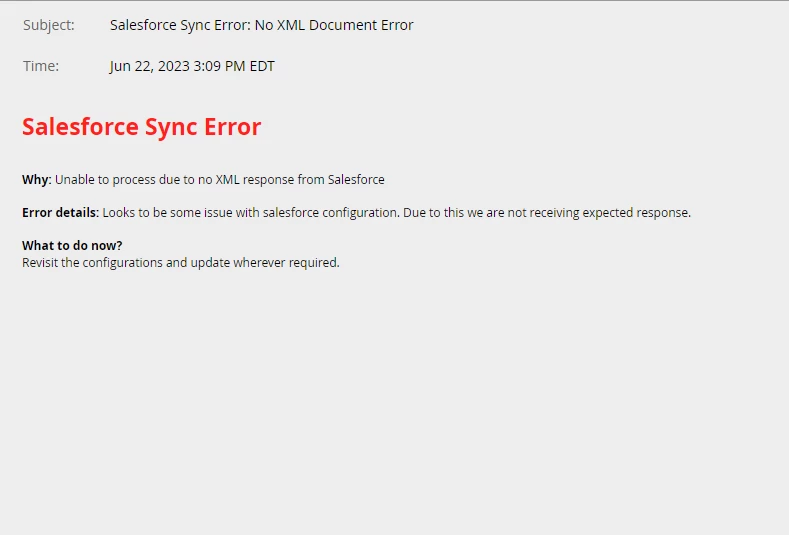
I was able to find one post about something close to this error, but their issue was with a specific to a lead sync issue, based on a problematic character. You can find that thread here: https://nation.marketo.com/t5/product-discussions/lead-sync-error/td-p/64235


I have ran a test and can see that we are syncing new and existing leads with no issue. I was wondering if anyone is familiar with this lead, and if any action is even needed. 


Thanks!

This post is no longer active and is closed to new replies. Need help? Start a new post to ask your question.

3 replies

Level 1
August 10, 2023

I am seeing this regularly as well. Not sure how to resolve. It just started in July 2023.

Level 2
August 31, 2023

same here, started seeing this error 3 times now since July, 2023. Is it something in Salesforce summer release that causes the error?

I am the Salesforce Admin. I created some new flows but nothing related to sending XML documents. 

I submitted a case to Marketo and techsupport said nothing she could find and everything looks okay. But then two days later, I got the error again.


SanfordWhiteman
Level 10
September 6, 2023

@yuchieh wrote:

same here, started seeing this error 3 times now since July, 2023. Is it something in Salesforce summer release that causes the error?

I am the Salesforce Admin. I created some new flows but nothing related to sending XML documents. 

I submitted a case to Marketo and techsupport said nothing she could find and everything looks okay. But then two days later, I got the error again.


As noted above, you can’t send custom XML documents. Every valid response to a SOAP API call is an XML document. Most likely your flow is erroring out so an empty body is being sent.

AjayS
Community Advisor and Adobe Champion
August 21, 2023

Hi, @nzegarra98 


Can you please check with your Salesforce admin if there is a listener process/workflow/Apex-Trigger through which some custom code from Salesforce sends an XML document? I think the process/flow/Apex-Trigger is failing for some reason on Salesforce. If there is an automation on Salesforce, please check if this is working well.

SanfordWhiteman
Level 10
August 21, 2023

Can you please check with your Salesforce admin if there is a listener process/workflow/Apex-Trigger through which some custom code from Salesforce sends an XML document?

You can’t craft a custom XML document this way. But all responses from the Salesforce SOAP API are XML, by definition.

Level 4
March 11, 2024

@sanfordwhiteman - This thread is so old I wasn't sure if I should reply here or start a new thread. We have been seeing the No XML Document error periodically for months now. When I go into the Salesforce Integration section in Admin and check the sync errors, it says:


(Hope you can see that - it says "Error Type: Job Level" "Error Details: getDeletedSObjects failed for type 'CampaignMemberStatus' - looks like we got no XML document".


I shared this information with the SFDC administrator. He does not know how to interpret it and said "I don't understand why Marketo is trying to Get deleted Standard Objects of CampaignMemberStatus. I would think it would try to get records as there would only be 1 object with that name. This object is actually just an object whose records are the same as the  values for the picklist field "Status" on the Campaign Member object. And it doesn't look like it actually does anything from the Salesforce perspective as the picklist doesn't appear to be related to the CampaignMemberStatus object."


I don't know what Job Level would have to do with CampaignMemberStatus either.


Are you able to offer any insight or should I log a support ticket?

Level 1
November 21, 2024

I have been getting the same error for some time too. And ever since, we are not getting alerts regarding new form fills. The fills are successfully being pushed into Salesforce but no alerts. This makes it tedious to check on new leads. I have reached out to Marketo several times with no help at all. Moreover, this was working fine for over a year before the Sync Error first started. And we have not touched anything with the Marketo flow or trigger. 


Can anyone offer any advice?

SanfordWhiteman
Level 10
November 22, 2024

You mean Salesforce alerts? What are the criteria for the flow/trigger in SFDC that’s supposed to trigger on form fills? And how are you inserting form fills — as Tasks?