Salesforce Sync Error: Apex CPU time limit exceeded | Community
Skip to main content
Cameron_Zellner
Level 1
June 25, 2019
Question

Salesforce Sync Error: Apex CPU time limit exceeded
  • June 25, 2019
  • 2 replies
  • 9585 views

Hello - 

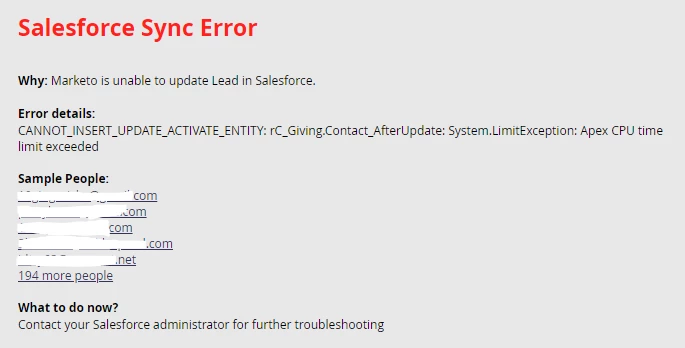
I am trying to make a Salesforce campaign sync using the native sync between Marketo program and SFDC campaign but after it syncs 50K records out of 140K records this error message is returned in Marketo.  What does Apex CPU time limit exceeded refer to and how would I go about fixing this?

Thanks.

2 replies

Level 6
June 25, 2019

Hi @@Cameron Zellner :

You can refer to this post for details: https://nation.marketo.com/docs/DOC-6251-sfdc-sync-error-limitexception-apex-cpu-time-limit-exceeded

Issue Resolution
The error means that you have one or more triggers running when the leads are inserted that consume too much CPU time. You are hitting what are called SFDC Governor limits. This is really something you need to review with your SFDC admins and developers. Consider moving some workflows from Triggers (synchronous) to batches (asynchronous).

Thanks

Daniel_Ducharme
Level 1
June 25, 2019

Hey @Ankit Dua,

Thanks for the information! I'm the SF Dev on this project. What's confusing about this situation is that our understanding of the MKTO SFDC sync is that it is backlogged when it's too large for the SF API limits and we were seeing roughly 2k records go in per sync which is in line with what we expect.

We tested with 2 campaigns and they both threw this error when the sync reached 50k, even though every time the sync happened for those campaign records were written to SFDC in previous 2 days, we didn't run into the SFDC Governor limits.

Is there any reason you know of in SFDC or MKTO that would limit a given campaign membership to <50k Contacts/Leads? We looked into the limits for importing and know there is a 50k record limit for the Import Wizard. But the SF API and third party tool limits are way higher that what we're trying to do.


Thanks for your response! Any insight is helpful!

SanfordWhiteman
Level 10
June 25, 2019

Tell us more about what's happening in that After Update trigger.

Level 6
June 25, 2019

I feel problem is somewhere else, even if API's are running all day long that wouldn't cause this error as CPU limits are per-transaction. There might be some functions that might be eating up enormous amounts of CPU time. 

@Sanford Whiteman‌ could you please suggest here?

Thanks

Jep_Castelein2
Level 10
June 26, 2019

This appears to be related to a managed package from roundCause Giving: roundcorner.screenstepslive.com/s/roundCause_Documentation/m/8404/c/52649.

Based on the error message, it appears to be related to a Contact update, not to an "Add to Campaign" event.