
Salesforce Custom Object Error Message | Community
Skip to main content
Aubrey_Morgan
Level 3
October 15, 2015
Question

Salesforce Custom Object Error Message

  • October 15, 2015
  • 2 replies
  • 3330 views

We recently created a new SFDC custom object that maps our leads/contacts to their product trial user account information. I've had success with Salesforce custom objects in the past, but this time around I'm receiving an error that the object was modified in CRM since the sync was last enabled. See below:
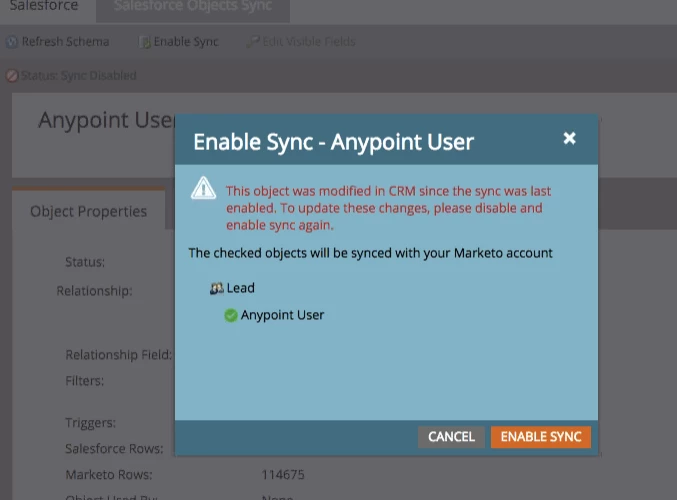
Please note: nobody is is modifying this custom object in SFDC so this error is completely unwarranted. 

Now, I've tried a number of ways to troubleshoot - I've refreshed schema, disabled and enabled sync (multiple times), logged in and out of Marketo - and nothing seems to work. I've also submitted a support ticket but Marketo Support doesn't have any explanation as of yet.

Anyone have any theories or past experiences they can share to help me solve this issue? Thanks in advance!

This post is no longer active and is closed to new replies. Need help? Start a new post to ask your question.

2 replies

Level 7
October 16, 2015

Just a theory - possibly a glitch related to the latest release : Release Notes: October 2015 - Marketo Docs - Product Docs "You now can add new fields to your custom object sync without disabling and enabling your entire custom object." Did Support escalate the ticket?

Aubrey_Morgan
Level 3
October 21, 2015

Hey Alex - yes it was resolved. Turns out we had a conflicting custom object that was not allowing the other fields to sync.


Thanks for your input!

October 28, 2015

Aubrey, what was the actual conflict?  Was it that the custom objects had the same name?

Mike_Reynolds2
Level 10
October 16, 2015

Aubrey,

If this is a new custom object, you'll probably need to make sure the custom object and its fields are synced over, then refresh the schema from inside Marketo. Here's the documentation for that: Enable/Disable Custom Object Sync - Marketo Docs - Product Docs