Sales Insight - Request Campaign | Community
Skip to main content
October 15, 2014
Solved

Sales Insight - Request Campaign

  • October 15, 2014
  • 6 replies
  • 1807 views
We would like to be able to have our sales reps send an follow up email that will come from our VP of Sales & Marketing, following a prospect demo, through Sales Insight. I am struggling with how to set this up. I tried to set up a trigger campaign with Smart List: Campaign is Requested/Sales Insight, but I am struggling with the flow. Thoughts on how to set this up?
This post is no longer active and is closed to new replies. Need help? Start a new post to ask your question.
Best answer by
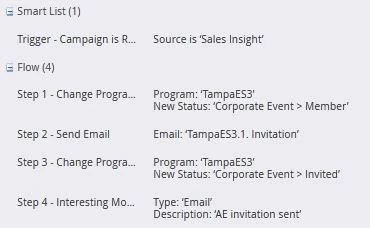
I have added a screen shot of one of mine to give you a reference point. It works everytime once activated, I've never had to trigger a second one. If you are doing more than one email you may have to set criteria. Please let me know if this helps.

Smart list = Campaign is requested > source is Sales Insight
Flow =  Send email > Email Name  (the other flow steps are optional)

6 replies

October 15, 2014
If you just wanted to send the email --- Flow: Send Email (create and select an email that already has the VP emails in the from/reply)

I like to include an interesting moment for things the sales team does but that is a preference of our sales team.
October 15, 2014
Thanks for the reply Shannan!  Unfortunately, I believe I have done that and it's not working. The activity log shows the campaign is requested but email is not sent. 

How do I designate which campaign should be selected for the correct email to be sent?

Right now, I have:

Trigger campaign with Smart List= Campaign is Requested/Sales Insight
Flow: Send Email (email is chosen)

Should the flow be more along the lines of "Request Campaign" and then I have a totally different campaign for the email send?
Accepted solution
October 15, 2014
I have added a screen shot of one of mine to give you a reference point. It works everytime once activated, I've never had to trigger a second one. If you are doing more than one email you may have to set criteria. Please let me know if this helps.

Smart list = Campaign is requested > source is Sales Insight
Flow =  Send email > Email Name  (the other flow steps are optional)

October 15, 2014
Thanks Shannan! I am going to try again.
October 15, 2014
It worked Shannan! I appreciate your help.
October 15, 2014
Glad to hear it Meghan. Have a great day.