Saleforce mapping to Person object rather tan Lead object | Community
Skip to main content
February 9, 2017
Question

Saleforce mapping to Person object rather tan Lead object

  • February 9, 2017
  • 1 reply
  • 2059 views

Hi Marketo gang,

I have noticed that the object type mapping is now displaying as 'person' rather than 'lead'. As below
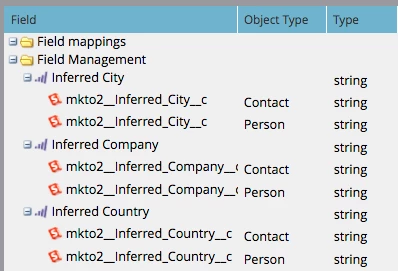
Could someone please explain what the difference is, if any?   It doesn't appear to have made a dent on any of the fields which weren't discontinued at the end of last month, but the new inferred country has not synced as expected.

Any advice?

This post is no longer active and is closed to new replies. Need help? Start a new post to ask your question.

1 reply

Grégoire_Miche2
Level 10
February 9, 2017

Hi Mitchell,

The field mapping screen does not update over time and therefore provides obsolete information. See

You should go to admin -> field management and review the mapping of you key fields. If you have performed the recommended operations before Jan 31st, you fields should be mapped with SFDC fields that are prefixed with "mkto71" and not "mkto2".

If this is the case and you fields seem to not sync anyway, then it can be related to the Marketo user accessing the fields in SFDC.

Now, with regards to the person object, it makes NO difference at all. Marketo Lead used to map with lead and contacts in SFDC. The Marketo lead has simply be renamed as Person, but the mapping is unchanged.

-Greg

February 9, 2017

Hi Greg,

We created and mapped to mkto71 and everything looked right for the switch over on the 31st.

All of the mkto71 fields in SFDC have for for some reason overwritten as mkto2.

Any further ideas?

Grégoire_Miche2
Level 10
February 9, 2017

You might be looking at the wrong place.

Please provide screenshots of the mapping you see in admin->field management->select the field.

It should look like:

-Greg