
reverse 'change data value' action ? | Community
Skip to main content
Zoe_Forman
Community Advisor and Adobe Champion
October 24, 2019
Solved

reverse 'change data value' action ?

  • October 24, 2019
  • 1 reply
  • 4415 views

Help - Can you reverse or undo a Change Data Value ?

I was trying to change persons with NULL value to EN ( English) I work in 8 langages across Europe and some of our persons have incomplete data due to historic import of lists.

I have managed to switch my whole list to EN not just NULL !

Is there a way to undo this action for those that had assigned languages or will I have to go line by line for the 700 contacts and manually return to origional langauge?

Thanks in advance
This post is no longer active and is closed to new replies. Need help? Start a new post to ask your question.
Best answer by JDNelson1

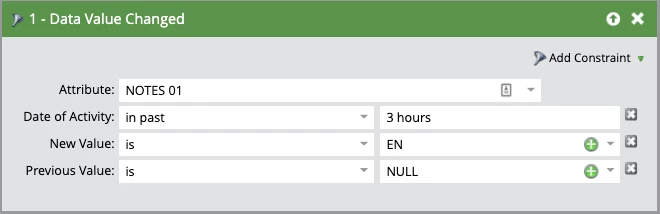
there's no "undo" per se, but you can update your smart campaign to only focus on the criteria you did change. If you change your filter to "Data Value Changed" select your attribute, timeframe, and previous/new values in the constraint menu you can undo them in bulk.

Something like this:


1 reply

JDNelson1Community AdvisorAccepted solution
Community Advisor
October 24, 2019

there's no "undo" per se, but you can update your smart campaign to only focus on the criteria you did change. If you change your filter to "Data Value Changed" select your attribute, timeframe, and previous/new values in the constraint menu you can undo them in bulk.

Something like this:


Community Advisor
October 24, 2019

obviously your attribute will be whatever field you used -- Notes 01 was just an example I had in my system.