Restricting flow steps in Smart Campaign to M-S between 7am-6pm | Community
Skip to main content
Melody_Frieda1
Level 2
August 1, 2018
Question

Restricting flow steps in Smart Campaign to M-S between 7am-6pm

  • August 1, 2018
  • 4 replies
  • 5545 views

Hi,

I have a pretty frustrating situation that I hope the Marketo Community can help me resolve. We have integrated a SMS and Voicemail platform called Call Loop into Marketo. Our goal is to test SMS and ringless voicemail as a means to increase "offer accept rates" of our loan product. I cannot for the life of me figure out how to keep a text message and voicemail from being triggered (via a webhook in the Smart Campaign) when someone applies for our loan "after hours" (between 7pm-6am in a person's respective time zone).

People can apply for a loan anytime on our website, and the ideal flow for this Smart Campaign would start like this for the first 36 hours:
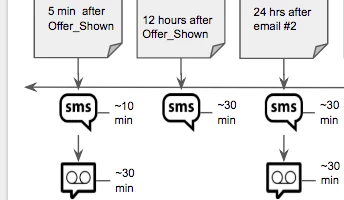
So in this example, the first step would look like this:

  • Email #1 would trigger 5 minutes after the applicant sees their offer
  • 10 minutes after the offer event, a text message is triggered
  • 30 minutes after the offer event, a ringless voicemail is sent out.


Second step looks like this

  • 12 hours after the offer event, an Email #2 is triggered
  • 30 minutes after Email #2 is triggered, a text message is sent out

The situation I'm trying to avoid is someone who applies at 3pm getting their second email and SMS at 3am. Or someone who applies at 11pm getting a pre-recorded ringless voicemail at 11:30pm prompting the applicant to call our customer service dept if they have questions about their loan offers (our customer service dept closes at 6pm)

This is just a snippet of the Smart Campaign we want to execute, but what is pivotal here is being able to define the hours in the day that these communications are acceptable to send--for example, defining the Smart Campaign to only send flow step items between 7am and 6pm Monday through Saturday.

Any suggestions on how to pull this off?

4 replies

Jay_Jiang
Level 10
August 1, 2018

Have you tried adding Advanced Wait steps with "Must end on" before each action? However, you mentioned:

in a person's respective time zone

and

our customer service dept closes at 6pm

Which if you want to address both, then would require a more complex solution...

Jay_Jiang
Level 10
August 1, 2018

Actually, I understand your frustration now as Advanced Wait with "must end on" doesn't work so well with shorter wait durations. The only alternative I could think of that honours the after hours logic, was to write a webhook in php and have the script sleep until the right time, i.e. sleep 30 mins; if (current time is greater than current day 7pm){sleep until next day 6am}, before returning a response to a custom field which Marketo can use as a trigger to send the next comm. You'll need a developer with php knowledge if you want to go down this path.

SanfordWhiteman
Level 10
August 1, 2018

Webhooks time out after 30 seconds, so... nope!

(Also, this doesn't require knowledge of any particular language... you could write the webhook in Rust if that were your specialty. Any language can sleep, in fact PHP's sleep() is worse than most because of the process-oriented nature of the language.)

Melody_Frieda1
Level 2
August 1, 2018

One last piece of information that can potentially help--one of our fields is a "datetime" field related to the date and time their loan offers were shown. The unfortunate part of this equation, once again, is that if I want to use that specific field on the flow step of the Smart Campaign, Marketo will only allow me to use the date, and not the time stamp--unless there's something else I can do to utilize that time stamp? I tried to see if using the Date Token in the wait step with this specific field is possible, but no luck.

Maybe there's a way to concatenate the time portion of the "datetime" field, and find a flow step that can properly use AND recognize that value? Open to any ideas...seems silly that there isn't a "snooze" feature in Marketo to avoid sending emails at inopportune times.

Level 6
August 1, 2018

Hi Melody,

Here are some options that may help.  It sounds like you rather not write a bunch of code, so option A might work

A: use @Sanford Whiteman​'s example which utilizes a 3rd party service called timezonedb (which means you don't have to host files but there is a small fee)

MktoForms2 :: TZ/Business Hours

^ this example utilizes a hidden custom field called: lastFormBizHours

B: Use some javascript and a custom field:

After doing some conversions for time- When the form is submitted you store 'In Business Hours' / 'Out of Business Hours' which can be used to trigger the correct Marketo campaign (immediate send vs wait until).  You will more than likely need code to accommodate Daylight Savings (pretty sure I ran into that last time)

*Note: You could use an existing library like: https://momentjs.com/timezone/ to make it a little easier; or since you already log date/time in a field- maybe break off time into it's own field and then use constraints for this value.

C:  Server side script + custom field + webhook :

Make a simple server side script that finds current time and returns 'In Business Hours / Out of Business Hours', then setup a webhook making sure to map the response to a custom field.  After that setup a Marketo campaign that calls the webhook.  Now you can utilize the 'In Business Hours' / 'Out of Business Hours' value to run the appropriate campaign.

SanfordWhiteman
Level 10
August 1, 2018

Yeah, [A] could be switched to use momentjs instead of timezonedb.  It's all about the easier API.

When it comes to the webhook, I think it needs to do more than a Boolean for in/out of business. It can write back to DateTime fields, and those fields can in turn be used in wait steps to send an email at the next legit time.

SydneyMulligan
Level 7
August 2, 2018

Hey Melody! Similar to what @Sanford Whiteman​ mentioned, I've accomplished this functionality (with Sanford's help) using a webhook called Flowboost. The code in the webhook checked if the current time was acceptable (there was an array of blackout dates which were holidays, weekends were always blacked out, and there was a timezone variable to handle sending in different time zones) then a campaign was requested to execute the desired operation, if not a campaign was requested to wait until the next morning then check again.

Diane_Condon1
Level 2
August 2, 2018

Hi Melody,

Thought I would throw this out there - not a total solution for what you're trying to accomplish, but it's another way to think about business hours. We don't use wait steps. We basically want to stop automated emails from sending outside of our business hours (not the lead's time zone) and so we date time stamp users in a "Email System Time Field" and then use a smart list (screenshot below) to see if they are in our defined business hours. If they qualify for the smart list - we send the email. If they don't - we add them to a static list. Then we have a batch campaign that runs M-F at the beginning of our business hours to users that came in during the night/weekend. For holidays, we have an extra step to pause these emails from sending. 

Diane
SanfordWhiteman
Level 10
August 2, 2018

Ah, but it seems like you already have a String field you're using to represent only the time, which is exactly what the OP doesn't have! (I would've done this w/24-hour time -- no need to deal with AM/PM.)

You're on to something in the sense that you can run change Change Data Value against a String field, with the new value a DateTime {{lead.}} token. This will give you the ISO 8601 string representation (mmmm-YY-dd hh:MM:ss) of the date. That string always has a space before the hour (hh). Out-of-the-box you can't search on a leading space (it's stripped out) but if you hack around that using the same mechanism I use to create line break tokens, you can filter on the leading space followed by the hour.  It would be really fragile, though.