Require at least 1 field from a set of fields on a form | Community
Skip to main content
July 3, 2014
Solved

Require at least 1 field from a set of fields on a form

  • July 3, 2014
  • 2 replies
  • 1388 views
Hello Marketo Community,

I am trying to figure out if it is possible to do the following configuration on a Marketo form:

I want to have a group of check-box fields where the user would 'check all that apply' - but at the same time, make it mandatory to select at least one of the available options.

Can this be achieved in the 2.0 editor, or must I apply the 'required' attribute on a field-by-field basis?  

side note, I am sure there is a way to build this functionality with custom js added, but is there a way to do this natively without custom code?
This post is no longer active and is closed to new replies. Need help? Start a new post to ask your question.
Best answer by Grant_Booth

Hi Nate,

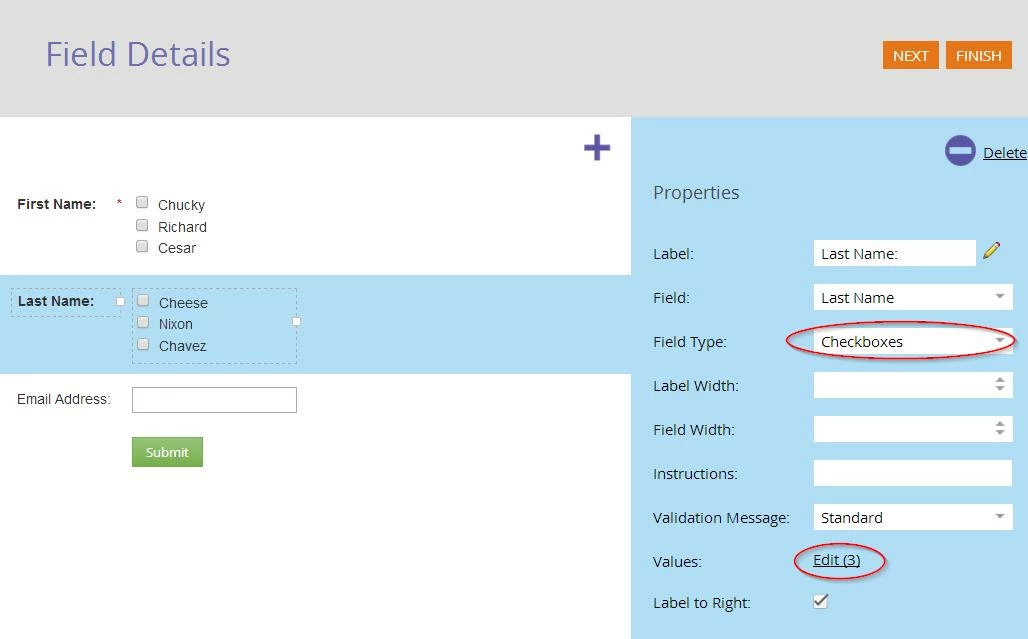
Rather than using multiple boolean fields, each set up as a single checkbox, just use a single string field, but tell it to have a field type of "checkboxes" in the form editor. Then you can give it multiple values, and a different checkbox will appear for each value. Then you can make the field required.

If your business needs require each value to be a separate boolean field, then I don't know of a way to accomplish this without custom javascript.

-Grant

2 replies

Grant_Booth
Grant_BoothAccepted solution
Level 9
July 3, 2014

Hi Nate,

Rather than using multiple boolean fields, each set up as a single checkbox, just use a single string field, but tell it to have a field type of "checkboxes" in the form editor. Then you can give it multiple values, and a different checkbox will appear for each value. Then you can make the field required.

If your business needs require each value to be a separate boolean field, then I don't know of a way to accomplish this without custom javascript.

-Grant

July 7, 2014
Thanks Grant.  This solves the front-end functionality question, but I am still unclear on how the information gets recorded upon form submission in this format.

To mirror your example above, what if someone selected Nixon and Chavez under the Last Name field?  Can we identify that they selected both options somehow?

In our situation "Last Name" would be replaced by something like "Products I'm interested In:" - then we want to be able to identify all the products they've selected from the field set.  Can the available field values be separately identified by a smart campaign? Or will the entire field only populate as TRUE if at least one option is selected?

Thanks for your feedback, much appreciated!