Remove from flow? | Community
Skip to main content
December 2, 2014
Solved

Remove from flow?

  • December 2, 2014
  • 5 replies
  • 1836 views
Hi Everyone,

So bascially we have a simple engagement program running after someone signs up at PointDrive.. goes like this:

Sign up for and the account = trial, then you enter the flow of that campaign...works great.

Issue I'm having is that, I have a campaign sniffing out that one, that should remove anyone who's account changes from trial to paid (or comes in as paid...) Basically want to completly remove then from getting any of the your trial is abouto to expire emails....

Does not seem to be working here is example of a guy who went from trial to paid and as you can see still revieved emails after that???
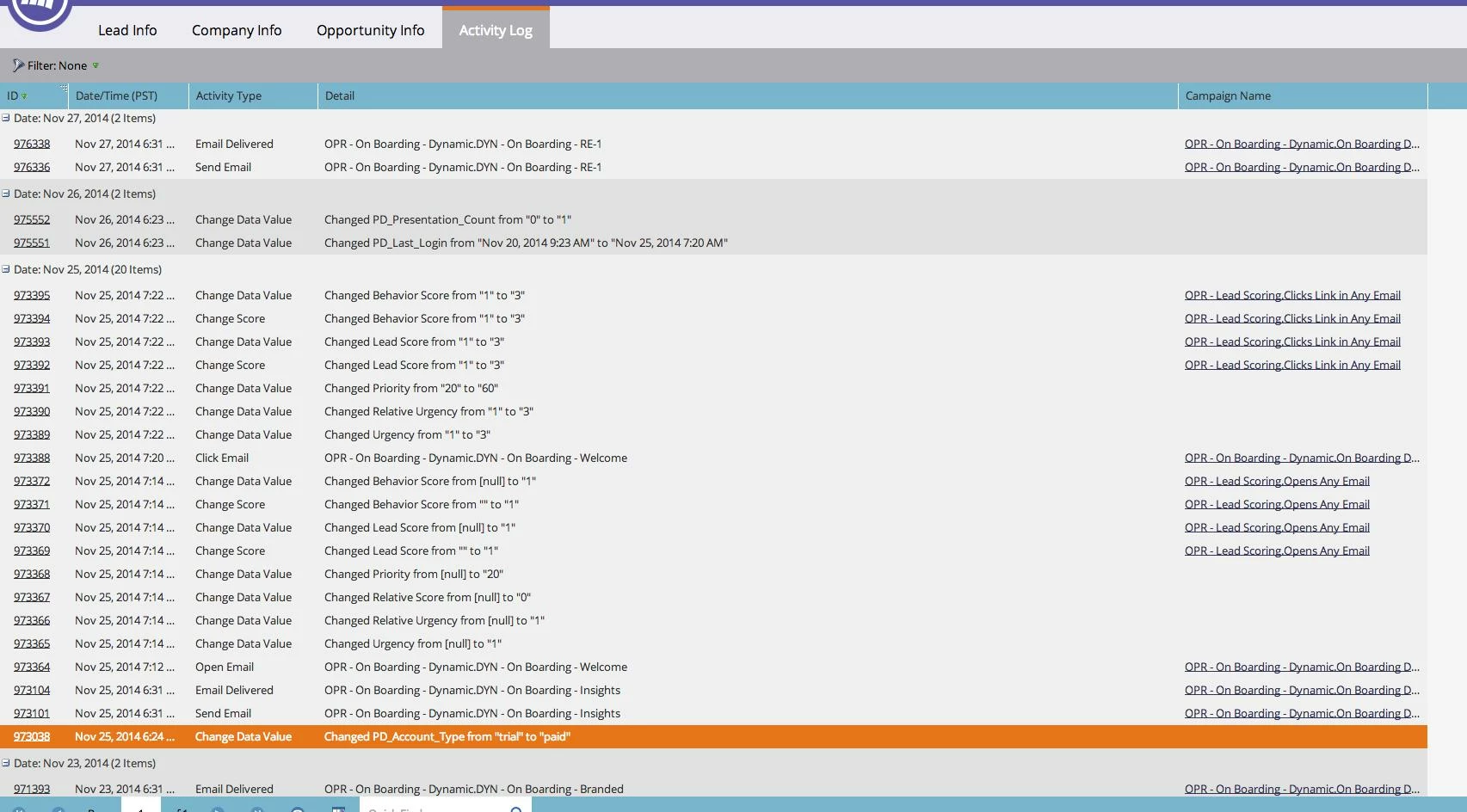

value changes on 25th...but up top recieves another email on the 27th...should have been removed based on this logic I believe...
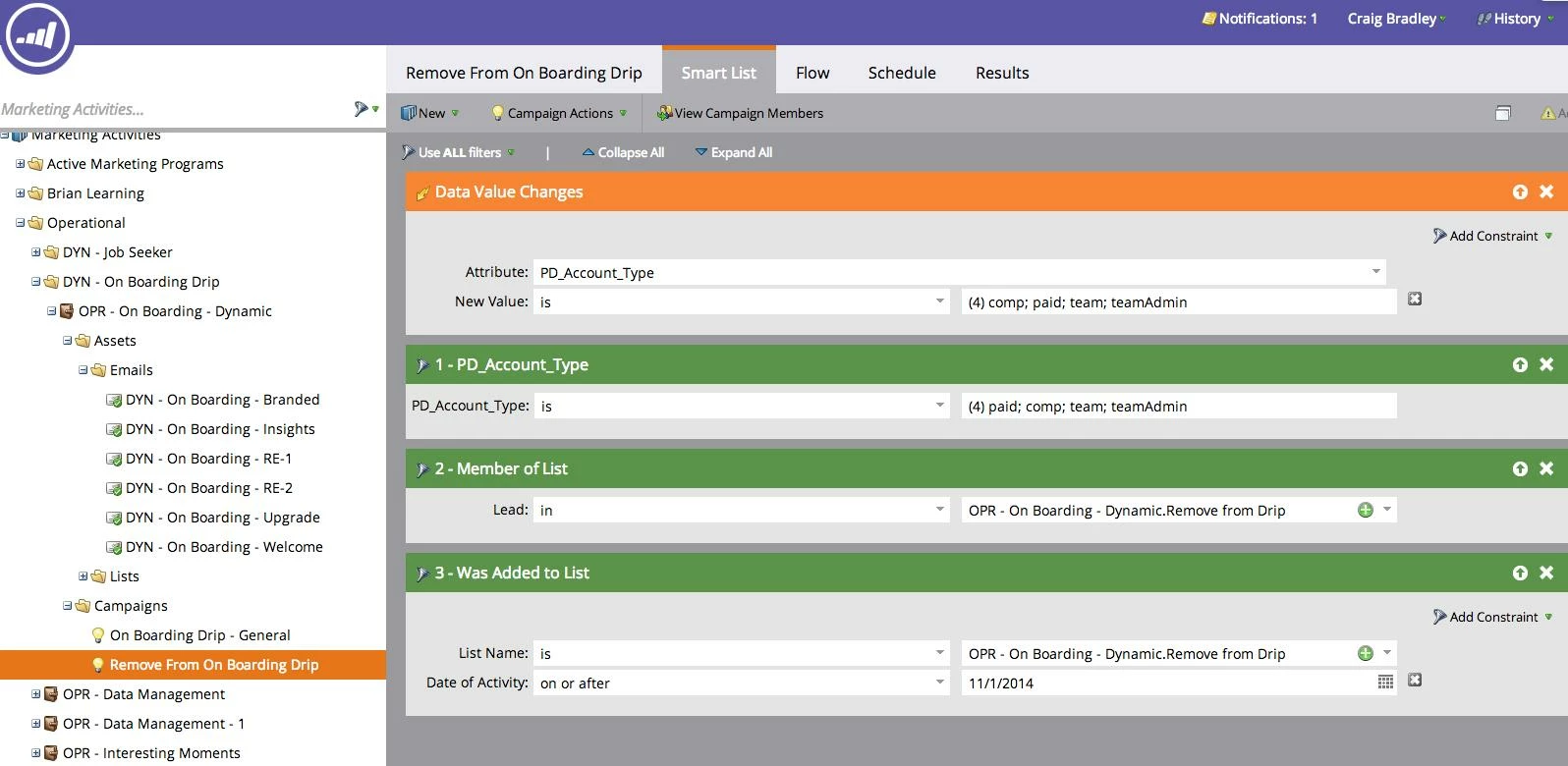


any ideas why this user...and others are not being removed?

Thanks

Craig B.

 
This post is no longer active and is closed to new replies. Need help? Start a new post to ask your question.
Best answer by Dory_Viscoglio
Hey Craig, no great answer here but I've seen similar things randomly in our instance. One way I've worked with this is by having nightly batch campaigns that will remove people who no longer meet the criteria for the campaign, as well as using segmentations to determine who should be in certain campaigns. (Obviously not ideal, but most of the time it prevents the emails from going out erroneously.)

Looking at your images a little more closely, when does someone get added to the "Remove from Drip" list? Your filters are saying that they must be a member of that list in order for them to move to the flow steps in that campaign, so this could be preventing them from running through properly if they aren't already on that list.


5 replies

Dory_Viscoglio
Dory_ViscoglioAccepted solution
Level 10
December 2, 2014
Hey Craig, no great answer here but I've seen similar things randomly in our instance. One way I've worked with this is by having nightly batch campaigns that will remove people who no longer meet the criteria for the campaign, as well as using segmentations to determine who should be in certain campaigns. (Obviously not ideal, but most of the time it prevents the emails from going out erroneously.)

Looking at your images a little more closely, when does someone get added to the "Remove from Drip" list? Your filters are saying that they must be a member of that list in order for them to move to the flow steps in that campaign, so this could be preventing them from running through properly if they aren't already on that list.

 
December 2, 2014
Thanks Dory...I am hoping that I do not have to segment everything that like you mentioned is not ideal...I've got to assume marketo cna do this without that...or I am screwed...:) The only flow step in this campaign is to remove them from the "On Boarding Drip - General" campaign...so I want any one added to that list to also be removed...we added that in after the fact trying to figure out why some users were still entering and getting through te campaign... example of that flow step for the smartlist items....


again my basic assumption would be anyone who meets these criteria would be pulled from that other campaign??? 

Thanks for getting back to me, will see if Marketo support can take a look as well, if I can't get it figured out.

CB
Dory_Viscoglio
Level 10
December 2, 2014
Hey Craig, it sounds like at this point, the filter is the issue here. Your trigger will "activate" the campaign, but someone is still required to be a member of that list to meet the qualifications to go into those flow steps. Filters + triggers don't make OR statements, they're always AND statements. 

 
December 2, 2014
Thanks Dory! 

That makes sense, I have removed the 2 list filters. I appreciate your help!

CB
Dan_Stevens_
Level 10
December 3, 2014
Just to clarify, you can combine TRIGGERS and FILTERS and still use "OR" (and even "ADVANCED") logic.  As long as you have two or more filters, you can use OR logic with the filters.  With three or more filters, you can include ADVANCED logic.  Multiple triggers, when by themselves or mixed with filters, will always be evaluated as "OR".  And as Dory mentioned, a trigger + a filter will always be "AND"