
Redirect to new page if user selects certain value in form drop down | Community
Skip to main content
Gerard_Donnell4
Level 9
March 27, 2017
Solved

Redirect to new page if user selects certain value in form drop down

  • March 27, 2017
  • 2 replies
  • 3249 views

Does anyone know if you can redirect a user to a different page midway through a form completion?  I have a dropdown on a landing page form that asks a user their industry.  If they select one specific industry from the dropdown I would rather redirect them to a different section of the website rather than letting them complete the form. 

Thanks for your help.

Gerard
This post is no longer active and is closed to new replies. Need help? Start a new post to ask your question.
Best answer by SanfordWhiteman

I agree with Greg, skipping the form completely may not be the best way to make use of the lead's visit to your site. But sometimes there are compliance and other reasons to not accept the post from the lead at all.

To redirect on dropdown change, while you can use native DOM onChange events, I don't advise it (it's better to work within the Forms API model because there's no other way to be sure events will be captured). Instead you can do it with the one line of code I have here:

     MktoForms2 :: Redirect on Change (API-driven)

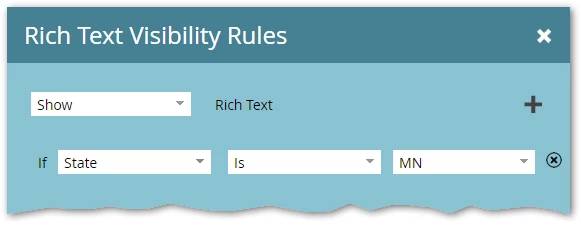
Select "MN" from the State dropdown and you'll see it redirect. The backing form simply has an empty Rich Text area with a Visibility Rule, in order to trigger the Render event. You can obviously add as many other VRs as you want:

2 replies

Grégoire_Miche2
Level 10
March 27, 2017

Hi Gerard,

This could be done with some JS only.

But I would suggest another way to handle this that requires no coding:

  1. Just let the email address always visible and make any other field visible only if the user does not select this industry
  2. if the user select this industry, then let them hit the button and have a conditional follow-up set to redirect them to the dedicated section of your web site

At least, you would have captured the leads and linked the cookie to the email address.

-Greg

SanfordWhiteman
SanfordWhitemanAccepted solution
Level 10
March 27, 2017

I agree with Greg, skipping the form completely may not be the best way to make use of the lead's visit to your site. But sometimes there are compliance and other reasons to not accept the post from the lead at all.

To redirect on dropdown change, while you can use native DOM onChange events, I don't advise it (it's better to work within the Forms API model because there's no other way to be sure events will be captured). Instead you can do it with the one line of code I have here:

     MktoForms2 :: Redirect on Change (API-driven)

Select "MN" from the State dropdown and you'll see it redirect. The backing form simply has an empty Rich Text area with a Visibility Rule, in order to trigger the Render event. You can obviously add as many other VRs as you want: