Quick Email Sends | Community
Skip to main content
April 27, 2015
Solved

Quick Email Sends

  • April 27, 2015
  • 2 replies
  • 1116 views
Is there a way to quickly select an approved email and send it to an uploaded list, with necessarily creating a new campain? Thanks!
This post is no longer active and is closed to new replies. Need help? Start a new post to ask your question.
Best answer by Bruce_Jeffers
Yes, you can do this in the Lead Database area.

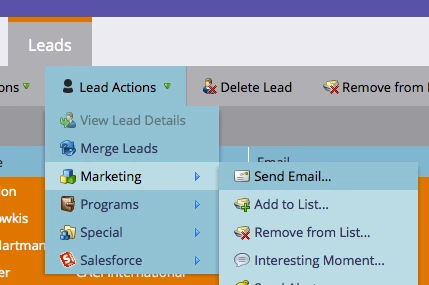
Go into the List or Smart List that you want to send to, and select any (or all) of the Leads that you want to receive the email. Then click on the 'Lead Actions' drop-down --> Marketing --> Send Email.

2 replies

Bruce_Jeffers
Bruce_JeffersAccepted solution
Level 4
April 27, 2015
Yes, you can do this in the Lead Database area.

Go into the List or Smart List that you want to send to, and select any (or all) of the Leads that you want to receive the email. Then click on the 'Lead Actions' drop-down --> Marketing --> Send Email.

April 28, 2015
Worked perfectly. Thanks for your help!