April 11, 2018
Question

program status question

  • April 11, 2018
  • 2 replies
  • 2904 views

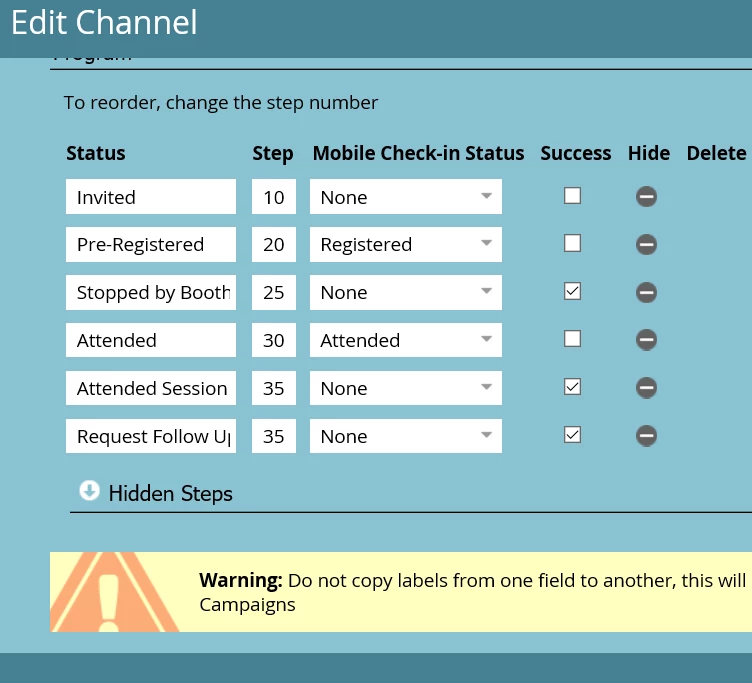
Hi - can someone explain what these step numbers are in the program status? Thanks
This post is no longer active and is closed to new replies. Need help? Start a new post to ask your question.

2 replies

Devraj_Grewal
Level 10
April 11, 2018

Niti,

The step numbers indicate the forward progress of statuses that people can run through. For example, if you are at a step of 20, you cannot go back to an earlier step, ex. 10. The 10-point increments allow for you to place steps in between without having to move other steps around. There is no significance to how much larger a step number is than the previous one, as long as it is larger it means that step can be progressed to. Also if two statuses have the same step number, they allow people to go back and forth between the statuses.

More information is available here: Understanding Program Membership - Marketo Docs - Product Documentation

April 11, 2018

Thanks,

This is helpful. But why pick these numbers? What if I change say a step number from 20 to 30? Or 35? How are these numbers picked?

Niti Shah

Marketing Automation Consultant

o: +1 312.470.8612

Trustwave | SMART SECURITY ON DEMAND

www.trustwave.com<http://www.trustwave.com/>

2017 Best Managed Security Service Winner – SC Media

Devraj_Grewal
Level 10
April 11, 2018

These are the numbers that are out-of-the-box. They are designed to have large increments in between so that if you place more steps in between pre-designed steps, you won't need to modify all of the steps.

Ex.

Invite - Step 1

Register - Step 2

Attend - Step 3

If you wanted to place a new step between 1 and 2, you would then have to move all of the future steps as well to a higher step number.

Ex.

Invite - Step 1

Invite Delivered - Step 2

Register - Step 3

Attend - Step 4

These numbers are picked simply to allow flexibility if you need to add more steps in between.

Erika_S
Level 2
April 11, 2018

The step points basically define the progress route and as Devraj mentioned above you are not allowed to back to an earlier step, but you can interchange member status if they are the same point value. In your case, you can't have a member go from 'Attended' back to 'Invited' because that's going backwards. But you can have a member go between 'Attended Session' and 'Request Follow Up' as those are the same point value.