Problems A/B Testing in a Smart Campaign | Community
Skip to main content
July 23, 2015
Question

Problems A/B Testing in a Smart Campaign

  • July 23, 2015
  • 1 reply
  • 2993 views

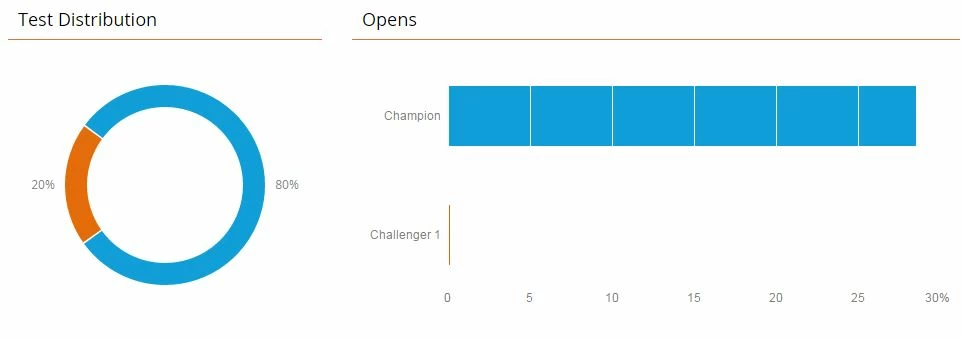
Can someone please help? I'm new to using Marketo and we set up two of our emails (both within separate smart campaigns) to have A/B subject line testing. We set the distribution to 20%/80% but only one subject line was sent. This happened for both smart campaigns.

These are the test results I see on my dashboard:
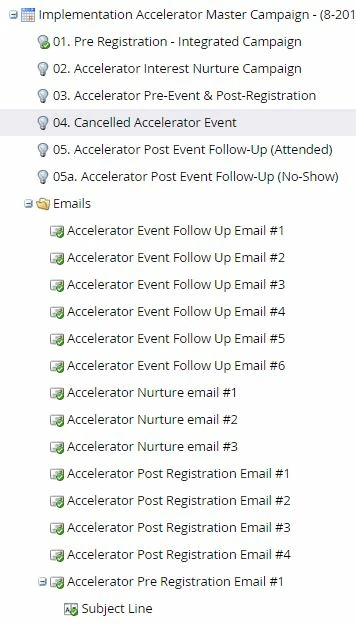
Here is what my campaign set up looks like (there are triggers set up in the flow, which aren't shown here):
Here is what I see when I set up an A/B test in my smart campaign email:
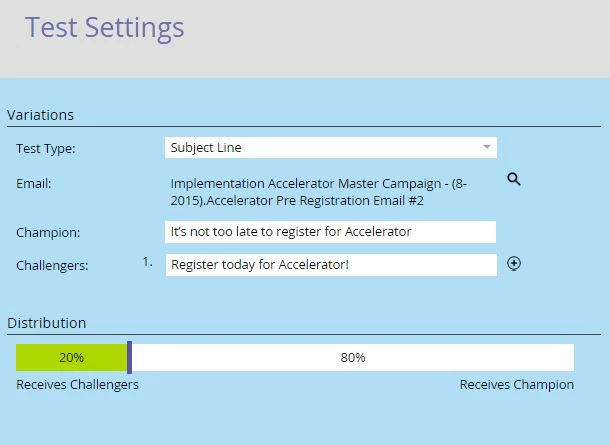
I'm not sure why there is a "Champion" already defined on this screen, but it's defaulting to the subject line that I used when I created the email. Should "Champion" be left blank and I define two Challengers?

Thank you for any help you can provide!

This post is no longer active and is closed to new replies. Need help? Start a new post to ask your question.

1 reply

Jenn_DiMaria2
Level 10
July 23, 2015

It looks like you've created a Champion/Challenger (within an already-existing Program) as opposed to an A/B Test (within an Email Send Program). They function slightly differently, so the setup also looks slightly different.

The dashboard you provided only shows opens (not sends), which means it's possible people received the Challenger email, but didn't open it. Can you run a report?

July 23, 2015

Thank you for responding, Jennifer. Where would I go to run a report manually? It looks like we have the report set up to be sent to us later today, but if I can pull it manually I'll look at it now.