Previewing RTP campaigns targeting different industries | Community
Skip to main content
Level 2
May 1, 2015
Solved

Previewing RTP campaigns targeting different industries

  • May 1, 2015
  • 1 reply
  • 3135 views
Hello

Can anyone tell me how to preview/test RTP campaigns that target different industries (without asking our customers within those industries to do a screen sharing of what they see on our website)?

Thanks
Mark
 
Best answer by
Hi Mark,

To verify that your campaign will be displayed to the right visitors you can create the segment and let it run for a few days before launching the campaign.

Then, find your segment on the segments page and click the 'Distinct Visitors' to see the visitors that matched it:
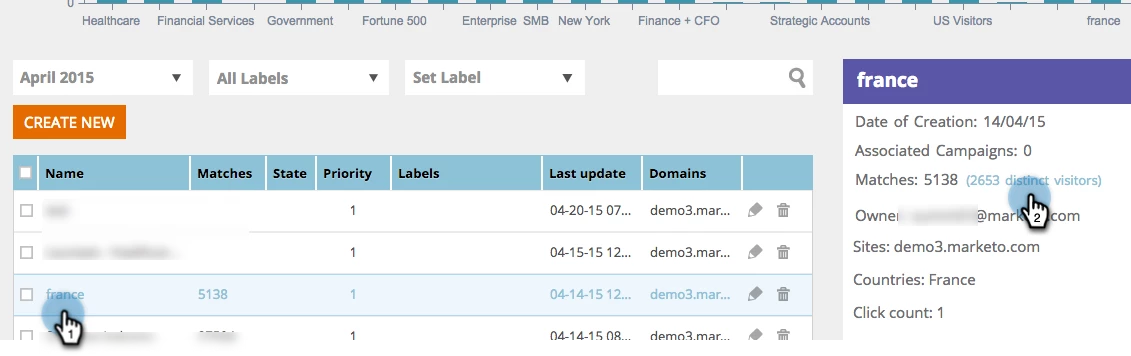
You'll then see a list of organizations that matched the segment and you can verify they all meet your targeting criteria.

In order to test the actuall CTA they will see, you have 2 options :
1. Use the preview option in the campaign editor (see step #3)
2. Use a sandbox segment:
a. Create a new 'Sandbox' segment (call it "sandbox=1" / "sandbox=2"...)
In the segment editor, check the 'Specific Pages' parameter and insert   *sandbox=1*

b. Change the campaign's target segment
In the campaign editor, select the new 'sandbox' segment from the dropdwon list
Click 'Launch'

c. Preview on the website
Go to your website and add the ?sandbox=1 at the end of the url (i.e www.marketo.com?sandbox=1)

Let me know if you have any questions,

Yanir.

1 reply

Accepted solution
May 4, 2015
Hi Mark,

To verify that your campaign will be displayed to the right visitors you can create the segment and let it run for a few days before launching the campaign.

Then, find your segment on the segments page and click the 'Distinct Visitors' to see the visitors that matched it:

You'll then see a list of organizations that matched the segment and you can verify they all meet your targeting criteria.

In order to test the actuall CTA they will see, you have 2 options :
1. Use the preview option in the campaign editor (see step #3)
2. Use a sandbox segment:
a. Create a new 'Sandbox' segment (call it "sandbox=1" / "sandbox=2"...)
In the segment editor, check the 'Specific Pages' parameter and insert   *sandbox=1*

b. Change the campaign's target segment
In the campaign editor, select the new 'sandbox' segment from the dropdwon list
Click 'Launch'

c. Preview on the website
Go to your website and add the ?sandbox=1 at the end of the url (i.e www.marketo.com?sandbox=1)

Let me know if you have any questions,

Yanir.

Level 2
December 19, 2015

Belated thanks Yanir!