
Prevent deactivated/inactive/deleted CRM USERS from appearing/syncing to Marketo
There’s been a long-standing issue with the way Marketo sees CRM users (in both MS Dynamics and SFDC) in that it will display all users – active, inactive, deleted – as available users to sync leads to from within Marketo. Many companies like us never delete user records - instead, we deactivate them in CRM. For example, a contractor who transitions to an FTE which requires a new/different enterprise ID (and CRM user record). For example, Arun has two records in CRM (one active, one deactivated). Yet when we attempt to sync a lead to him, we see this:
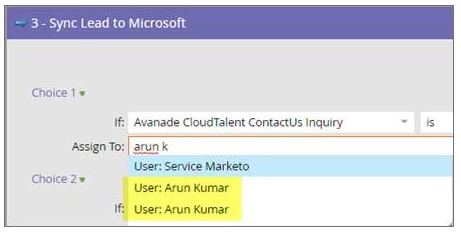
Since Marketo only shows first/last, there’s no way for us to identify the active record. To make matters worse, just this week a new issue has surfaced where Marketo is throwing an error flag when trying to sync since it’s now using just the user's name as the unique identifier (even if we select the active record) - why Marketo doesn't use the user GUID makes no sense to me:

One workaround would be to modify the last name on our end in CRM (e.g., "Kumar (deactivated)". Unfortunately, the first and last name in CRM are locked and synced from Active Directory… we cannot change them in CRM directly.