(Part II) Weird Outlook issues with VML button
Here is the second part of my VML button issues saga.
We want to primarily use this button as a Call-to-Click button AND be able to track the links.
Again, here is what the button should look like:
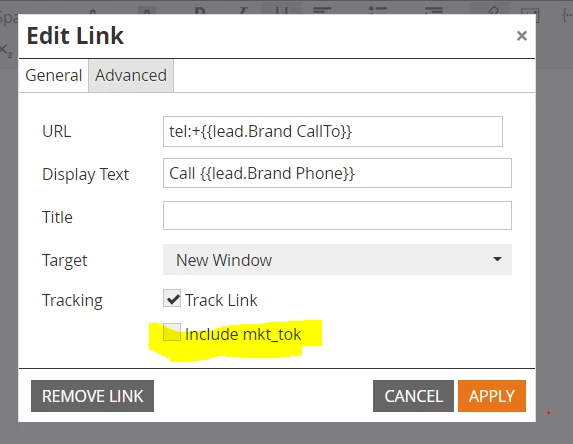
I read the discussions in Community about making C-to-C buttons trackable and did what was instructed by adding the tel:+ to our {{lead.Brand CallTo}} token and unchecking the Include mkt_tok box as shown below:
<!--[if mso]>
<a:roundrect xmlns:a="urn:schemas-microsoft-com:vml"
xmlns:w="urn:schemas-microsoft-com:office:word" href="{{lead.Brand Phone MX - Nationals CallTo}}" target="_blank" style="height:48px; v-text-anchor:middle;width:180px;" arcsize="15%" strokecolor="{{Lead.Brand Primary Color}}" fillcolor="{{Lead.Brand Primary Color}};width: 180;"> <w:anchorlock/>
<center style="color:#ffffff; font-family:'Helvetica', Arial, sans-serif;
font-size:16px; font-weight: 600;">Call <span style="text-decoration: underline;">{{lead.Brand Phone}}</span></center>
</a:roundrect>
<![endif]-->
<div><a href="tel:+{{lead.Brand CallTo}}" target="_blank" style="display: inline-block; mso-hide: all; background-color: {{lead.brand primary color}}; color: #ffffff; border: 1px solid {{Lead.Brand Primary Color}}; border-radius: 8px; line-height: 48px; width: 180px; font-family: 'Helvetica', Arial, sans-serif; font-size: 16px; font-weight: 600; text-align: center; -webkit-text-size-adjust: none; text-decoration: none;">Call <span style="text-decoration: underline;">{{lead.Brand Phone}}</span></a></div>
However, the following issues arose--again in Outlook--ugggh.
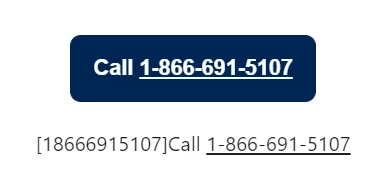
In Outlook.Office.com:
You can see that this extra text gets added below the button )-:
In Outlook Desktop:
I click on the button, but the link is not clickable, i.e., nothing happens.
I made a short video below:
https://www.awesomescreenshot.com/video/11259155?key=87888e44b4af06663486a6c1748b1101
Any help is appreciated.
LK