Nurture Streams - what are the rules for clicks? | Community
Skip to main content
Level 2
February 12, 2019
Question

Nurture Streams - what are the rules for clicks?

  • February 12, 2019
  • 1 reply
  • 4801 views

Hi there,

I am a newer user to Marketo and working on a Nurture campaign. I am researching in the product documentation but I cannot seem to locate what I need.

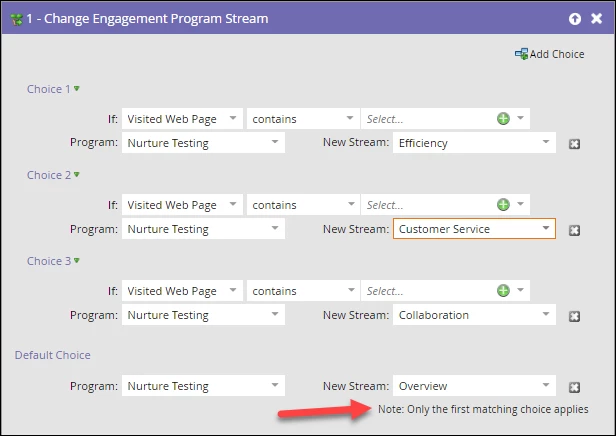
The campaign manager is supplying an asset with multiple links. If a customer clicks a link they will move to an appropriate stream based on that click. However, what is the rule regarding multiple clicks? I see a notation (below) that seems to indicate the first click override but I would like to verify.

As in if a customer clicks link A which sends him to stream A, then what happens if they also, in the same email, click link B which should move them to stream B? Do they stay in the stream of the first click?

Do I have a way to apply a different set of rules to this?

Does this notation (red arrow) indicate only the first click counts?
Thanks in advance for any assistance.

T Sparks

This post is no longer active and is closed to new replies. Need help? Start a new post to ask your question.

1 reply

Denise_Greenb12
Level 6
February 12, 2019

Hi Trisha,

My first question is what do you want the rule to be? Then we can help you make it happen.

It would help to see the Smart List in the campaign you showed us the flow for. However, for any campaign with Flow Step choices, the first choice that applies is executed and the rest are ignored. Based on what you've shown us, if the campaign's smart list is a trigger for "Clicks Link in Email" (where link can be any link or the set of links related to the web site visits in your flow) and the qualification rules for the campaign are each person can run through the flow every time, then if they click a second link they will run through the flow again and be moved to the other stream.

Also note that "Visits web site" doesn't necessarily mean the person visited the web pages as a result of having clicked on the email. A person could click on the email and have visited one of the web pages in the past and get put into the stream as a result.

Before I go into more detail with suggestions, please explain what you want to happen.

Denise

TSparklesAuthor
Level 2
February 12, 2019

Thank you, Denise.

1. So here is the smartlist I was proposing. (Note that this is a test I am building in order to work out the issues)

Which is just "Clicks Link in Email" and I will define the links based on the criteria from the campaign.

2. My apologies also for this ask but I am still unclear.

I see you said the first choice (click) applies however you also said if they click a second link they will run through the flow again if it is set to run through every time. In this instance, it would be that they are set to run through the flow once. (They can run through multiple streams - but only once for each)

I am curious to know what happens if that customer opens the email and clicks two different links before ever receiving any assets from the first stream. Will they run through the first stream or will they be moved to the second stream based on that second click?

3. Thanks for the VIsited Web Page heads up. I was using that as a test to solve for the fact that I can't define the links in that flow step. If I choose "Clicked Link in Email" the only thing I define is the email itself - which has multiple links and those links should lead to different streams.

I am probably just missing obvious things here or completely overthinking it.

I do truly appreciate that you took the time to provide such a detailed answer.

You rock!

SanfordWhiteman
Level 10
February 12, 2019

I am curious to know what happens if that customer opens the email and clicks two different links before ever receiving any assets from the first stream. Will they run through the first stream or will they be moved to the second stream based on that second click?

If they requalify for the Smart List (again, for this to happen you must have every time selected in the Smart Campaign setup) and are not filtered out by any choices in the Flow, they will move to the 2nd stream. The flow as shown doesn't care what stream they're currently in.

3. Thanks for the VIsited Web Page heads up. I was using that as a test to solve for the fact that I can't define the links in that flow step. If I choose "Clicked Link in Email" the only thing I define is the email itself - which has multiple links and those links should lead to different streams.

The Add Choice options that look back at the person's Activity Log should be avoided at all (or perhaps most) costs. They cause massive confusion because they jump out of the context of the Smart Campaign, and they also refer to items that may have aged out of the ActLog.