
Not filled out form | Community
Skip to main content
James_Zolinski
Level 4
April 26, 2019
Solved

Not filled out form

  • April 26, 2019
  • 2 replies
  • 6783 views

We are setting up kind of a nurture campaign where if a lead fills out a form, we send them an email with an offer to download another piece of content by filling out a form. If the lead does not fill out this form, another email is sent 7 days later offering a product demonstration. The problem I am having is getting the second email to send correctly within the time frame of 7 days. I currently have a filter for the form if it is not filled out, but only having a filter makes the SL a batch campaign but we want it to be a trigger, but I'm not sure which trigger to use that will send the second email in 7 days if the form from the first email is not filled out. My current SL and Flow is:
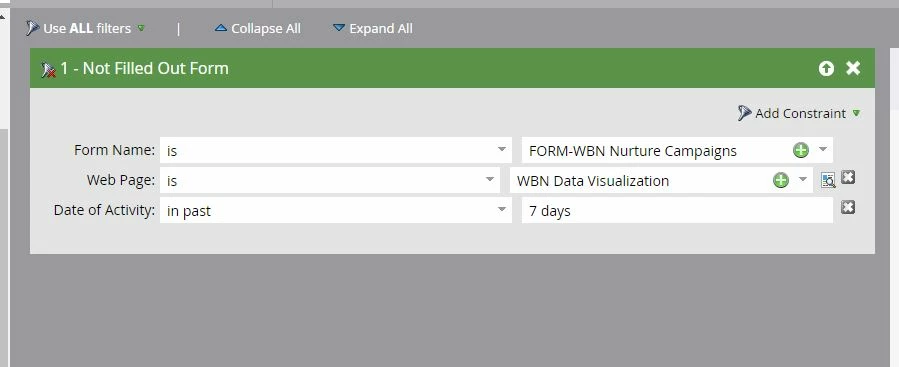
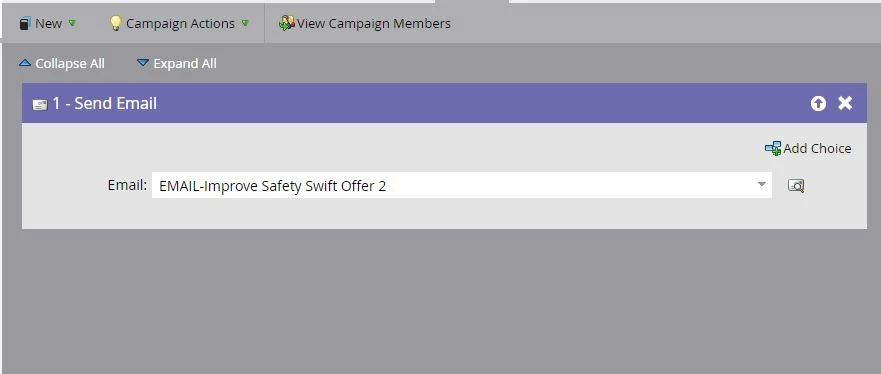
This post is no longer active and is closed to new replies. Need help? Start a new post to ask your question.
Best answer by Gursimran_Chand

Hi Gursimran,

Form 1 is a form a lead will fill out for gated content on our website. After they fill out form 1 from the website, we send them an email to fill out form 2 for another content offer. If the lead does not fill out form 2 within 7 days, we then want to send them another email to fill out form 3 for a product demo. Does that help?


1st Smart Campaign (Trigger)

-> SMART LIST

If someone fills FORM 1

-> FLOW

send email to fill FORM 2

2nd Smart Campaign (Batch)

(logic is same as the above image of smart campaign)

-> SMART LIST

Filter 1: was sent email to fill FORM 2 in last 7 days

Filter 2: Form name is FORM 2

Filter 3: Person NOT IN Smart List Asset

-> FLOW

send email to fill FORM 3

-> SCHEDULE

Schedule it daily

* Smart LIst Asset

-> SMART LIST

Filter 1: was sent email to fill FORM 2 in last 6 days

Filter 2: Form name is FORM 2

2 replies

Gursimran_Chand
Level 3
April 26, 2019

You can achieve by using Filter in the smart list and set 'Schedule Recurrence' to daily. Also, make sure your qualification rules are set to "Each person can run through the flow once".

James_Zolinski
Level 4
April 26, 2019

Thanks Gursimran, that worked. But one problem, I tested not filling out the first form from the first offer, and since I did not fill out the form, I did receive the second email, but so did everyone in our database. How do I set up the SL and Flow so that only leads that have entered this program receive the second email if the form from the first offer was not filled out?

Natalie_Kremer
Level 4
April 26, 2019

You could add another Smart List constraint of Member of Program or Was Sent Email to only send the second email to those who are within your current Program.

Gursimran_Chand
Level 3
April 27, 2019

As Sanford mentioned, using a trigger campaign based on the above logic is not good for reliability. You can use the batch campaign as below and schedule it daily.

You can use Was Sent Email in the past 7 days. This will also include people who received email 2,3 days ago etc.. To exclude these people, you have to create another smart list (logic below) and include in Filter 3.

Smart List Logic

James_Zolinski
Level 4
May 1, 2019

Thank you Gursimran. When you say create another smart list logic, do you mean I have to create another campaign with this logic? So if my second campaign to send the second email offer is 02-Second offer, as an example, I should create another campaign called 03-Second Offer excludes?

Looking at your screen shots I’m not exactly sure where to create this other logic.

Gursimran_Chand
Level 3
May 1, 2019

When you say create another smart list logic, do you mean I have to create another campaign with this logic?

No. Just create a "Smart List" asset (not "Smart Campaign") with the above logic and place that smart list anywhere in the folder.

The first image of mine is for your Main Smart Campaign. The second image is for Smart List asset.