Not able to edit images in Email Editor | Community
Skip to main content
Level 1
May 8, 2017
Question

Not able to edit images in Email Editor

  • May 8, 2017
  • 3 replies
  • 2599 views

Hello -

We are having issues trying to edit an image within the email editor.  It's happening across all of our email templates.   
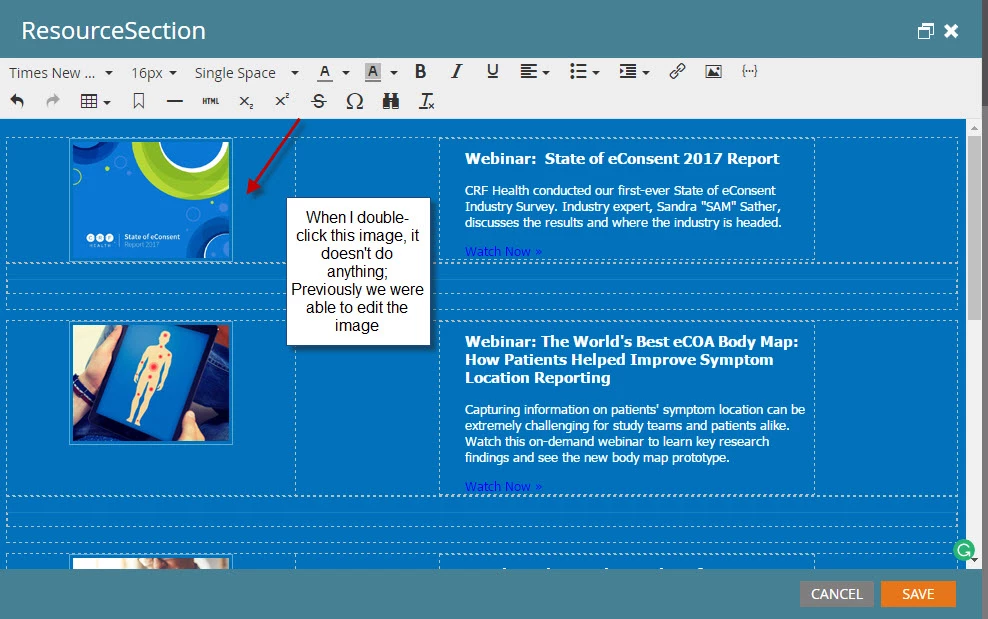
We are able to edit the image by going to HTML view, then updating the image URL, etc.  But, previously we were able to do it by double clicking the image.

Any ideas what's happening here?

Heather

This post is no longer active and is closed to new replies. Need help? Start a new post to ask your question.

3 replies

Josh_Hill13
Level 10
May 8, 2017

Did someone modify the email or template and drop the mktEditable sections?

This looks like a 'blank template" method where it was coded separately and pasted HTML directly w/o mktEditable.

Grégoire_Miche2
Level 10
May 9, 2017

Or this could be the result of an ill prepared upgrade to editor v2.0.

-Greg

Cayce_Armstrong
Level 4
May 11, 2017

We seem to be having a similar issue. The strange thing is, I have no problems editing the image on am email template, but my coworker encounters the same issue that you are having when he tries to edit the same template. That makes me think it's not an issue with the actual template, but maybe has something to do with his computer or Marketo instance?

Cayce Armstrong
Grégoire_Miche2
Level 10
May 11, 2017

The first thing I would do here is clean completely the browser cache.

-Greg

Cayce_Armstrong
Level 4
May 24, 2017

Clearing my cache seems to have helped for now. I also reached out to Support who basically said the same thing so hopefully the issue won't return!

Cayce Armstrong
Steven_Vanderb3
Adobe Employee
Adobe Employee
May 24, 2017

As a follow up to this, Chrome's last update didn't mesh well with TinyMCE (the software that powers the text editor).  A patch was rolled out late last week to fix.