Solved
No field mapping for new SFDC fields?
We use a custom SFDC field “sub industry” for both, leads and accounts. Both SFDC fields have the same name, and I also made sure that both fields are mapped in SFDC. So SFDC definitely knows that these fields belong together.
I don’t know why, but somehow I forgot to give the Marketo user in SFDC read/write rights for the sub industry field before starting the initial sync process. So I did this now.
After the first sync the lead sub industry field shows up in Marketo and is filled with data, but it is not mapped to the already existing (SFDC account) sub industry field which was created during the initial sync.
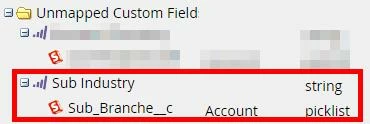
I don’t see the new field in the Marketo field mapping:
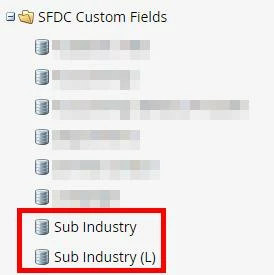
But I do see both fields in the field list:
So consequently for Marketo leads which are also Salesforce leads the SFDC lead sub industry field is filled with SFDC data:

And for Marketo leads which are Salesdorce contacts the SFDC account industry field is filled with SFDC data:

(I granted Marketo read-only access to the account fields, so it’s OK that it is not editable.)
So my questions are:
I don’t know why, but somehow I forgot to give the Marketo user in SFDC read/write rights for the sub industry field before starting the initial sync process. So I did this now.
After the first sync the lead sub industry field shows up in Marketo and is filled with data, but it is not mapped to the already existing (SFDC account) sub industry field which was created during the initial sync.
I don’t see the new field in the Marketo field mapping:
But I do see both fields in the field list:
So consequently for Marketo leads which are also Salesforce leads the SFDC lead sub industry field is filled with SFDC data:
And for Marketo leads which are Salesdorce contacts the SFDC account industry field is filled with SFDC data:
(I granted Marketo read-only access to the account fields, so it’s OK that it is not editable.)
So my questions are:
- Is this the default sync behavior?
- How can I fix this?
- And how can I prevent this from happening again?