Newsletter suddenly classified as 'phishing' by Microsoft. Now what? | Community
Skip to main content
Gerard_van_den_
Level 3
April 12, 2018
Question

Newsletter suddenly classified as 'phishing' by Microsoft. Now what?

  • April 12, 2018
  • 12 replies
  • 9094 views

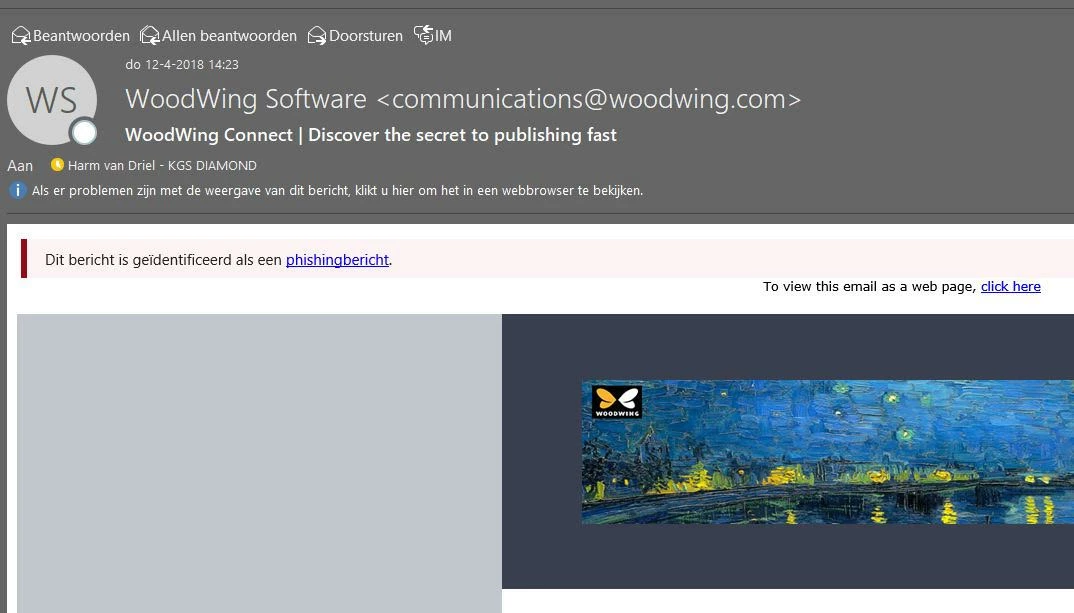
Today, for the first time, we got a message from a newsletter subscriber thatMicrosoft classified our message as phishing.

Did anybody bump into this issue? Any ideas how we could try to solve this?

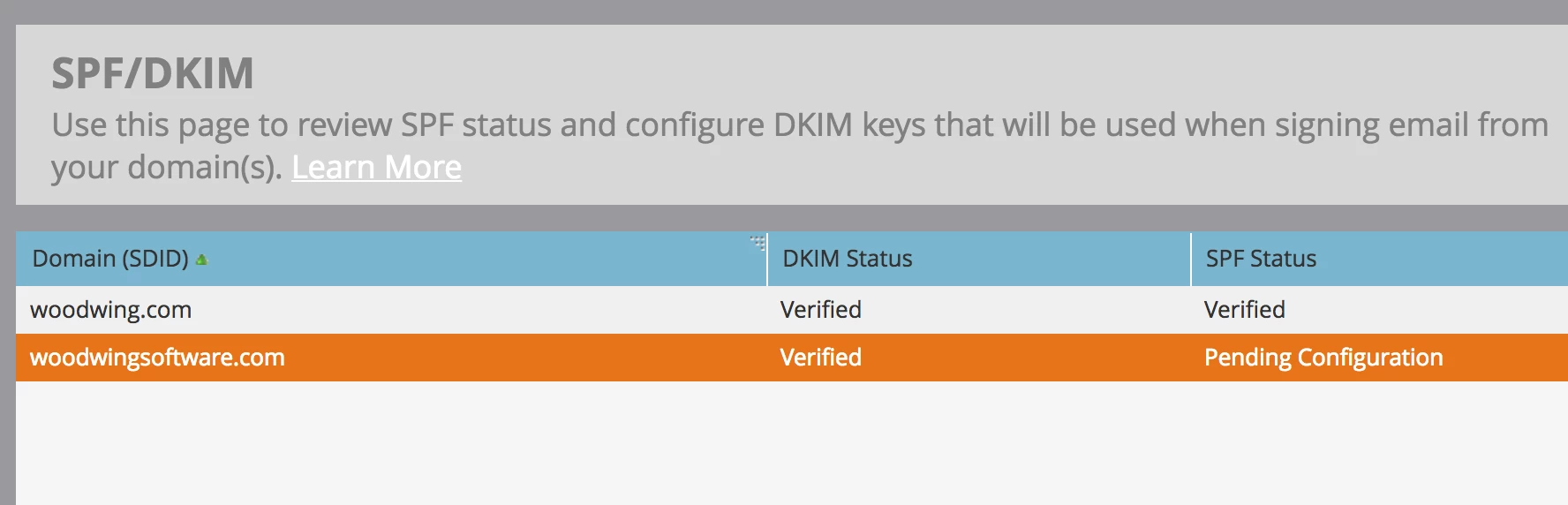
SPF / DKIM should be ok we were told, even though the screen states 'Pending Configuration' for one of the domains.

Thanks for any suggestions.

Gerard.
This post is no longer active and is closed to new replies. Need help? Start a new post to ask your question.

12 replies

Janna_Botha
Level 1
April 12, 2018

I'm having the same exact issue.   I wonder if Microsoft recently updated their security settings?    I tried changing the content of the email, sending, everything and all of it is flagged as phishing by O365.

Will_Thomas
Level 2
April 12, 2018

We had the same issue starting today - all emails we sent are getting flagged as potential phishing attempts, even ones we have been sending for years.

Dan_Stevens_
Level 10
April 12, 2018

Same thing happened to us today.  And this was for an internal newsletter to our Marketing team (about 100 people).  And we have whitelisted all of Marketo's IP address ranges internally (and have SPF and branded sender domain configured properly).  We have never had issues in sending internal emails from Marketo.  Definitely a setting/update that Microsoft applied to their Exchange/O365 servers.  Deliverability was tough previously.  Now it's next to impossible (when sending to Exchange clients - which is the majority of our audiences) unless there's some way to change this.  Although the thing is, the emails are being delivered - but with a that top/pink phishing banner at the top of the email message.

Oliver_Zosel
Level 3
April 12, 2018

We've had automated internal confluence updates get flagged as phishing as well. I think it's safe to say this is an Outlook thing and not related to MATs. We've had Marketo and Hubspot emails get diverted at times, but not consistently.

Cory_Gabor1
Level 3
April 12, 2018

Same thing happened to us today as well with an internal email. Just submitted a ticket to support.

Will_Thomas
Level 2
April 12, 2018

I just built and sent one of Marketo's example templates to myself and it still had the phishing warning - but a blank template text email didn't have a warning.  Looks like it's something to do with more complex html.

Cory_Gabor1
Level 3
April 12, 2018

Same thing happened with me. Text emails are okay, but html emails have the phishing alert.

Steven_Vanderb3
Adobe Employee
Adobe Employee
April 12, 2018

I forwarded along this topic to our Deliverability team to check into this.  Looking at Twitter though, it might be something going on with Microsoft/Outlook.  I see someone tweeting at Hubspot support asking why all their emails are being marked as phishing attempts with Microsoft too....

Dan_Stevens_
Level 10
April 12, 2018

Yeah, I don't think this is a Marketo issue - but rather an issue that is impacting any marketing automation/email service provider vendor.  But on the other hand, it is a Marketo issue if emailing to Microsoft/O365 audiences are now going to be flagged like this.  Considering Microsoft themselves are a Marketo customer, let's hope that some sort of resolution can be identified.

Chelsea_Kiko
Level 4
April 12, 2018

same thing, here! Happened to our own email internally and for a large client. Update the thread if you guys hear anything else!

Casey_Grimes2
Level 10
April 12, 2018

Hey folks,

The core problem that seems to be causing this is mentioning "hotmail" in your email, causing Microsoft servers to incorrectly display this message. Now, for most folks this should be a non-issue day to day, but if you have anything in your email code itself for Hotmail-specific rendering, you could run into this problem. For example, a very common email CSS declaration for Hotmail rendering is

.ExternalClass{width:100%;} /* Force Hotmail to display emails at full width */

In this case, you'd just want to strip your CSS comment.

Edit: Initial testing shows that "this email was sent to so-and-so@hotmail.com" does not trigger this effect, but going to continue to monitor the situation.

Chelsea_Kiko
Level 4
April 12, 2018

You got it, Courtney! Here is one of the emails that this happened to today....

April 12, 2018

I had the same issue just today! I thought it might be a code we're implementing to identify bot clicks - 1x1pixel link. The URL was not a real link so we switch it out and added an extra code to the end so that it was unique. I resent the same email that was flagged as phishing to myself and I got no alert saying it was spam phishing. Is there more to do to prevent this, sounds like it was bigger than my bot link thing?

Cory_Gabor1
Level 3
April 12, 2018

Hi Tiffany,

I read this from word to the wise on twitter:

People throughout the industry are reporting phishing notices in a lot of mail going through Microsoft properties this morning. I even got one in an email from one of my clients earlier today

Multiple people have talked to employees inside Microsoft, and I suspect their customers have been blowing up support about this. I know they’re aware, I suspect they’re frantically working on a fix.

Update 11 am PDT: It appears this filter is firing when mail has the word “hotmail” in it. This includes if non displaying text (like CSS) has the word in it. It feels like they were attempting to mitigate something and wrote a rule that wasn’t quite right. Still no word on a fix, but don’t panic.

Cory_Gabor1
Level 3
April 12, 2018

Word on the street is that Microsoft has resolved this issue. I just ran a test on our email that was marked as phishing this AM and it worked fine.

Can anyone else confirm this?

Carla_Villaverd
Level 1
April 12, 2018

Sent one to my email address. Didn't show the message.