New Marketo Email Editor - Background & Container color | Community
Skip to main content
Level 2
May 15, 2025
Solved

New Marketo Email Editor - Background & Container color

  • May 15, 2025
  • 1 reply
  • 1231 views

Hi, 


I am working on creating a new template in the new Marketo email builder and am struggling to find resources about using background colors. 


I have created a 2:1 structure and filled this with text and a button. I would like to make the background color different from the email viewport and cannot determine the best way to do this. If I use a container then fill it with content the container is not responsive. Has anyone been able to solve for this?
Best answer by Disha_Goyal6

Hi @disha_goyal6, yes this is what I am trying to do. The background color of a column is full width, I would like this to just be the background color on the content. Adobe has this built in the pre loaded template, but I cannot figure out how to build this. We also cannot change the color of the Adobe templates.


We can change the background color of a container but it is not responsive to the rest of the structure.


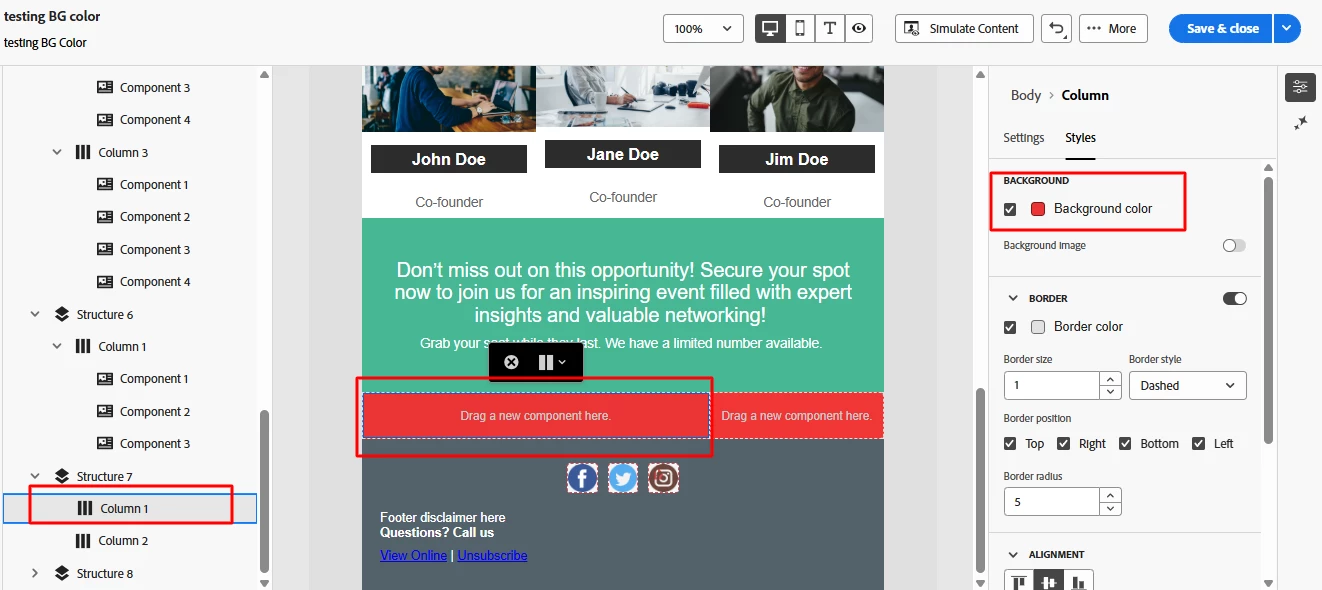
Hi @cassiest, I have found the solution to add BG color on the column section. Please follow the below step:

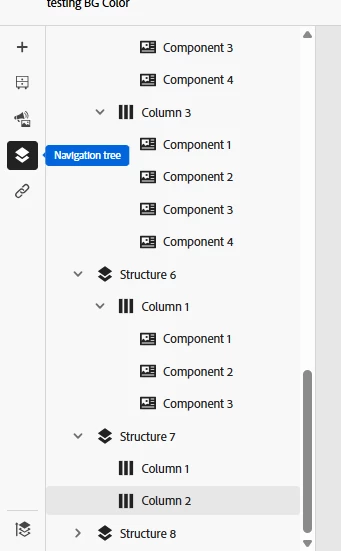
1. After adding column sections, go to "Navigation Tree" option

2. Here Click on column section to add BG color


3. Now BG color will work on columns.


If you still face any issue, let me know.


Thanks,

Disha

1 reply

uditmathur
Community Advisor
Community Advisor
May 16, 2025

Hi @cassiest ,


Can you elaborate what you are trying to achieve.

As changing background color in New email editor is pretty straight forward. 


Disha_Goyal6
Community Advisor
Community Advisor
May 16, 2025

Hi @uditmathur, I think I am able to replicate the issue.

When I drag the 2:1 column section, it is showing like this:

When I am trying to add the Background color, it is going on full width and there is no way to add BG color only on the component.

@cassiest, let me know if this is the scenario.

CassieStAuthor
Level 2
May 16, 2025

Hi @disha_goyal6, yes this is what I am trying to do. The background color of a column is full width, I would like this to just be the background color on the content. Adobe has this built in the pre loaded template, but I cannot figure out how to build this. We also cannot change the color of the Adobe templates.


We can change the background color of a container but it is not responsive to the rest of the structure.