New Email Editor - Fragment Use & Background Color | Community
Skip to main content
Level 2
June 9, 2025
Solved

New Email Editor - Fragment Use & Background Color

  • June 9, 2025
  • 1 reply
  • 1746 views

Hi Community,


I want to see if anyone else is having the same problem as me. I attended last week's office hours for the new email editor and am exploring the use of fragments in our templates. 


When I create a fragment with a background color and add it to an email, the background color does not appear in the email. Is anyone else experiencing this issue or know how to fix it?


Thanks!
Best answer by CassieSt

It looks like the background color behind the Contents is working, but what about the background color of the Structure? 

It looks like the issue here is how the fragments are engineered to require that you save a Structure (or adjacent Structures) but then you have to place them into a Structure to use them.


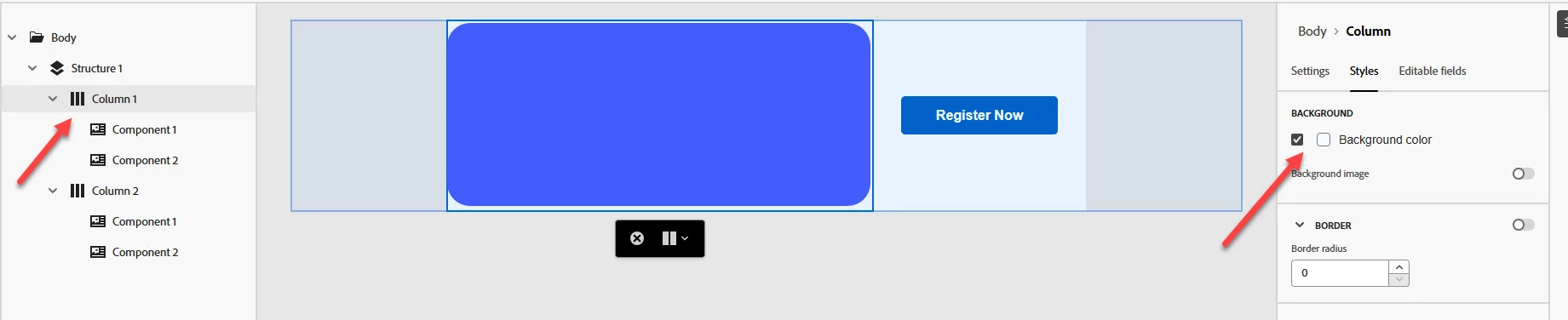
Ok I figured out a way for this to work - you must use the navigation tree to select the column you want to contain a background color and apply it there. This will carry over to the email. Applying the background color to the container or structure will not work, it has to be the column!


1 reply

Dave_Roberts
Level 10
June 9, 2025

It's not you -- it's just that this new email editor isn't really well thought out in terms of User Experience and execution of functionality. 


I jumped into a sandbox environment to see if I could replicate the background color issue and sure-as-sugar-pie it's happening on my end as well. The good news is that what you're experiencing is expected behavior based on how the thing is setup in the current state. The bad news though, is there's not a way to "fix" it b/c it's actually not "broken" in the first place.


Here's the idea with Fragments (as they stand today) -- You put a "structure" on your page and then put some "content" inside the structure. In the example below, there's a 1-column structure with a paragraph and a button inside it. The structure has a beige background, the paragraph has a light orange background and the button has a darker orange background. When I go to save this as a Fragment, you'll notice the "help" suggestion says you can only select Structures (not Content). So you'd think, hey if I select the structure with the beige background it'll remember that I added a beige background right? I am, after all, saving a Structure and not Content as the air-quotes "help" suggests.


... Ok great -- I've saved my Fragment now and then I want to place the structure that I saved into a new email. Since it's already got a structure (b/c that's what it told me I have to do) I should be able to just drag-n-drop it into an email right?  

WRONG?!? Oh man, just when I thought this was all starting to make sense and might be able to save me some time.... audible sigh.

What I'm really confused about here is the Structure / Content dynamic. When you save a Fragment, you save the Structure (which has the beige background) but when you place the Fragment, it's got to go inside a Structure (which either is already setup and has a background color or is a new Structure and doesn't have one) and then only the background colors (oranges) come thru behind the paragraph and button b/c those colors are a part of the content and NOT the Structure. 

.... so you save a structure, then when you place the fragment into a structure, you only place the content and not the structure. It doesn't make any sense as to why you'd set it up to work this way, but that's the way it's setup to work and that might help to explain why the Structure background color (beige) doesn't come thru when you place the fragment. 

For what it's worth, I think the new Email Editor tool is a long way from production-worthy (late '26 - early '27 is my guess) and this is another example of how even when it IS working as expected it's just not well executed. I think it'll be a few years before these types of bugs are worked out and this is something to take seriously in a professional setting.


Disha_Goyal6
Community Advisor
Community Advisor
June 10, 2025

Hi @cassiest  @dave_roberts, I tried to add the fragment in my email and it is working fine for me.


CassieStAuthor
Level 2
June 10, 2025

@disha_goyal6 Can you share how you got the background color to work?