July 20, 2015
Question

Need help with subscription center setup

  • July 20, 2015
  • 4 replies
  • 4608 views

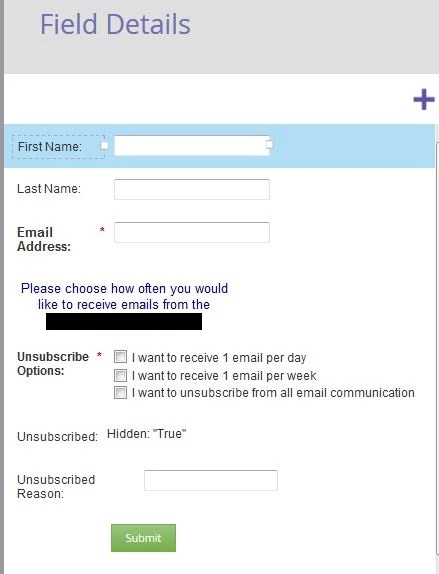
I am trying to set up a subscription center that will allow members who are thinking about unsubscribing to choose alternate options, including receiving one email per day or one email per week. I've set up a new form in the Design Studio, but am not sure it will work as intended. There is still an option to unsubscribe, which is part of a checklist field. However, when I tested the unsubscribe option by checking the box and clicking the submit button, my Marketo account showed that I was still subscribed. Can you please help me figure out what I am missing? I've pasted the form setup I've created thus far below:

Thank you,

Laura

This post is no longer active and is closed to new replies. Need help? Start a new post to ask your question.

4 replies

July 21, 2015

Hi Laura,

Can you give us some more information on what your doing outside this form. What mechanisms are you using when the form executes? This will give us more idea on how to give you the best advice.

Ben

Justin_Norris1
Level 10
July 21, 2015

Laura Kimball​ I would second Ben Robinson​ that more info on what's happening outside the form would be helpful (the Smart Campaigns triggering off it, etc.)

At first glance, it looks like this form will ALWAYS unsubscribe someone no matter what, because you have "unsubscribed" as a hidden field defaulting to true.

Keep in mind that unsubscribing won't remove a lead automatically from any other list mechanism you have set up; rather it just sets the field "Unsubscribed" = true, which prevents any non-operational emails from being sent to that lead.

One other option for this form is you could have the Unsubscribe field be visible as a different option -- "unsubscribe from all emails altogether" or something similar. You can use Forms 2.0 visibility rules to make the other fields disappear when you select that checkbox if you want to make it a bit more dynamic.

Then you can have a separate smart campaign triggered off unsubscribed = true to remove them from any other lists, uncheck any other checkboxes etc. that are relevant so you keep your list of emailable contacts clean.

July 21, 2015

Hi Justin and Ben,

I am working on following the Marketo Subscription Center setup in the PDF located on this page: How to build a Marketo Subscription Center

My plan is to create several campaigns that will add people to different lists and streams based on the option they choose, one email per day, one email per week, or unsubscribe. I've added the visibility rules to the three fields I set up (1 per day, 1 per week, and unsubscribe) so that if either of the other two are chosen then only one will appear. However, I noticed that I'm still getting unsubscribed when I choose one of the non-unsubscribe options...Any ideas what is going on?

Thank  you,

Laura

July 21, 2015

Yes - you have "unsubscribed = true" as a hidden field on your form.  So no matter what people choose on the checkbox array, their "hard coded" unsubscribe status is being set to true, and they won't get anything other than operational emails.


Remove that field, and manage the unsubscribe field w/ your new fields (e.g. marking unsubscribe would set unsubscribe to true)

July 21, 2015

On a somewhat related note, I'd change the wording from "unsubscribe options" to "subscription options" to avoid accidentally communicating to leads that they are unsubscribing when they are actually only reducing their email frequency.

Some color would be helpful on what exactly that field is mapped to, and what campaigns you have triggering off of that field.  Are you adding people to static lists to manage your subscription preferences, or using fields on the lead records that you look for when you run email campaigns?

Josh_Hill13
Level 10
July 21, 2015

Justin is correct.

You need to design the form as well as the backend of this. I would also design the form and page to be more friendly and encourage "subscriptions" rather than Unsubscribe options.

Each sub option has a corresponding field checkbox (which should exist in Marketo and SFDC)

  • Event Invitation = T/F
  • Webinar Invitations
  • Product Promotions
  • Blog Updates
  • Unsubscribe

or whatever you want. Next to each option I would have a link to a pop up example of the content and the expected frequency (1/month, 2x/week.) so people know what they are getting into.

When the lead says Unsub=T, a campaign flips the others to F

You then have a series of lists that look for Event Invitation, etc = T so you know whom to send to.

Frequency is hard to implement because it requires a lot of logic and smart list use and your team will have to use this exclusion list. What you can do that is easier is say "Pause Me" like Marketo does:

  • Pause for 30 days > when flipped to T, a campaign triggers that sets Marketing Suspended=T for 30 day wait step, then sets it to F.