Need help with parsing json-string | Community
Skip to main content
Level 2
May 5, 2024
Solved

Need help with parsing json-string

  • May 5, 2024
  • 1 reply
  • 2106 views

I have stored a json-string in a lead field in marketo =>

 

{ "name": "Milan", "cm_name": "Master Manager", "signature": "Hello \"There\"", }


When I am trying to parse the json string using the following script =>

#if( $lead.emailVariables.isEmpty() ) #set( $lead.emailVariables = '{}' ) #end #set( $emailVariables = '#set( $emailVariables = ' + $lead.emailVariables + ' )' ) #evaluate( $emailVariables )
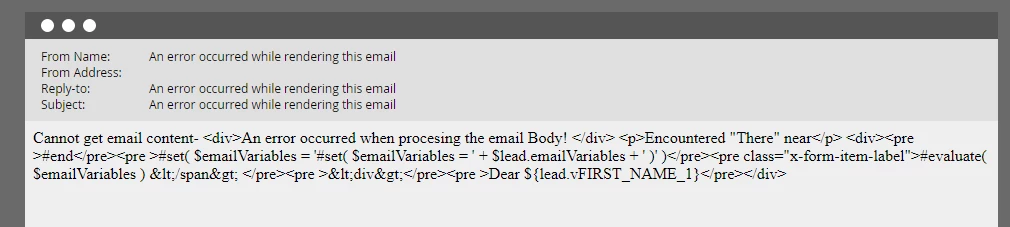

I am getting this error ->

Cannot get email content- <div>An error occurred when procesing the email Body! </div> <p>Encountered "There" near</p> <div><pre >#end</pre><pre >#set( $emailVariables = '#set( $emailVariables = ' + $lead.emailVariables + ' )' )</pre><pre class="x-form-item-label">#evaluate( $emailVariables ) &lt;/span&gt; </pre><pre >&lt;div&gt;</pre><pre >Dear ${lead.vFIRST_NAME_1}</pre></div>


This post is no longer active and is closed to new replies. Need help? Start a new post to ask your question.
Best answer by SanfordWhiteman

Velocity only supports long-form JSON Unicode escapes. It doesn’t support shortcuts like \" or \n. For the double quotes you use \u0022.

1 reply

SanfordWhiteman
SanfordWhitemanAccepted solution
Level 10
May 6, 2024

Velocity only supports long-form JSON Unicode escapes. It doesn’t support shortcuts like \" or \n. For the double quotes you use \u0022.

Level 2
May 6, 2024

Got it. Thanks for the help.

Level 2
May 21, 2024

hi

I have followed the same steps, but still no luck in parsing the JSON from my Custom Object.

My Custom Object field (Field Name: RData) has data like below


[ { "StuLast": "Abram", "StuFirst": "Easton", "Program": "UGD", "Subject": "MUSC", "Catalog": "10A", "Section": 90 }, { "StuLast": "StuLast2", "StuFirst": "StuFirst2", "Program": "UGD", "Subject": "Chemistry", "Catalog": "20B", "Section": 65 } ]


When I tried the following code in the Token to parse, I am getting an empty string


#set($data = ${registrar_cList.get(0).rData}) #if($data.isEmpty()) #set($data='{}') #end #set($parsedJson = '#set($parsedJson='+ $data+')') #evaluate($parsedJson) $parsedJson['subject']


My Custom object has data like 

[ { "StuLast": "Abram", "StuFirst": "Easton", "Program": "UGD", "Subject": "MUSC", "Catalog": "10A", "Section": 90 }, { "StuLast": "StuLast2", "StuFirst": "StuFirst2", "Program": "UGD", "Subject": "Chemistry", "Catalog": "20B", "Section": 65 } ]


When I tried the following code in the Token to parse, I am getting an empty string

#set($data = ${registrar_cList.get(0).rData}) #if($data.isEmpty()) #set($data='{}') #end #set($parsedJson = '#set($parsedJson='+ $data+')') #evaluate($parsedJson) $parsedJson['subject']


Note: I did upload the csv file into Marketo as  UTF-8 format when updating the Custom object.


My Goal is to display data from this Custom object field in an email.

Any help is appreciated.


thanks

-Sree