
Need help with mobile view button alignment | Community
Skip to main content
Nichole_Trobar1
Level 2
March 31, 2015
Solved

Need help with mobile view button alignment

  • March 31, 2015
  • 4 replies
  • 3339 views

http://info.stanjohnsonco.com/2015-ICSC-RECon-Vegas.html

Form looks great in desktop view, but when I switch to mobile if aligns to the right instead

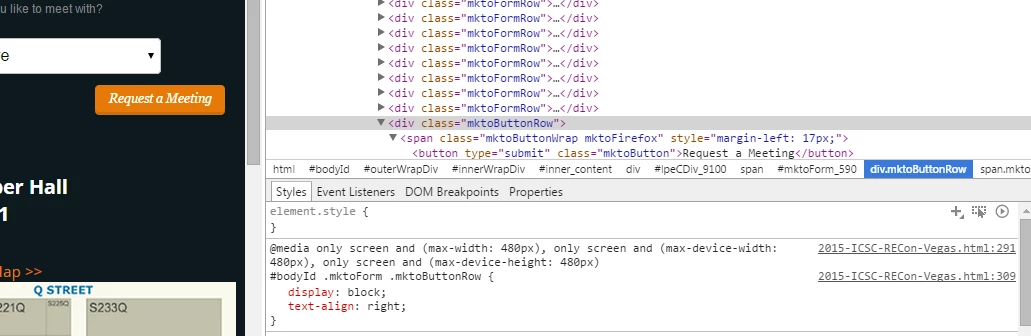
Here is the style that is applying but I can't figure out how to turn it off - suggestions?
 

This post is no longer active and is closed to new replies. Need help? Start a new post to ask your question.
Best answer by Casey_Grimes2
Hi Nichole,

Your problem is on line 309:
#bodyId .mktoForm .mktoButtonRow { display:block; text-align:right; }
To fix this, you simply need to have your desktop version of mktoButtonRow be text-align: left !important rather than left (or fix the mobile-specific error.)

4 replies

March 31, 2015
It looks like there is Firefox-specific CSS pushing the submit button to the right.  Is this happening in any browser you view your mobile page in, just the Marketo preview window, or on an actual mobile device?

For starters, you might try adding custom CSS in your form editor to override the style="margin-left:17px;" on the button class. You'll probably have to add a !important tag to make it take to the form.  Good luck!
Casey_Grimes2
Casey_Grimes2Accepted solution
Level 10
April 1, 2015
Hi Nichole,

Your problem is on line 309:
#bodyId .mktoForm .mktoButtonRow { display:block; text-align:right; }
To fix this, you simply need to have your desktop version of mktoButtonRow be text-align: left !important rather than left (or fix the mobile-specific error.)
Nichole_Trobar1
Level 2
April 1, 2015
THANK YOU for all your help!!  Adding the important! to the custom CSS did the trick!
Justin_Cooperm2
Level 10
April 2, 2015
Much better to use CSS specificity to do this instead of using !important tags.

You could add the following anywhere to your page to fix it:
html #bodyId .mktoForm .mktoButtonRow { display:block; text-align:left; }