Need help with advanced filters in smart list | Community
Skip to main content
May 23, 2018
Question

Need help with advanced filters in smart list

  • May 23, 2018
  • 2 replies
  • 3887 views

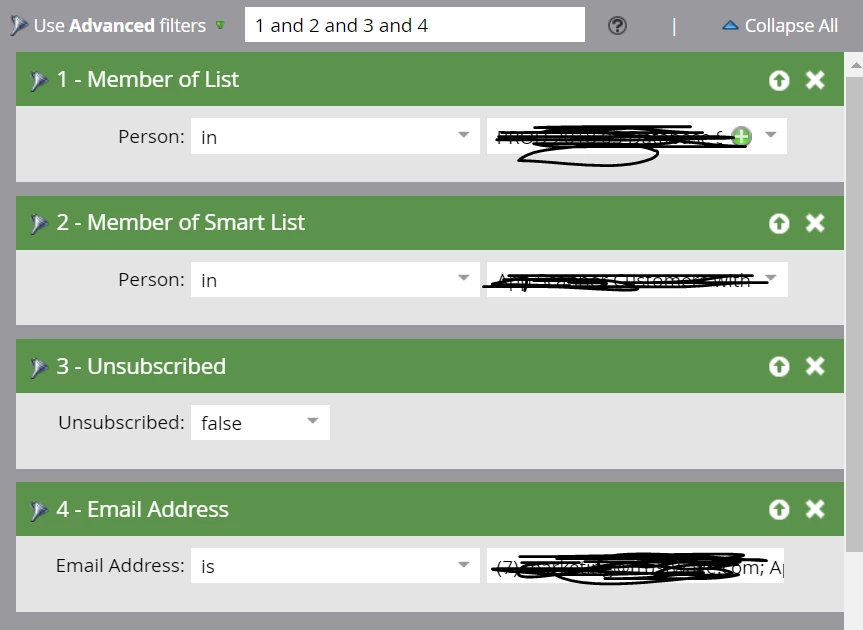
We need to send out an email campaign.  I need help with advanced filters. What I want to achieve is: I need the adudience to be member of the list, member of the smart list referenced, but I do not want to send to anyone that has unsubscribed in these two filters mentioned.

Can someone advise on the advanced filter logic?    Also, should unsubscribe be set to true or false?

The way I have it set up right now, it’s not giving me any leads. 
This post is no longer active and is closed to new replies. Need help? Start a new post to ask your question.

2 replies

Chirag_Agarwal1
Level 2
May 23, 2018

You probably don't need the 4th filter or Advance Filter for this matter. Leave 1, 2 & 3 as it is and change to "Use ALL Filters". If there are people who are present in BOTH the List & Smart List and have not unsubscribed, these filters would pull them.

May 23, 2018

Hi Chiarg,

actually, I do need the 4th filter. The email addresses are for people that are not in "member of smart list" and "member of list".

thanks,

Niti

Chirag_Agarwal1
Level 2
May 23, 2018

In that case, your advance filter logic would be:

((1 and 2) or 4)) and 3

Make sure to change Unsubscribe to TRUE FALSE

May 23, 2018

Hi, your recommendation actually didn't work.

I also moved the smart logic filters around and adjusted the logic a bit. This is still not working. See below. Still not working.