August 15, 2017
Solved

Need help styling a form

  • August 15, 2017
  • 2 replies
  • 2416 views

Hello,

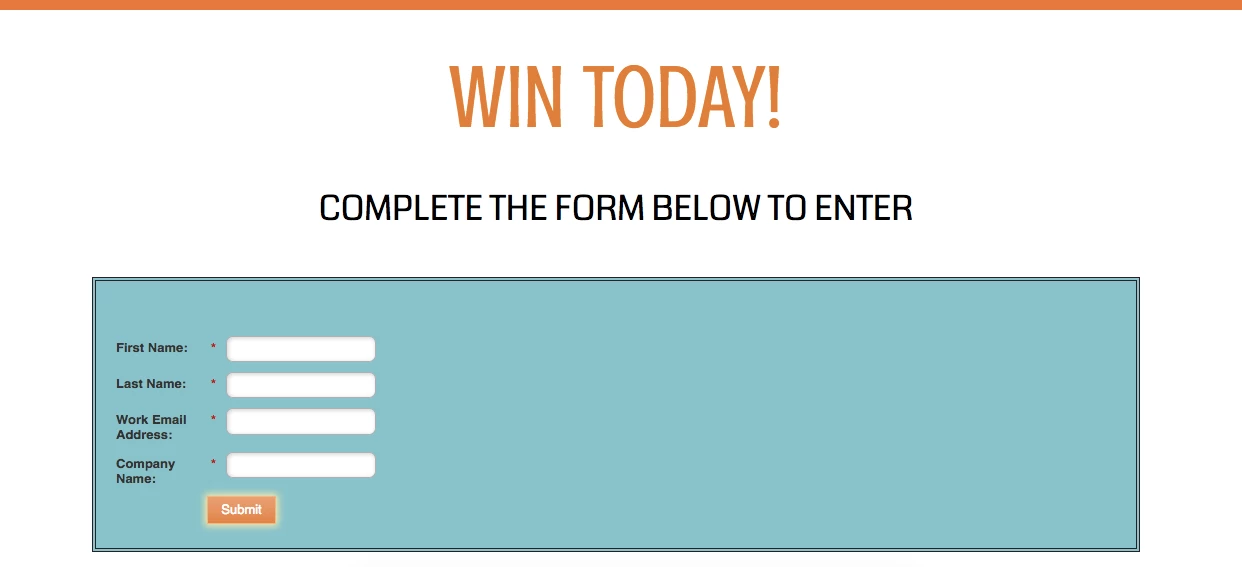
I would love some help styling this form! I don't have strong feelings on what it should look like as long as it looks professional.

When I tried to center the form, it stretched the box even though I set the width. Any recommendations would be greatly appreciated!

This post is no longer active and is closed to new replies. Need help? Start a new post to ask your question.
Best answer by SanfordWhiteman

That's not valid CSS; float: center is not a thing.  Generally to center the width'd form within a container, use

.mktoForm {

  margin-left: auto;

  margin-right: auto;

}

Can you point to your actual URL?

2 replies

SanfordWhiteman
Level 10
August 15, 2017

Kinda seems like bespoke form design should be under Job Opportunities as opposed to the peer support places.

August 16, 2017

Sorry! I should been more specific. I'm trying to center the form, but the entire form stretches out when I try to center it. I need to know how to center it, while maintaining the width. 

FROM THE LANDING PAGE

#MainForm {

  margin:15px 0px 10px 0px;

  float:center;

  padding:55px 10px 25px 10px;

  background-color:#7ac5cc;

  border:double 4px #252126;

  width:40%;

}

FORM CSS

.mktoForm .mktoButtonWrap.mktoSimple .mktoButton {

  width:100%;

}

.mktoField {

width:100%;

}

#MainForm {

  float:center;

}

{

  height: 54px;

  line-height:1.5em;

  text-align: center;

  font-size: 24px;

  font-weight: 600;

  color:#000;

  border:1px solid #aeb0b6;

  padding:0.2em 0.3em;

  box-shadow:inset 1px 1px 4px 1px #ddd;

}

SanfordWhiteman
SanfordWhitemanAccepted solution
Level 10
August 16, 2017

That's not valid CSS; float: center is not a thing.  Generally to center the width'd form within a container, use

.mktoForm {

  margin-left: auto;

  margin-right: auto;

}

Can you point to your actual URL?

August 16, 2017

Gotcha- I pulled "float: center " from a stack overflow discussion.

Your suggestion worked perfectly though, thank you!