
Solved
Need Fancy Button Help with Forms 1.0
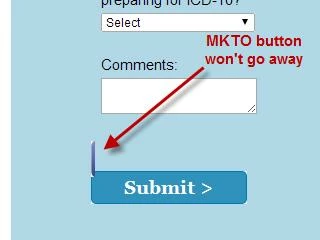
I have been using the code below to easily update our form buttons to fancy buttons for nearly a year. I've found on a new page that the MKTO button is still showing up. MKTO provided the original fancy button code, but that throws all of my page's elements out of whack. The header goes to the top of the page, the sub head where the heading should be, etc. Does anyone know how to completely hide the button, possibly using the code below? We can't use forms 2.0 because our customers and internal users all still use IE8 and there are issues with the page not progressing after a form submission in IE8.
<script src="//ajax.googleapis.com/ajax/libs/jquery/1.8.3/jquery.min.js"></script>
<script>
$jQ = jQuery.noConflict();
$jQ(document).ready(function(){
$jQ("#mktFrmSubmit").val('');
});
</script>
<style>
#mktFrmSubmit {
background-image:url(<---Insert URL Image--->);
background-position:left 0px;
background-repeat:no-repeat;
background-color: #b2d8e7;
height:33px;
width:156px !important;
left:0px;
top:30px;
position:relative;
cursor:pointer;
border:0px none;
}
</style>
<script src="//ajax.googleapis.com/ajax/libs/jquery/1.8.3/jquery.min.js"></script>
<script>
$jQ = jQuery.noConflict();
$jQ(document).ready(function(){
$jQ("#mktFrmSubmit").val('');
});
</script>
<style>
#mktFrmSubmit {
background-image:url(<---Insert URL Image--->);
background-position:left 0px;
background-repeat:no-repeat;
background-color: #b2d8e7;
height:33px;
width:156px !important;
left:0px;
top:30px;
position:relative;
cursor:pointer;
border:0px none;
}
</style>