My Token Standard/Custom Objects do not load | Community
Skip to main content
October 11, 2015
Question

My Token Standard/Custom Objects do not load

  • October 11, 2015
  • 1 reply
  • 1501 views

We are observing this issue when creating My Tokens for some of our customers.

The Standard & custom objects on the right panel fail to load

The right panel looks like the screenshot below.
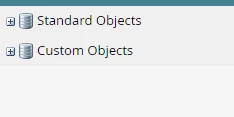
We tried with different browsers, with mixed results. With chrome, clicking on + does not open the object hierarchy..

With IE, part of the objects load, but the browser becomes unresponsive and crashes after 2-3 minutes.

This problem is occurring only for those customers with large number of custom objects.

If anyone has encountered similar issues and found any work-around, really appreciate if you can post it here.

Thanks in advance for your input.

This post is no longer active and is closed to new replies. Need help? Start a new post to ask your question.

1 reply

Grégoire_Miche2
Level 10
October 11, 2015

There is no such thing as a standard & custom objets on the MyToken creation screen. The right panel should look like this :

The screen you are referring to is the screen that shows up when you create a Email script (Velocity) token.

I have been able to replicate this issue on My Mac, not on a PC, on the same instance. Works correctly also on a Windows VM on a Mac.

So the tip is : try on a Windows OS :-)

Worth a ticket to support, IMHO

-Greg

October 11, 2015

Greg,

  Thank you for your response. The screen I was referring to was indeed on the Email Script token, I should've been specific there!

We've observed these problems on a Windows PC, what browser did you use ? We tried with both Chrome and IE without much success.

Thanks!

Grégoire_Miche2
Level 10
October 11, 2015

Hi Rajeev,

I used Firefox 41.0.1 on Windows 10, it worked.

Have you tried cleasing historical data on the browser ?

-Greg