Munchkin Code Not Tracking | Community
Skip to main content
January 29, 2016
Question

Munchkin Code Not Tracking

  • January 29, 2016
  • 4 replies
  • 6076 views

Hello Marketo Community,

I am hoping someone can help with an issue related to our Munchkin Tracking Code. Over the last year we have sporadically been receiving web activity & click link activity for user who visit our website  This issue has caused us to inaccurately utilize some of the features Marketo currently offers because we are unable to consistently receive web & click link activity.

Below you will find what our current implementation looks like along with our attempts at fixing the problem.

Current Munchkin Tracking Code:

<script type="text/javascript">

$.ajax({

  url: '//munchkin.marketo.net/munchkin.js',

  dataType: 'script',

  cache: true,

  success: function() {

Munchkin.init('###-###-###', {asyncOnly: true});

  }

});

</script>

Previous Issue:

XMLHttpRequest.timeout cannot be set for synchronous HTTP(S) requests made from the window context. From: munchkin.js:11

Solution:

set 'asyncOnly: true' flag

References:

We still get what looks like an XHR error when looking at the network tab for "visitWebPage" and also "clickLink".
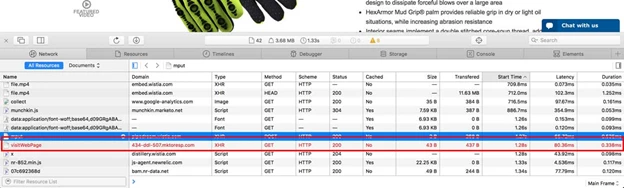
Activity like stated before is sporadically not tracked. We connect all our forms via the API. The API originally was on a different top level domain which we changed after reading the following Marketo Document; specifically in relation to the sub-section "Domain"

Due to this documentation we moved our forms API on a subdomain of (see below) to resolve this as a potential cause of this issue; but still receive sporadic web & click link activity.

  • api.hexarmor.com/api/marketo/

Below you will also see an instance of a known leads activity log:

As you can see the first activity recorded for the lead is filling out the form but no web or clicklink activity before or after that.

Any help you may be able to give related to this issue would be greatly appreciated.  If you need more information please feel free to let me know.

- Mihkey

This post is no longer active and is closed to new replies. Need help? Start a new post to ask your question.

4 replies

Kenny_Elkington
Adobe Employee
Adobe Employee
January 29, 2016

So a few things here.  Those "aborted" requests you're seeing shouldn't affect tracking.  The tracking server will sometimes send reset packets instead of a full response to improve throughput.  Do you have an example page that isn't tracking?  An example form?

January 29, 2016

@Kenny Elkington​ Check out HexArmor.com for examples, this issue occurs across the entire site.  Web activity is sporadic at best, and only shows up after a form is filled out if it actually shows up at all.  Any ideas?

Kenny_Elkington
Adobe Employee
Adobe Employee
January 29, 2016

So the visits look to be registering fine.  I'd bet on this being a lead association problem.  Do you have an example form we could look at?

SanfordWhiteman
Level 10
January 29, 2016

Mihkey, switching to asyncOnly is guaranteed to lose activities, especially Clicked Link.

If you follow and DM me I can supply you with our advanced Munchkin adapter which will clear up the bulk of these issues.

Andy_Varshneya1
Level 7
February 1, 2016

Another note - your Munchkin code is towards the bottom of the body tag. Put it in the header.

February 2, 2016

Hi Andy

Marketo support told me to put munchkin at the end of <body> section.

He taught me this Docs.

Add Munchkin Tracking Code to Your Website - Marketo Docs - Product Docs

5. Place the tracking code on your web pages right before the </body> tag. New leads that visit this page will be assigned to this lead partition.

And he persisted "RIGHT BEFORE the </body> tag".

I want to know why.

SanfordWhiteman
Level 10
February 2, 2016

When you use the part-synchronous embed code you do want that right before the </body>, because it starts with a blocking download of the bootstrapper.  When you use the all-asynchronous embed code, the <head> would be better placement for the Munchkin bootstrapper, and in turn for the actual Munchkin library.

Either way, unless you have a very, very simple page, the actual analytics library is going to end up in the head.

I differ with the docs' recommendation that the all-asynchronous embed code be used by default (the Munchkin docs have factual errors, but this is more one of opinion). As I've written before, all web analytics libraries bear an inherent contradiction:

  • On the one hand, we mandate that analytics must not impede webpage navigation, rendering, interaction, nor exit -- a low-priority, essentially disposable component.
  • On the other hand, we require that analytics losslessly captures all interesting activities -- a high-priority, business-critical component of the marketer's toolkit. 

These two missions cannot both be accomplished, even if you target only modern browsers. You might lean toward disposability... until you have to explain why your reports don't match with web server logs or other expectations.  You might swing toward infallibility... until you see that geographically remote users are struggling with wait times.

Anyway, despite the contradiction, you can at least fit the best browser tech to the task. My Munchkin adapter (which Takehiro uses, or least used to) is one way to go about getting the best of both worlds.  That doesn't always mean "async everywhere": it depends on site-specific (and sometimes page-specific) needs.

February 4, 2016

@Sanford Whiteman has helped me identify the issues with our implementation.  One of our issues is that we don't actually need our own API to submit our forms and instead are attempting to move to Forms 2.0 API.  I am trying to follow the guide @Kenny Elkington​ post https://nation.marketo.com/blogs/marketowhisperer/2015/09/30/make-a-marketo-form-submission-in-the-background#comment-21…  I am attempting to tackle our issues one at a time, so I have posted a more focused questions about forms 2.0 in that guide.

I would love to know if anyone has experience implementing munchkin tracker in a Rails Turbolinks project.  There does not seem to be any information on this subject.

SanfordWhiteman
Level 10
February 5, 2016

I would love to know if anyone has experience implementing munchkin tracker in a Rails Turbolinks project.  There does not seem to be any information on this subject.

One of the problems with abstractions like "Turbolinks" is that they obscure the real rules by which any web app must play.  In this case when Turbolinks is enabled in uplevel browsers, it's replacing (most of) the document and pushing a new URL (we talked about this on our call the other day).  The easiest Turbolinks event to catch this moment is page:receive:

Turbolinks.supported && document.addEventListener('page:receive',function(e){

     Munchkin.munchkinFunction('visitWebPage',{url:e.data.url});

});

Note you don't need to worry about backward-compatible attachEvent because TL won't be activated in old browsers anyway.