June 20, 2017
Question

Move progressive profile window

  • June 20, 2017
  • 1 reply
  • 3250 views

Within the Marketo form I can create a progressive profiling window that defaults to a position right above the Submit button.  Within the Progressive Profiling window I can drop multiple fields that will show to the customer (whether I want 1, 2 or 3 at a time) if they are empty to gather more info. 

After I add in a subscription box it looks like this:
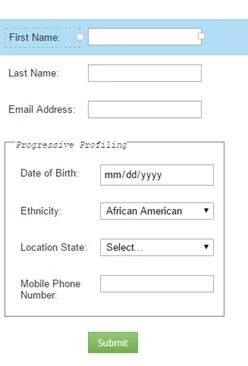
And I want the progressive profiling (in this case the date of birth field) to be right under the email address.
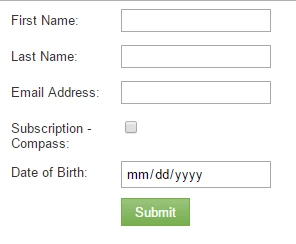
Does anyone know coding I could use and where/how to insert it to move it?

Thanks!

This post is no longer active and is closed to new replies. Need help? Start a new post to ask your question.

1 reply

SanfordWhiteman
Level 10
June 20, 2017

Wasn't this answered on your other current thread Move Progressive Profiling field on Marketo form​ which in turn refers to my code at Progressive profiling fields above required fields?

June 20, 2017

I just moved it.  I'm not a developer/coder, so I'm trying to sort through the post, "Progressive profiling fields above required fields? ".

I'm a bit confused as to what code to put where to make the fields movable.  The posts jump back and forth between JS, CSS and HTML.  I have "https://codepen.io/figureone/pen/qroomy "  up and I have the embed code box pulled up for the form, but I'm not sure what to put where at this point.

SanfordWhiteman
Level 10
June 20, 2017

Can you close the other thread you have open now, then we'll come back here?  I don't know why there are 2 with the same exact topic.