
Move checkbox to left | Community
Skip to main content
Frank_Breen2
Level 8
May 27, 2016
Solved

Move checkbox to left

  • May 27, 2016
  • 1 reply
  • 9328 views

We're using the Left Label Position in a Marketo form and it looks like this:

The team wants the checkbox moved to the left and the label to the right, like this mockup:

Any ideas on how to do this?

This post is no longer active and is closed to new replies. Need help? Start a new post to ask your question.
Best answer by Grégoire_Miche2

Hi Franck,

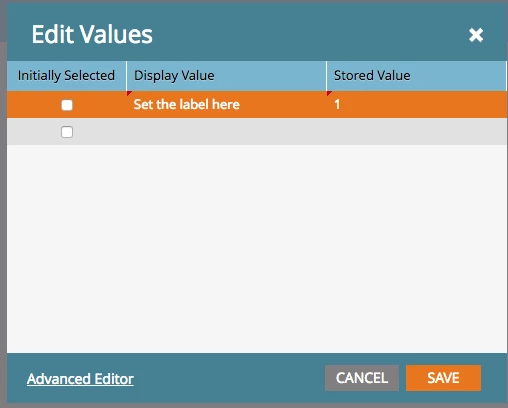
Use a "checkboxes" instead of a checkbox. Remove the label and click Edit on the values property. Add the label text to te "Display Value", using "Yes" or "True" or "1" as the stored value.
-Greg

1 reply

Grégoire_Miche2
Grégoire_Miche2Accepted solution
Level 10
May 27, 2016

Hi Franck,

Use a "checkboxes" instead of a checkbox. Remove the label and click Edit on the values property. Add the label text to te "Display Value", using "Yes" or "True" or "1" as the stored value.

-Greg

Level 4
September 18, 2018

Hi Greg,

But is there a way to hyper link a text within the 'Display Value'?

I tried but it converts it into a text instead.

Please guide.

Best,

Manish

Grace_Brebner3
Level 10
September 18, 2018

Hey Manish,

I don't believe this is possible on the display values. If a hyperlink is required, I would recommend reverting back to using the label and then control the layout with custom CSS. This isn't particularly difficult if you have developer resource, you can easily control which element sits left and which sits right