July 8, 2014
Question

Move Button In a Form?

  • July 8, 2014
  • 5 replies
  • 1310 views


Hey everyone,

how can I change a form layout?,  all i want to do is move a button to the right of the text tield

an example is below of what it looks like now (NO) and what I want it to look like (YES)
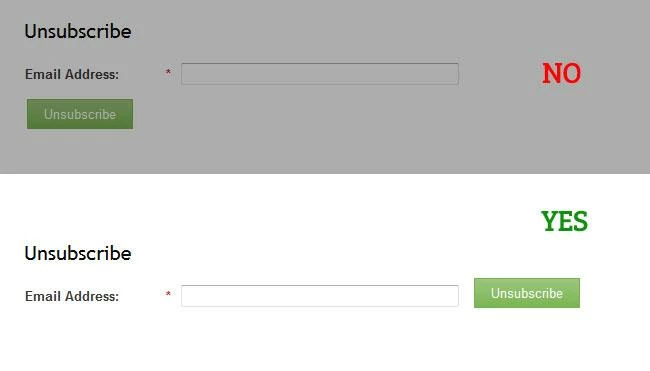


thanks in advance for any ideas

-R

This post is no longer active and is closed to new replies. Need help? Start a new post to ask your question.

5 replies

July 8, 2014
Hi Richard, 

I am not sure how to move the unsubscribe box next to the text field, but if you click on the unsubscribe in the editor you can drag it back and forth. 

Sorry I wasn't more help! 
July 8, 2014
I don't believe you can do this through the visual form editor UI.  You will probably have to insert some custom CSS to align the submit button where you want vertically.
July 8, 2014
ok, thanks for the info,

does anyone know the name of the button or the div that holds it so i can try and move it around.

and  /  or does anyone have a piece of code that is similar that i can use?

July 9, 2014
In Chrome you can right-click on the button and then click inspect element. This will show you id and class of button. Then you override default styling of button. 

Please review the following more info:

https://developer.mozilla.org/en-US/docs/Tools/Page_Inspector
February 20, 2015
I think you can "drag to reposition" the button." That just worked for me!