Move all leads from one stream to another | Community
Skip to main content
February 22, 2016
Question

Move all leads from one stream to another

  • February 22, 2016
  • 1 reply
  • 1846 views

I have a stream with 140K leads and I just want to move them all to a different stream.  I ran a smart list to determine the qualified people:
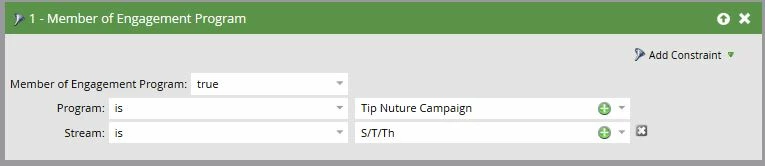
But in my smart campaign (which uses the same criteria as above) when I add the Flow Step of either Add to Engagement Program Stream or Change Engagement Program Stream

It returns ZERO qualified leads. (the ones that show up are all users who have unsubscribed)

There are no trigger actions on the part of our users that would allow me to use the Transition Rules - I just need to manually move everyone from one stream to another.  What am I missing?

This post is no longer active and is closed to new replies. Need help? Start a new post to ask your question.

1 reply

February 22, 2016

Sometimes this take a while to run.  Did you give it some time?

February 22, 2016

I'm looking at the "Set to affect around XX people" on the Schedule tab, which has always been a reliable indicator of how many people will be affected. (all of the 262 are unsubscribed leads) and I should expect 140K based on my Smart List.

Josh_Hill13
Level 10
February 22, 2016

Check your smart list again and check the # in the Stream 1 on the Engagement Summary Tab.