
Solved
Modules unavailable after bradning Marketo template
Is there a way to keep the modules available in a Marketo Guided Template while still changing parts of the HTML to match with company's branding?
Is there a way to keep the modules available in a Marketo Guided Template while still changing parts of the HTML to match with company's branding?
Hey Sophia,
Is it possible that you used the "Edit Code" dialog within the Email Editor instead of making these changes at the template level?

I've seen this happen before when the code is edited here, locally on the email asset itself. The result of most edits in the "Edit Code" screen will break the Email away from the template and that's usually what blocks out the module panel in the editor. You can see if your email has been broken from the template by checking the screen below when you click on the email, but before you open up the editor. There's a line that should have a template associated with it -- if it says "none" that means it's not associated with the template anymore (which hold the modules) so they're now longer available the next time you open the editor.
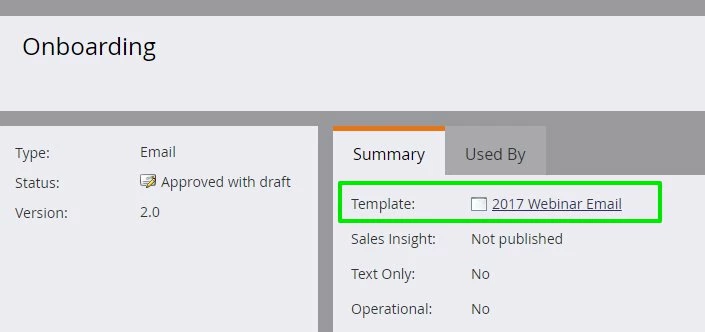
If this is the case, you could try grabbing all the code from the Edit Code dialog -- when you're editing an email, it's in the top left under the page title -- and try to dump that into a new template. Save the template and create a new asset using that template to re-associate the modules with the template.

Let me know if you've got any questions or if this maybe is not the nature of the error.
Enter your E-mail address. We'll send you an e-mail with instructions to reset your password.