Missing Email Picker Template Screen | Community
Skip to main content
Level 1
April 28, 2023
Solved

Missing Email Picker Template Screen

  • April 28, 2023
  • 2 replies
  • 1420 views

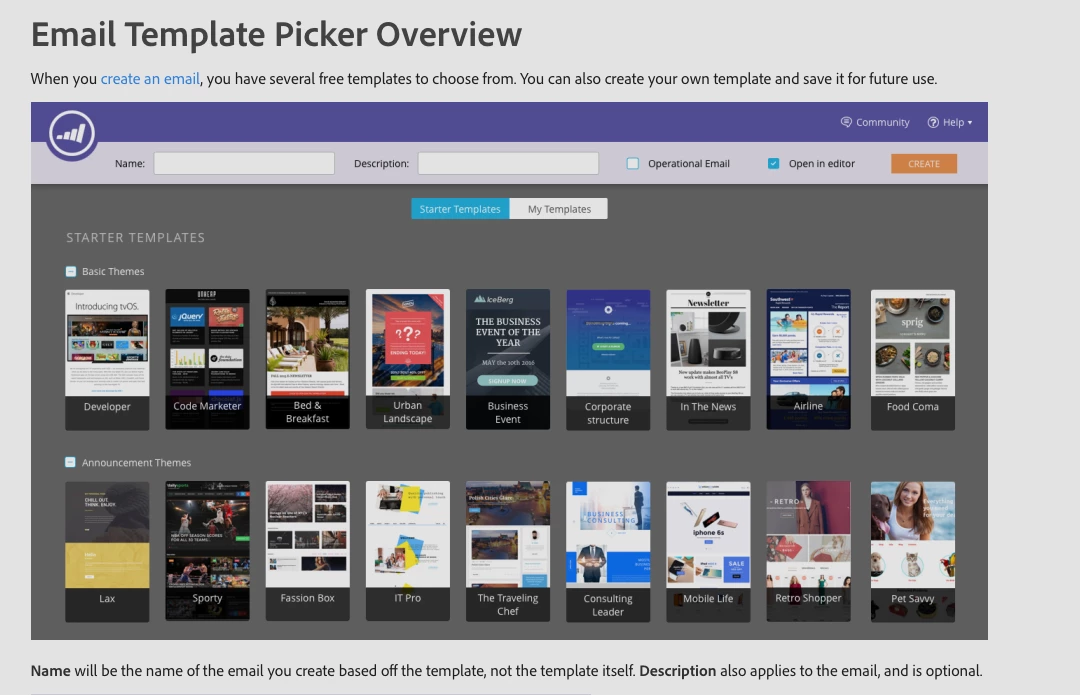
How do I get to this screen? 


This post is no longer active and is closed to new replies. Need help? Start a new post to ask your question.
Best answer by Darshil_Shah1

This window opens up when you create a new email asset in a program in the Marketing Activities section or in the Design Studio. Here you choose the email template that you want to use for creating the email asset. You can either choose one of the standard OOTB marketo email templates or if you have any custom templates created in your Marketo under design studio, you can also select one of those by switching to the "My Templates" section in the top. Check out this experience league article on how to create an email in Design Studio, for creating an email in Marketing Activities, you need to first create a Marketo program and then create it as a local asset in it. Let us know if this helps clear up the clouds, if not happy to answer any specific questions you may have about this.


2 replies

Darshil_Shah1
Community Advisor and Adobe Champion
Darshil_Shah1Community Advisor and Adobe ChampionAccepted solution
Community Advisor and Adobe Champion
April 28, 2023

This window opens up when you create a new email asset in a program in the Marketing Activities section or in the Design Studio. Here you choose the email template that you want to use for creating the email asset. You can either choose one of the standard OOTB marketo email templates or if you have any custom templates created in your Marketo under design studio, you can also select one of those by switching to the "My Templates" section in the top. Check out this experience league article on how to create an email in Design Studio, for creating an email in Marketing Activities, you need to first create a Marketo program and then create it as a local asset in it. Let us know if this helps clear up the clouds, if not happy to answer any specific questions you may have about this.


SanfordWhiteman
Level 10
April 28, 2023

By choosing New Local Asset » Email (Marketing Activities) or New Email (Design Studio).