
Microsoft Office 365 Outlook rendering poorly | Community
Skip to main content
jrent
Level 2
June 26, 2024
Solved

Microsoft Office 365 Outlook rendering poorly

  • June 26, 2024
  • 2 replies
  • 5645 views

Just yesterday we received user feedback that our emails are rendering poorly in specifically Office 365 Outlook when accessed through any web browser. Outlook desktop apps are fine as well as every other email client. See image below and this Litmus link – https://litmus.com/pub/ELkgO7uottua7X0R – where you can see that the very last 2 items under "Web-based clients" are Office 365 Outlook and the only 2 results that display this way.

  • Any ideas if there have been recent changes to Office 365 Outlook that would cause this?
  • Has any one remediated these sorts of bugs within their email templates?
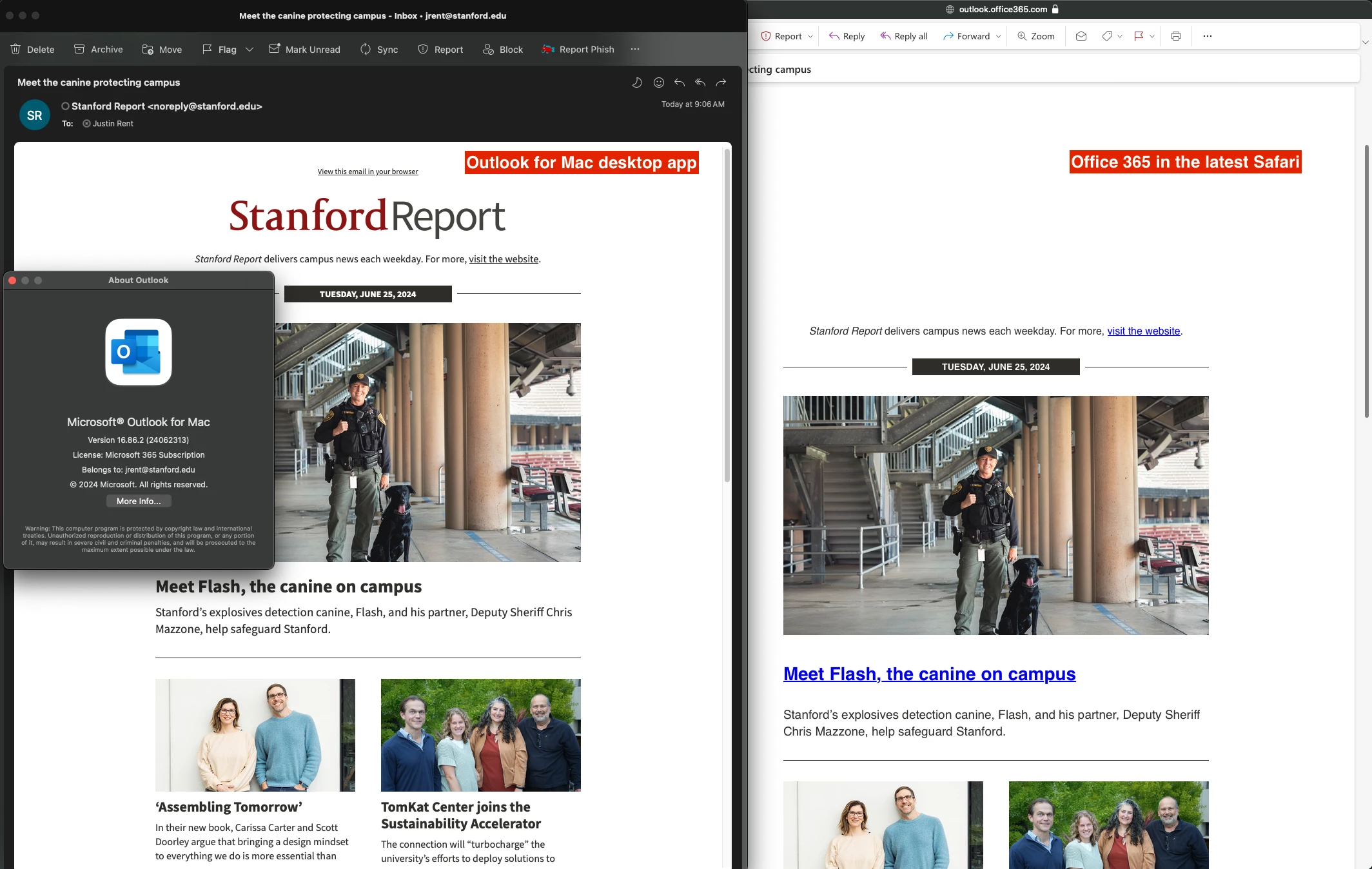
Best answer by jrent

As of yesterday (06/27/2024) our blue link and spacing issues seem to "magically" be resolved in Office 365 Outlook. I had not implemented any template changes yet, so this indicates to me that some changes were made on the Microsoft product side. Yay!


This morning I realized that the issue with our logos not displaying in the header and footer of the template is due to the fact that the src for these was .... instead of .... – the secure protocol is what Office 365 Outlook wants.


So, our issues are solved! For now...


Thanks for the input.

2 replies

ktronolone
Level 2
June 26, 2024

We did encounter problems with renderings in a few versions of Outlook this week (online and desktop.) Our team dev found that styles are being removed from the head so classes had to be applied to the elements in the body. This was our issue, perhaps it affected your template as well. Best of luck with a solve!

jrent
jrentAuthor
Level 2
June 26, 2024

Thank you @ktronolone!


Following up as I continue to troubleshoot...We use Marketo with FeedOtter. I've been emailing with their support to see if they had any info. They provided me with a response as well as this insight from their rep at Litmus:


Your issue in Office 365 you described sound similar to odd behaviors our own email team is seeing in Microsoft webmail clients as well. There is a thread on this in the Email Geeks slack community if you have joined there (or want to!).

It appears Microsoft is rolling out some UI changes that are randomly breaking or removing style tags and impacting the CSS so things like fonts and spacing are messed up. Some people are seeing images being affected as well. Reloading with F5 has helped some people get to a more stable version but other people are still seeing different errors.

A person on that thread found a workaround that may help:
"Since it's only pulling the content within body tags, try adding a <body></body> tag around your <style></style> tag in the head so you end up with two in the code."

At this point, it seems we're a bit stuck until Microsoft's teams get things settled. Our teams try to keep up with what these external services are doing and maybe even get ahead of it but we're in the same boat with you for now. Hopefully they will figure this out soon!

In testing, adding a <body> tag around your template's <style> tag does resolve the CSS problems. Weeeiiiiird.

My last issue to resolve at the moment is why my logo images aren't displaying at the top and bottom of our emails.

ktronolone
Level 2
June 26, 2024

Sheesh! That is frustrating. Thank you for sharing as you are working through your issues. I'm positive this will help some other folks. 

jrent
jrentAuthorAccepted solution
Level 2
June 28, 2024

As of yesterday (06/27/2024) our blue link and spacing issues seem to "magically" be resolved in Office 365 Outlook. I had not implemented any template changes yet, so this indicates to me that some changes were made on the Microsoft product side. Yay!


This morning I realized that the issue with our logos not displaying in the header and footer of the template is due to the fact that the src for these was .... instead of .... – the secure protocol is what Office 365 Outlook wants.


So, our issues are solved! For now...


Thanks for the input.