Merge Fields | Community
Skip to main content
Michael_Florin-2
Level 10
September 23, 2024
Solved

Merge Fields

  • September 23, 2024
  • 1 reply
  • 2170 views

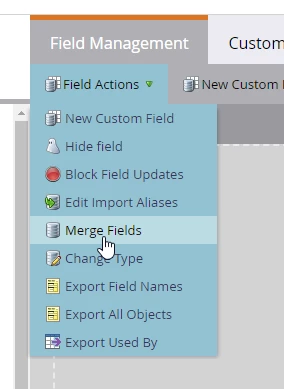
To our surprise, we found this option in Marketo Field Management. It seems to only appear if your instance was moved to the Adobe Admin Console.


Does anybody know what this function does? The only documentation I find is a decade old.


Thanks!
Michael

This post is no longer active and is closed to new replies. Need help? Start a new post to ask your question.
Best answer by Michael_Florin-2

After some experimentation, we find that you can in fact merge fields, if they


1. Are Marketo custom fields - aka: not Marketo system-generated fields.

2. Are of the same field type - no surprise here.

3. Are not in use. You would have to remove all dependencies first.


Once that is the case, you can define which field's value wins in case of conflict, and then you can merge away.


Good function. Odd though that it appears like a ghost. Field merging - at least in my experience - was always a support-only function. Also I wonder how it behave with CRM-synced fields.

1 reply

Michael_Florin-2
Michael_Florin-2AuthorAccepted solution
Level 10
September 24, 2024

After some experimentation, we find that you can in fact merge fields, if they


1. Are Marketo custom fields - aka: not Marketo system-generated fields.

2. Are of the same field type - no surprise here.

3. Are not in use. You would have to remove all dependencies first.


Once that is the case, you can define which field's value wins in case of conflict, and then you can merge away.


Good function. Odd though that it appears like a ghost. Field merging - at least in my experience - was always a support-only function. Also I wonder how it behave with CRM-synced fields.

Ruchi_Lapran1
Adobe Champion
Adobe Champion
September 25, 2024

I'm equally surprised to discover this feature. Another fact is that you cannot merge a hidden field either, however, you can unhide merge-worthy fields and take action on them. Now it got me thinking of the scenarios where we can use this feature!

Sometimes, multiple fields exist in the system for capturing the same or similar data and they might lead to redundancies. Merging such fields will be useful for decluttering unnecessary or outdated fields.  If Marketo integrates with other platforms like your CRM system, merged fields will reduce the risk of conflicting data. This would help in database management.

Michael_Florin-2
Level 10
January 28, 2025

Just wanted to add that we used this feature a couple of times recently, and we're happy with the results.


We merged Marketo-only fields with Dynamics synced fields and even two Dynamics synced fields. And the results were exactly as expected: The winning field took over the field sync from the losing field. Which means we don't need Marketo Support anymore to combine fields on lead and contact objects into one Marketo field. Very nice.