


Marketo’s MCP vs REST API
Under the Hood: Comparing the Official MCP Toolset to the REST API
I’ve lived and breathed the Marketo REST API for years. In fact, I was so deep in the weeds that I actually built my own custom Marketo MCP before the official one existed. Back then, I was limited strictly to standard REST endpoints, since that was the only systematic way to work within in Marketo. So, when I finally got my hands on the official beta, I was dying to know: how does this new AI toolset actually stack up against the "old reliable" REST API?
Whether you’re looking to supercharge an AI assistant for your team or just trying to figure out which integration path won’t break your workflow, understanding these gaps is huge. Let's dive into where they overlap, where the REST API still reigns supreme, and those cool spots where the MCP pulls off tricks the REST API can’t do at all.
Just a heads-up: all of this is "as of now." Since the MCP is currently in beta, things can, and most likely will, change. Knowing the amazing Adobe Engineering team, I expect this toolset to keep improving and expanding rapidly.
The Core Difference
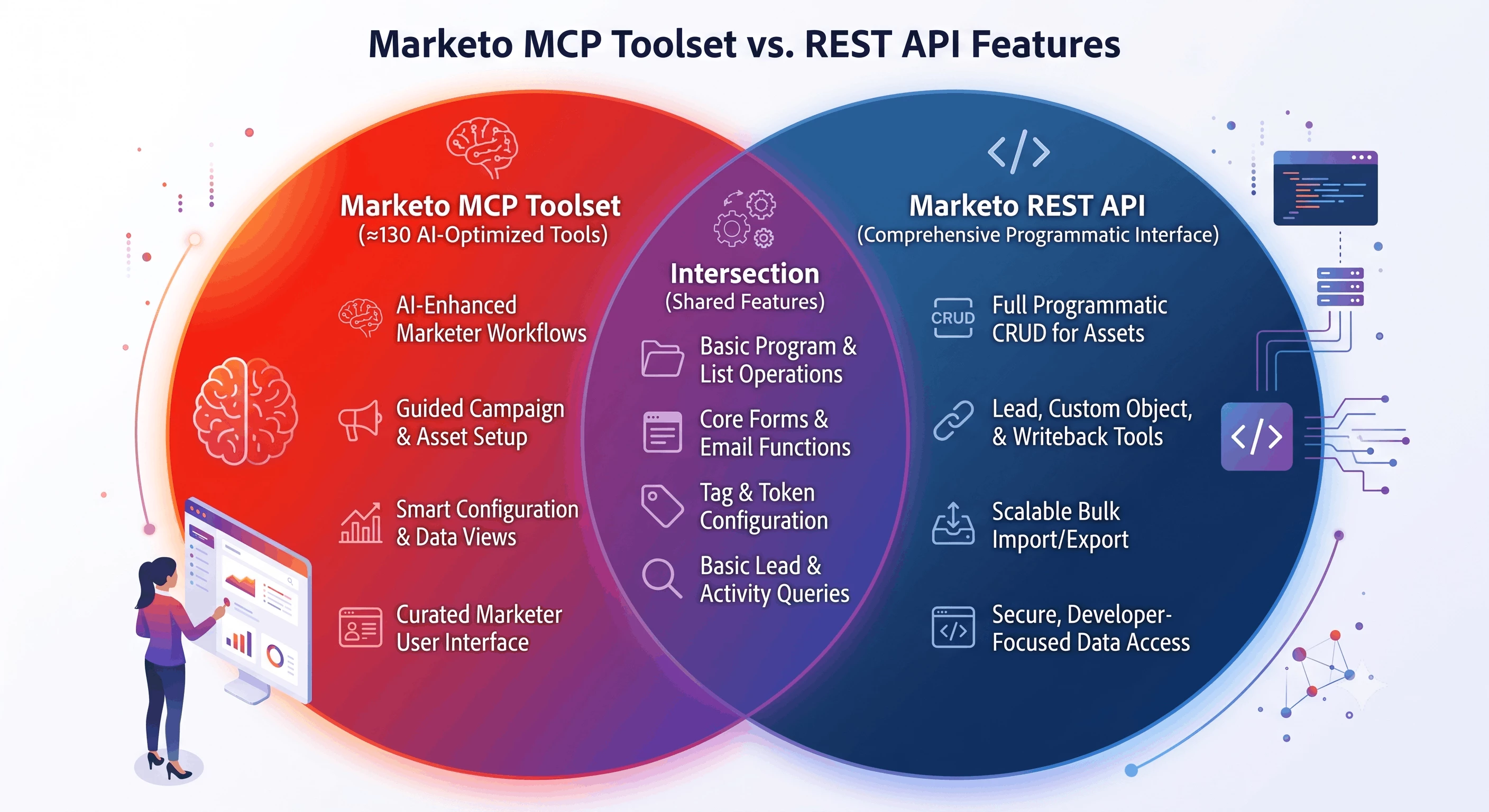
The REST API is comprehensive but developer-facing it returns raw JSON, requires careful request construction, and leaves all interpretation to you. The MCP is a curated, AI-optimized layer on top of that same Marketo instance. It trades breadth for usability: named, self-describing tools that an AI can reason about in natural language. As of this writing, the MCP offers 130 tools across programs, campaigns, lists, forms, leads, emails, snippets, and more.
The practical implication is that the MCP covers most of what a marketing operations user needs day-to-day, while the REST API remains the authoritative interface for data engineering, CRM integration, and full platform control.
Key Differences and Delta Areas
While MCP provides a strong foundation for marketing operations, several important capabilities remain exclusive to the REST API or are currently limited in MCP. These gaps define where decision makers should consider extending MCP with custom tools or continue relying on REST API integrations.
Program Members
Current Delta:
MCP allows retrieval of program member custom fields metadata, but all membership operations, retrieving members, adding/removing members, changing member status, and bulk exporting program members are REST API-only.
Impact:
Managing and reporting on program attendance or membership status for events and campaigns requires REST endpoints. This is a critical limitation for AI-driven workflows that need to answer questions like “How many people attended this webinar?” or automate program member management.
Content Assets: Emails, Email Templates, and Landing Pages
Current Delta:
While MCP supports basic email creation, approval, and content querying, it currently does not support:
- Cloning, deleting, unapproving, or discarding email drafts
- Modular email design management (adding/removing/rearranging content blocks)
- Dynamic content editing and full content or variable management
- Sending sample emails and updating email metadata
- Full CRUD and approval workflows for email templates
- Any landing page or landing page template management, including content editing, template use, approval workflows, or redirect/domain configuration
Impact:
Emails, templates, and landing pages are the pillars of marketing program execution. Their absence in MCP means AI agents cannot fully own content creation and lifecycle management today a key consideration for teams designing advanced AI marketing assistants.
Smart Campaigns & Smart Lists
Current Delta:
MCP shines by enhancing smart campaign and list workflows with AI-friendly features like:
- Detailed flow step and rule metadata discovery
- Adding and updating flow steps and choice configurations
- Faceted analysis and visualization of campaigns
- Intelligent auto-suggest for configuring campaign flows and smart list rules
- Full rule catalog access and filter logic editing
Impact:
The REST API delivers raw campaign and list data but lacks these AI-tailored abstractions, making complex configurations more difficult or manual for developers.
Lead Data Management
REST-only Operations:
- Creating/updating (syncing) leads
- Deleting and merging leads
- Changing lead program statuses
- Lead partition assignment and updates
- Lead association and form submission pushing
- Accessing deleted leads and lead field schema management
- Retrieving lists/programs/campaigns related to specific leads
MCP Supports:
Lead querying, metadata describing, and activity retrieval only.
Impact:
Lead data writeback and programmatic lead lifecycle management require REST API. MCP remains read-focused here.
Custom Objects, CRM Entities, User Management
Exclusive to REST API:
Full CRUD operations and schema management for custom objects, companies, opportunities, and named accounts
- Custom activity type definition and record submission
- User and role management (inviting, updating, deleting users)
Impact:
These areas are largely integration and developer-centric rather than daily marketing operations, aligning with REST API’s role as the comprehensive programmatic access layer.
Capability Comparison Table
| Capability Area | Functionality | REST API | MCP |
| Programs | Browse / search programs | ✅ | ✅ |
| Get by name or ID | ✅ | ✅ | |
| Create / clone / update / delete | ✅ | ✅ | |
| Approve / unapprove | ✅ | ✅ | |
| Tags management | ✅ | ✅ | |
| Browse with full details (tags + costs inline) | ✅ | ✅ | |
| Browse events / nurture / scheduled by type | ✅ | ✅ | |
| Get program smart list | ✅ | ✅ | |
| Get creation options (channels, tag types) | ❌ | ✅ | |
| Folders | Browse / get by name or ID | ✅ | ✅ |
| Get folder contents | ✅ | ✅ | |
| Create / update / delete | ✅ | ✅ | |
| Smart Campaigns | Browse / get by name or ID | ✅ | ✅ |
| Create / update / activate | ✅ | ✅ | |
| Schedule / trigger | ✅ | ✅ | |
| Get flow steps and rules | ❌ | ✅ | |
| Add flow steps / update choices | ❌ | ✅ | |
| Get scheduled runs | ✅ | ✅ | |
| Get "used by" dependencies | ✅ | ✅ | |
| Flow step / rule metadata discovery | ❌ | ✅ | |
| Asset Metadata Analysis and Summarization with visualization | ❌ | ✅ | |
| Auto-suggest for configuration | ❌ | ✅ | |
| Smart Lists | Browse / get by name, ID, campaign, program | ✅ | ✅ |
| Create / clone / delete | ✅ | ✅ | |
| Add / update / reorder / delete rules | ❌ | ✅ | |
| Update filter logic (all / any / custom) | ❌ | ✅ | |
| Get "used by" dependencies | ✅ | ✅ | |
| Full rule catalog discovery | ❌ | ✅ | |
| Auto-suggest for rule configuration | ❌ | ✅ | |
| Static Lists | Browse / get by name or ID | ✅ | ✅ |
| Create / update / delete | ✅ | ✅ | |
| Get members / add members / remove members | ✅ | ✅ | |
| Program Members | Get members by program | ✅ | ❌ |
| Add members to program | ✅ | ❌ | |
| Remove members from program | ✅ | ❌ | |
| Change member status in program | ✅ | ❌ | |
| Bulk export program members | ✅ | ❌ | |
| Get available program member fields | ✅ | ✅ | |
| Forms | Browse / get by name or ID | ✅ | ✅ |
| Create / clone / update / delete | ✅ | ✅ | |
| Approve / discard draft | ✅ | ✅ | |
| Add / update / delete fields | ✅ | ✅ | |
| Fieldsets, visibility rules, rich text, autofill | ✅ | ✅ | |
| Field positions / thank you page | ✅ | ✅ | |
| Get "used by" dependencies | ✅ | ✅ | |
| Update submit button | ✅ | ❌ | |
| Update thank you page content | ✅ | ❌ | |
| Get available program member fields | ✅ | ✅ | |
| Emails | Browse / get by name or ID | ✅ | ✅ |
| Create / approve | ✅ | ✅ | |
| Get / update content | ✅ | ✅ | |
| Clone / delete / unapprove / discard draft | ✅ | ❌ | |
| Add / delete / duplicate / rename / rearrange modules | ✅ | ❌ | |
| Get / update dynamic content | ✅ | ❌ | |
| Get / update full content | ✅ | ❌ | |
| Get / update variables | ✅ | ❌ | |
| Send sample email | ✅ | ❌ | |
| Get CC fields | ✅ | ❌ | |
| Update email metadata | ✅ | ❌ | |
| Email Templates | Full CRUD + approval workflow | ✅ | ❌ |
| Snippets | Browse / get by ID | ✅ | ✅ |
| Get content / dynamic content | ✅ | ✅ | |
| Create / clone / update / delete | ✅ | ✅ | |
| Approve / unapprove / discard draft | ✅ | ✅ | |
| Update dynamic content | ✅ | ✅ | |
| Asset Metadata Analysis and Summarization (e.g., snippets) | ❌ | ✅ | |
| Landing Pages | Full CRUD + approval workflow | ✅ | ❌ |
| Landing page content sections | ✅ | ❌ | |
| Landing page templates | ✅ | ❌ | |
| Redirect rules and domains | ✅ | ❌ | |
| Files | Create / get / update file assets | ✅ | ❌ |
| Channels & Tags | Browse channels / get by name | ✅ | ✅ |
| Browse tag types / get by name | ✅ | ✅ | |
| Get programs by tag | ✅ | ✅ | |
| Tokens | Get / create / delete My Tokens | ✅ | ✅ |
| Get / create calendar tokens | ✅ | ✅ | |
| Leads | Get leads by email or ID | ✅ | ✅ |
| Describe lead fields | ✅ | ✅ | |
| Get lead activities | ✅ | ✅ | |
| Get paging token | ✅ | ✅ | |
| Sync leads (create / update) | ✅ | ❌ | |
| Delete leads | ✅ | ❌ | |
| Merge leads | ✅ | ❌ | |
| Get leads by program ID (with status filter) | ✅ | ❌ | |
| Change lead program status | ✅ | ❌ | |
| Get lead partitions / update partition | ✅ | ❌ | |
| Associate lead | ✅ | ❌ | |
| Push lead / submit form | ✅ | ❌ | |
| Get lead changes | ✅ | ❌ | |
| Get deleted leads | ✅ | ❌ | |
| Lead field schema management | ✅ | ❌ | |
| Get lists / programs / campaigns by lead ID | ✅ | ❌ | |
| Bulk Export | Bulk export leads (create / enqueue / status) | ✅ | ✅ |
| Bulk export program members | ✅ | ❌ | |
| Bulk export activities | ✅ | ❌ | |
| Bulk export custom objects | ✅ | ❌ | |
| Bulk Import | Check import status | ✅ | ✅ |
| Import leads | ✅ | ❌ | |
| Import program members | ✅ | ❌ | |
| Import custom objects | ✅ | ❌ | |
| Custom Objects | Get / sync / delete records | ✅ | ❌ |
| Create / manage type schemas and fields | ✅ | ❌ | |
| Companies | Get / sync / delete / describe | ✅ | ❌ |
| Field schema management | ✅ | ❌ | |
| Opportunities | Get / sync / delete opportunities and roles | ✅ | ❌ |
| Named Accounts | Full CRUD for named accounts and lists | ✅ | ❌ |
| Custom Activities | Create / manage custom activity types | ✅ | ❌ |
| Submit custom activity records | ✅ | ❌ | |
| User Management | Browse / invite / update / delete users and roles | ✅ | ❌ |
What the MCP Adds Beyond the REST API
A few MCP tools don't have REST API equivalents at all they're purpose-built for AI-assisted workflows:
Faceted analysis facet_smart_campaigns and facet_snippets aggregate and visualise your Marketo data as pie charts and tables. The REST API returns raw records and leaves analysis entirely to you.
Rule and flow step discovery tools like get_smart_list_rules, get_smart_campaign_flow_steps, and get_smart_campaign_flow_step_types expose a full metadata catalog of what filters, triggers, and flow steps are available in your instance. Without this, an AI has no way to build campaigns correctly from scratch.
Auto-suggest get_smart_campaign_auto_suggest and get_smart_list_auto_suggest provide context-aware configuration hints. These are MCP-specific abstractions with no REST equivalent.
Program creation options get_program_creation_options returns all valid channels and tag types in a single call, designed specifically to help an AI plan a program creation correctly before executing.
The Practical Takeaway
For marketing operations users who want to query, report on, and manage campaigns, smart lists, programs, forms, and snippets through an AI assistant, the MCP covers the vast majority of day-to-day work.
The most significant gap is lead data writeback syncing, deleting, merging leads, or changing program statuses are all REST-only. For anyone expecting AI-driven data management, that's the wall you'll hit first.
Program member reporting is the other notable pain point. Answering "how many people attended this webinar?" requires either GET /rest/v1/leads/programs/{programId}.json with a status filter, or the Bulk Export Program Members endpoint neither of which exists in the MCP today.
Entire domains custom objects, companies, opportunities, named accounts, landing pages, and user management are REST-only and will likely remain so, as these tend to be developer and integration concerns rather than marketing operations workflows.
The MCP is best understood as a curated, AI-optimized interface to the parts of Marketo that benefit most from natural language interaction. For full programmatic control, the REST API remains the authoritative interface and for the foreseeable future, both will have a role to play.
Don't See What You Need? You Can Extend the MCP
If you've spotted a gap in the table above that matters to your team, it's worth knowing that you're not necessarily stuck. The MCP tool set described in this article is the out-of-the-box offering but most AI agent platforms that support MCP also allow you to register additional custom tools alongside it.
In practice, this means you can build your own tools that call the Marketo REST API directly for the endpoints the MCP doesn't cover, and make them available to your AI agent in exactly the same way as the native MCP tools. The AI treats them as first-class capabilities it can discover them, reason about when to use them, and chain them together with the existing MCP tools in a single workflow.
To return to the example from this article: getting a webinar attendance count requires GET /rest/v1/leads/programs/{programId}.json with a progression status filter a REST-only endpoint. You could build a single custom tool called something like get_program_members_by_status, wrap that REST call inside it, register it with your agent, and from that point forward your AI assistant can answer "how many people attended this webinar?" just as naturally as any other question. The same approach applies to syncing leads, querying custom objects, pulling program member exports, or any other REST capability that isn't currently in the MCP.
The key insight is that the MCP and the REST API aren't an either/or choice. The MCP gives you a strong, well-structured foundation for marketing operations workflows, and the REST API gives you the raw material to fill in whatever your specific use case demands. Together, they cover the full surface area of Marketo and a well-configured AI agent can work across both seamlessly.
References
Marketo Engage REST API Documentation
This article reflects the beta Marketo MCP tool set as of August 2026 and the Marketo REST API as documented by Adobe Experience League. Both are subject to change.