Marketo Out of the Box Template Renders Line Spacing Differently in Outlook | Community
Skip to main content
Sue_Wang
Level 2
May 1, 2019
Question

Marketo Out of the Box Template Renders Line Spacing Differently in Outlook

  • May 1, 2019
  • 2 replies
  • 4497 views

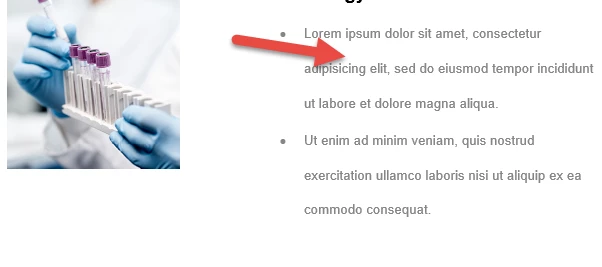
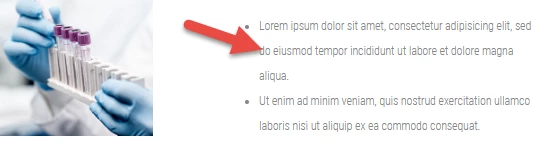
Hi I am using a marketo out of the box template "Mission Control". The emails renders OK in preview and Gmail. But Outlook is adding extra line spacing. Is there anything I can do to trick Outlook to have normal line spacing? Can someone help please?

Outlook:
Preview:
This post is no longer active and is closed to new replies. Need help? Start a new post to ask your question.

2 replies

Bram_Valdez1
Level 2
May 1, 2019

@Sue Wang​ Have you checked to make sure that you are single spaced?

Grace_Brebner3
Level 10
May 1, 2019

Hey Sue,

We'd really need you to provide the code for the email to help pinpoint the cause of the issue for you. It could simply be that the line height is set the same way but looks different because line height is relative to the specific font being used and the fonts differ between the two clients. It could be that there's some MSO conditional code that's causing the line height to change for outlook clients. Or it could be something else entirely.

It'd also help if you could specify which version of Outlook you're finding the issues on, on which OS. Office 2016 renders differently to Office 2019, and changes again between Windows/Mac.

Sue_Wang
Sue_WangAuthor
Level 2
May 15, 2019

Hi Grace,

Thank you for your reply. And sorry about the delay in reply. Below is the code used. The email renders OK in gmail. The Outlook we use is Office365Proplus. Outlook version is 1808. 

<ul>
<li>Lorem ipsum dolor sit amet, consectetur adipisicing elit, sed do eiusmod tempor incididunt ut labore et dolore magna aliqua.</li>
<li>Ut enim ad minim veniam, quis nostrud exercitation ullamco laboris nisi ut aliquip ex ea commodo consequat.</li>
</ul>

Grace_Brebner3
Level 10
May 15, 2019

Hi Sue,

We actually need the whole email code in order to be able to help - just the snippet of the problem text won't include most of the code that's likely to impact styling.

It'd also be helpful if you highlight the code syntax when you share it so that it's easy to read - you can do this by...

  1.  Expanding the comment tool bar:
  2.  Selecting "Syntax Highlighter" from "More"
  3. Then choosing HTML from the language drop down.