Marketo new builder questions (Adobe font & text transform) | Community
Skip to main content
Level 2
February 26, 2026
Solved

Marketo new builder questions (Adobe font & text transform)

  • February 26, 2026
  • 1 reply
  • 25 views

Hi Everyone! I have two separate questions, both related to the new Marketo builder. I’m working on setting up a theme for our brand styles, and I’ve run into two questions I’m hoping someone can help me with.

  1. Is there a way to set up an Adobe font in a Theme I created? Right now, in the “Text Settings” tab of the theme, it shows two dropdowns: “Font library” and “Font family”. Under “Font library”, I only see “Standard” and “Google Fonts”. Our font is Acumin Pro. Is there a way to add an Adobe font in the new builder/My Theme?
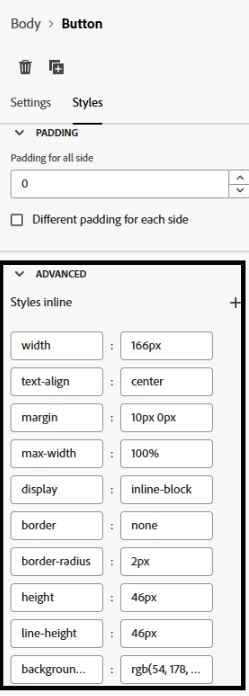
  2. The copy on our buttons is meant to be all caps. Instead of having to make sure it’s always physically typed as all caps, is there a way to do that under My Themes? Somewhere to maybe put text-transform CSS? It will make it much more foolproof to have it automatically capitalize everything within the button.

Any help is much appreciated. Thank you!
Best answer by Darshil_Shah1
  1. Adobe Fonts: Right now, Themes only support Standard fonts and Google Fonts, so Adobe Fonts (like Acumin Pro) can’t be configured directly in the Font Library dropdown. Also, as a side note, even if you add an Adobe font via custom HTML or external CSS, support across email clients is limited. Most clients (especially Outlook and Gmail) will fall back to system fonts anyway. The usual approach is to define a good fallback stack in the theme (e.g., Arial/Helvetica) and treat the Adobe font as a best-effort option.
  2. Button Copy Capitalized: Unlike the Text settings within Theme, Buttons don’t have a theme-control for something like text-transform: uppercase. If you're using templates, you can include the text-transform: uppercase CSS in the button styles, but it isn’t exposed as a standard Theme setting yet.


1 reply

Darshil_Shah1
Community Advisor and Adobe Champion
Darshil_Shah1Community Advisor and Adobe ChampionAccepted solution
Community Advisor and Adobe Champion
February 27, 2026
  1. Adobe Fonts: Right now, Themes only support Standard fonts and Google Fonts, so Adobe Fonts (like Acumin Pro) can’t be configured directly in the Font Library dropdown. Also, as a side note, even if you add an Adobe font via custom HTML or external CSS, support across email clients is limited. Most clients (especially Outlook and Gmail) will fall back to system fonts anyway. The usual approach is to define a good fallback stack in the theme (e.g., Arial/Helvetica) and treat the Adobe font as a best-effort option.
  2. Button Copy Capitalized: Unlike the Text settings within Theme, Buttons don’t have a theme-control for something like text-transform: uppercase. If you're using templates, you can include the text-transform: uppercase CSS in the button styles, but it isn’t exposed as a standard Theme setting yet.


rachelkayAuthor
Level 2
February 27, 2026

Thank you for your response ​@Darshil_Shah1 ! I may submit these as ideas just in case it’s something that could eventually be implemented 😊

Darshil_Shah1
Community Advisor and Adobe Champion
February 27, 2026

You're welcome, and sure! Glad to be of help. :)